What Is Cursor? An AI Coding Agent That Can Build Apps Without Manual Coding
2026-06-19
Amid the rapid advancement of artificial intelligence, many developers are wondering: what is Cursor?
Cursor isn’t just another autocomplete tool. It’s an AI coding agent designed to transform the way we build software—from simply helping to write code to becoming an autonomous partner that can plan, write, test, and even deploy features on its own.
Cursor is an IDE built on the foundation of VS Code, but enhanced with much deeper agent capabilities.
With Cursor, you can give instructions in natural language, such as “Create a research dashboard with Snowflake integration and deploy it to Vercel,” and then let the AI agent handle it from start to finish. This is no longer just coding assistance; it’s a shift toward agent-driven development.
Key Takeaways
- Cursor is an AI-native coding environment equipped with autonomous agents capable of executing development tasks end-to-end based solely on natural language instructions.
- Powerful features like Composer and Agent Mode allow developers to build complex features without having to manually type every line of code, while still maintaining full control.
- With support for a wide range of top-tier AI models (OpenAI, Anthropic, Gemini, xAI) and seamless integration with GitHub and Slack, Cursor is suitable for use by everyone from individual developers to engineering teams at large enterprises.
Register at Bittime now and start trading crypto with a fast, secure, and easy process in the app.
Understanding What Cursor AI Coding Agent Is
Cursor is a development platform that combines the power of a traditional IDE with advanced artificial intelligence.
More than just a coding chatbot, Cursor deeply understands your entire codebase and then uses that understanding to make coherent changes across multiple files at once.
Unlike previous AI coding tools which were more reactive, Cursor was designed with a philosophy agentic.
This means that AI not only answers questions or completes code, but can also take initiative: reading files, searching for information, creating implementation plans, executing terminal commands, testing results, and providing real-time progress reports.
This approach makes Cursor often referred to as an “AI coding agent” that is closest to the vision of future software development, where developers play more of an architect and decision-maker role, while agents handle technical execution.
Read also: What Is Meigen AI? An AI-Powered Gallery Platform to Simplify Image and Video Creation
How Cursor Works as an AI Coding Agent
The way Cursor works is quite simple yet very powerful. You issue commands in everyday language through an interface called Composer or Agent Mode. The cursor will then:
- Analyze your codebase structure thoroughly
- Create a plan of implementation steps
- Ask for clarification if needed (e.g.: “Does this feature require authentication?”)
- Edit or create relevant files
- Run shell commands if needed
- Testing work results and displaying progress transparently
As a real-world example, a developer can ask Cursor to build a complete Mission Control interface with spring-based animations.
The agent will plan the components, select the appropriate libraries (such as shadcn), write the code, and even set up the deployment. All of this can be done while you work on other tasks or simply oversee the process.
This capability is supported by advanced codebase indexing, ensuring that Cursor always has the full context of your project—not just the file currently open.
Read also:What Is ChainOpera AI? An Introduction to the Decentralized AI Agent Network and the COAI Token
Key Features of Cursor That Make It Different
The cursor is equipped with several core features that complement each other:
Composer
This feature lets you describe the feature you want to build. Cursor will break it down into steps and then implement them across multiple files. Composer is ideal for work involving multiple coordinated changes.
Agent Mode
This is the most "agentic" feature. Agents can work autonomously, executing tasks in the background or even in the cloud, while providing real-time progress updates. You can provide follow-up instructions at any time without having to start from scratch.
Super Fast Autocomplete
The Cursor model tab is known for its accuracy and speed. It doesn't just complete syntax, but actually predicts the next step that makes sense within the context of your project.
Design Mode & Mission Control
Visual mode allows for more intuitive interactions, as well as an overview view for managing multiple windows and tasks at once.
CLI Interface
For those who prefer working in the terminal, Cursor also provides access via the command line.
All of these features are designed to keep developers in the driver's seat, while AI does the heavy lifting.
Read also: What is BISA AI Academy? An AI and Data Science Course Platform from Indonesia
Cursor-Enabled AI Models
One of Cursor's strengths is its model flexibility. You're not tied to a single provider. Cursor supports:
- OpenAI models (including GPT-5.5)
- Model Anthropic
- Gemini
- xAI
- As well as Cursor's own proprietary model
You can choose the model that's best suited for a specific task—for example, using a more robust model for architectural planning and a faster model for autocomplete. This “bring your own model” approach provides greater freedom and cost control.
Read also: What Is GrowWithAI? An AI Learning Platform for Beginners to Professionals
Cursor Integration with GitHub, Slack, and Other Ecosystems
Cursors don't work alone. They're tightly integrated with tools developers already use every day:
- GitHub: Can review Pull Requests directly within the Cursor, providing contextual feedback to the codebase.
- Slack: Teams can delegate tasks to Cursors using the @cursor command. Results and changelogs can be shared directly to the team channel.
- Vercel & Snowflake: Agents can directly perform staging deployments or retrieve data from external sources to build dashboards.
This integration makes Cursor not only a personal tool, but also a collaboration platform for engineering teams.
Read also: What is Kolivo AI? KOL Relevance vs. Popularity: A Key Difference for Brands
Cursor vs GitHub Copilot: Which is Superior?
Many people compare Cursor to GitHub Copilot because they both use AI for coding. However, the differences are quite significant.
GitHub Copilot excels as a lightweight assistant, integrated into many editors. It's excellent for autocomplete and code annotation.
Cursor, on the other hand, is a full-fledged development environment built with an agentic mindset from the ground up. It boasts deeper codebase understanding, more robust autonomous execution capabilities, and more advanced multi-step planning features.
For developers who want to "hand over" much of the implementation work to AI while still maintaining oversight, Cursor offers an experience closer to that vision.
The best choice depends on your needs. Many teams use both in conjunction with each other.
Balso read:What Is Humanize AI? How to Make AI Writing More Natural
Cursor Prices and Available Packages
Cursor offers several tiers to meet different needs. There's a free version, which is powerful enough for individual developers to try. Paid plans are available for more intensive agent use, access to premium models, and team collaboration features.
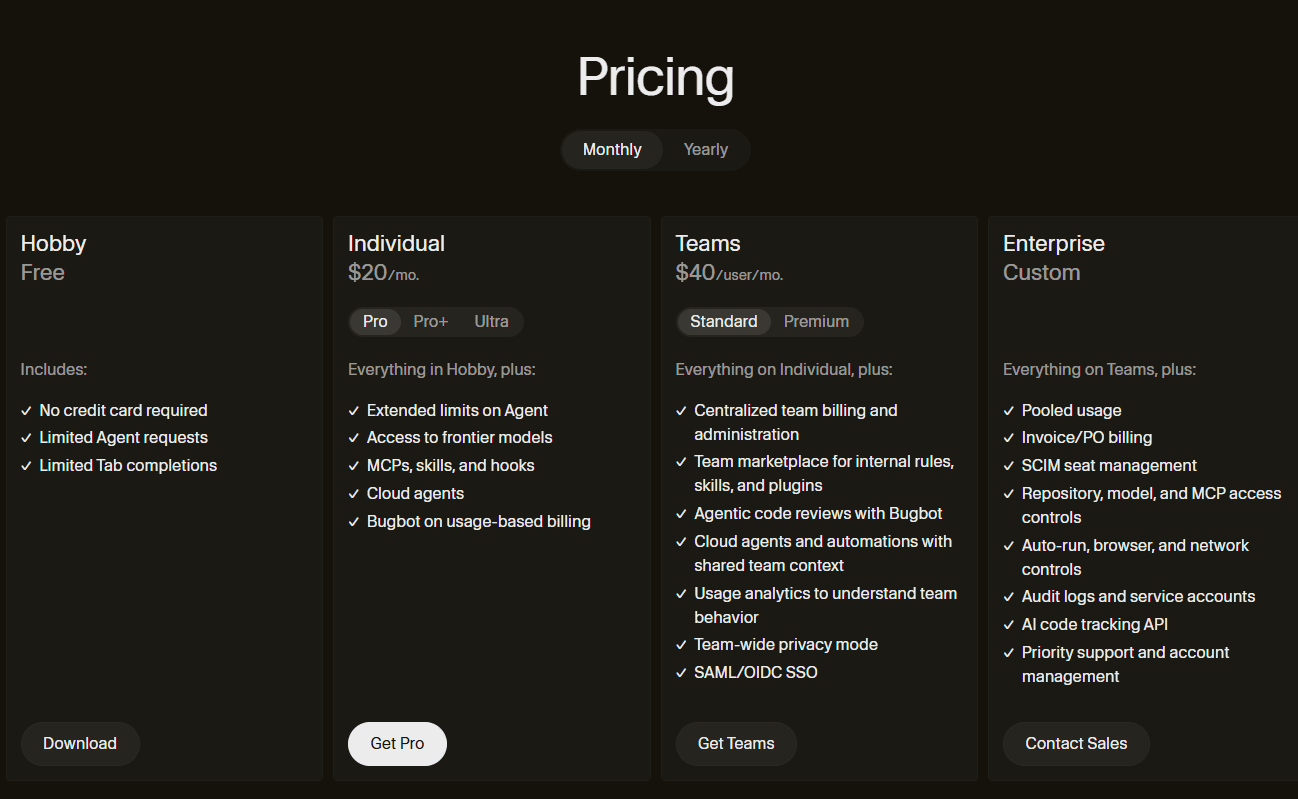
For enterprise needs, Cursor also offers specialized solutions with a focus on security and scalability. Prices are subject to change, so please check the official website at cursor.com for the latest information.
Who Benefits Most from Using Cursors?
Cursors are perfect for:
- Individual developers who want to accelerate prototyping and feature development
- Startups looking to increase the productivity of small teams
- Large companies looking to adopt AI across the board (some Fortune 500 companies are already using it extensively)
- Teams that frequently work on projects of medium to high complexity
Most importantly, Cursor doesn't eliminate the developer's role. Instead, it elevates it to a higher level—from writing code to designing systems and making strategic decisions.
Conclusion
Cursor represents a new direction in the world of software development. As an autonomous AI coding agent, it enables developers to build applications much faster without having to type out every detail manually.
Features such as Composer, Agent Mode, multi-model support, and integration with GitHub and Slack make it one of the most promising tools of 2026.
However, like other AI tools, Cursor still requires judicious human oversight. The best results are achieved when developers understand the project context and provide clear instructions.

Now that you’ve learnt about the latest AI developments, it’s time to explore AI-based cryptocurrencies on Bittime, such as the digital assets AI, AGI, RENDER, TAO and many more AI coins.
Bittime is a licensed and regulated Digital Financial Asset Trader (PAKD) supervised by Indonesia’s Financial Services Authority (OJK) — where you can buy Bitcoin in Indonesia and hundreds of other crypto assets starting from just Rp10,000. The registration process is fast, secure, and you can get started today.
Track USDT to IDR conversions and monitor your favorite crypto assets in real time. Everything is available in one crypto investment app that you can download for free on the Play Store
Ready to start? Register now on Bittime and execute your investment strategy with a platform trusted by millions of users in Indonesia.
FAQ
What is a Cursor?
Cursor is an AI coding agent and IDE that enables developers to build applications using natural language instructions. It features an autonomous agent that can plan, code, test, and deploy features independently.
Can Cursor replace programmer?
Not entirely. Cursors significantly speed up technical work, but humans remain crucial in defining architecture, making business decisions, and ensuring the quality and security of the resulting code.
What are the main differences between Cursor and GitHub Copilot?
GitHub Copilot focuses more on autocomplete and editor assistance. Cursor is a full-fledged development environment with autonomous agent capabilities that can perform end-to-end tasks and deeply understand the entire codebase.
What AI models does Cursor support?
Cursor supports a variety of the latest models, including those from OpenAI (GPT-5.5), Anthropic, Gemini, xAI, and Cursor's own proprietary models. Users can choose the most appropriate model for each task.
Is Cursor suitable for large teams?
Yes. Cursor has strong integration with GitHub and Slack, and offers an Enterprise plan designed for security and collaboration on a large scale. Several large companies, such as NVIDIA, have already adopted it widely.
Disclaimer: The views expressed belong exclusively to the author and do not reflect the views of this platform. This platform and its affiliates disclaim any responsibility for the accuracy or suitability of the information provided. It is for informational purposes only and not intended as financial or investment advice.

.png)