FaucetPay: How to Swap Coins and Withdraw
2026-09-22
A mid-2026 AllCoins report noted something quite surprising: most crypto faucets that still appear in search results have actually stopped paying their users, or have raised minimum withdrawal requirements to a level that is nearly impossible to reach.
From the few names that have survived and are proven to still pay, FaucetPay is one of the most frequently mentioned. The definition of FaucetPay itself is simple: this platform works as a payment bridge, collecting small rewards from hundreds of faucets into a single balance.
This article thoroughly discusses how to swap on FaucetPay between coins and how to withdraw the accumulated rewards to a personal wallet.
Key Takeaways
- FaucetPay is a crypto micro-wallet that collects rewards from 600+ faucets, PTC/offerwalls, and games, supporting swaps and withdrawals to 20+ coins.
- FaucetPay's swap feature allows instant coin-to-coin exchange inside the wallet, without needing to leave the platform.
- How to withdraw on FaucetPay is protected by a wallet address allow-list with a 24-hour cooldown for new addresses, to prevent fund theft.
What Is FaucetPay?
FaucetPay is a crypto micro-wallet designed specifically to collect small rewards from various sources — faucets, paid-to-click ads (PTC), offerwalls, and provably fair games — into one single balance.
Instead of withdrawing crypto pennies one by one from each faucet and getting hit by network fees multiple times, users can accumulate them first in FaucetPay and then withdraw them all at once.
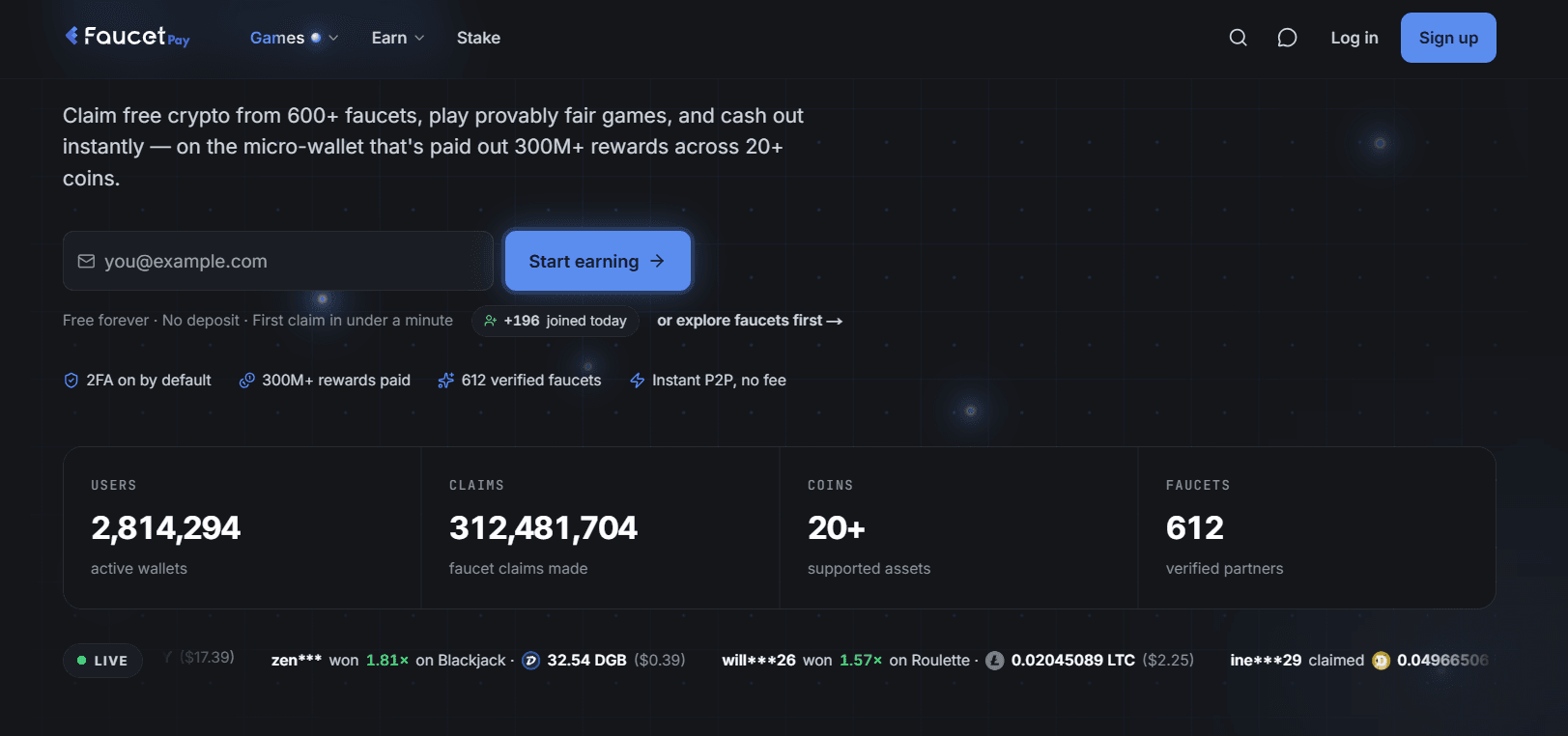
Based on official platform data, FaucetPay has hosted 2.8 million active wallets, processed more than 300 million faucet claims, and partnered with 612 verified faucets. In total, more than 20 coins are supported, from Bitcoin, Ethereum, USDT, Litecoin, Dogecoin, to Solana.
Read Also: Popular Tokenized Stocks 2026: Tech Stocks Become Investors' Favorite
Important to note: FaucetPay is a custodial wallet, meaning users do not hold their own private keys. It is suitable for holding small daily rewards, but not for storing large balances long term.
If the rewards accumulated in FaucetPay are already substantial and you want to trade or cash them out to rupiah, register an account first at Bittime so the deposit process is easier.
How to Swap Coins on FaucetPay
The swap feature is one reason people stay with FaucetPay, because users can exchange the balance of one coin for another directly inside the wallet, without needing to switch platforms or pay additional network fees (FaucetPay official site).
This feature was even discussed by content creators through a short tutorial video on Binance Square, a sign that quite a few users are looking for how to use it.
Here is how to swap on FaucetPay:
- Go to the Wallet menu. Log in to your FaucetPay account, then open the Wallet or Swap section on the dashboard.
- Choose the source coin and target coin. Determine which coin you want to exchange and which coin you want to receive, for example from DOGE to USDT.
- Enter the amount and check the rate. The system displays an estimate of the target coin amount based on the current rate, before the transaction is confirmed.
- Confirm the swap. The balance changes immediately in the wallet without an on-chain process that needs to be waited for.
Some users on Trustpilot call this swap process practical, although occasionally certain coins are temporarily out of stock, so the swap is delayed until liquidity becomes available again.
Read Also: Purbaya Removed from Finance Ministry, Becomes BI Governor? Check the Facts
How to Withdraw on FaucetPay
How to withdraw on FaucetPay, often abbreviated as how to WD FaucetPay, is also not complicated — but there are additional security steps that must be completed if withdrawing to a new wallet address.
- Open the Withdraw menu. Select the coin you want to withdraw from the list of available balances.
- Select or add a wallet address. Addresses already saved in the allow-list can be processed immediately. New addresses require a 24-hour cooldown plus additional email verification before they can be used (FaucetPay official site).
- Enter the withdrawal amount. Pay attention to the different minimum withdrawals for each coin, plus the network fee applicable at that time.
- Confirm and wait for processing. Withdrawal times vary, from minutes to several hours depending on the blockchain network used.
Regarding reliability, user reviews on Trustpilot are quite varied. Most are satisfied with the speed and reasonable withdrawal fees, although there are also reports of withdrawals getting stuck for certain coins such as Solana, which were then responded to directly by the FaucetPay team openly.
Because of that, users are advised to withdraw balances regularly, rather than accumulating them in large amounts.
Read Also: BIS Reveals New Potential for XRP Ledger for Digital Financial Systems
Conclusion
FaucetPay is a micro-wallet that bridges hundreds of faucets, PTC, and crypto games into one balance that can be swapped and withdrawn easily. Its swap feature makes it easy for users to manage small rewards without leaving the platform, while its withdrawal system is equipped with an allow-list and cooldown for added security.
Even so, its status as a custodial wallet still needs to be remembered — suitable for holding daily rewards, not for long-term storage, so balances should be withdrawn periodically to a safer wallet or exchange.
Check the price Bitcoin (BTC), Ethereum (ETH), XRP, Solana (SOL), GRAM, and BNB as well as leading memecoin DOGE. You can trade directly on Bittime!

Bittime is a licensed Digital Financial Asset Trader (PAKD) platform supervised by the Financial Services Authority — a place where you can buy Bitcoin in Indonesia and hundreds of other crypto assets starting from IDR 10,000. The registration process is fast, secure, and can be started right today.
Monitor the conversion USDT to IDR and the real-time price movements of your favorite crypto assets. Everything is available in one crypto investment app that can be downloaded for free on the Play Store.
Ready to start? Register now at Bittime and execute your investment strategy with a platform trusted by millions of users in Indonesia.
FAQ
What is FaucetPay?
FaucetPay is a crypto micro-wallet that collects small rewards from faucets, PTC, offerwalls, and games into one balance, which can then be swapped or withdrawn to another wallet.
How do I swap on FaucetPay?
Go to the Wallet or Swap menu, choose the source and target coins, enter the amount, then confirm — the balance changes immediately without an on-chain process.
How do I withdraw on FaucetPay?
Open the Withdraw menu, select the coin and destination wallet address, enter the amount, then confirm; new addresses require a 24-hour cooldown before they can be used.
Is FaucetPay safe to use?
FaucetPay applies 2FA by default, an anti-phishing phrase, and a withdrawal allow-list, but it is still a custodial wallet, so it is not recommended for storing large balances.
Is FaucetPay suitable for storing large amounts of crypto?
Not recommended — FaucetPay is better suited for holding small daily rewards before withdrawing them periodically to a safer wallet or exchange.
Disclaimer: The views expressed belong exclusively to the author and do not reflect the views of this platform. This platform and its affiliates disclaim any responsibility for the accuracy or suitability of the information provided. It is for informational purposes only and not intended as financial or investment advice.

.png)