How to Make Money from X through Video Clipping: Requirements and Steps
2026-11-24
Since November 9, 2026, X users have been able to clip moments from other people's videos directly in the app, then post them with their own commentary.
This feature adds another way to make money from X as well as a way to monetize X without always having to create content from scratch. The method for clipping videos on X is also relatively easy, as long as the video and account meet the requirements. The pattern of earning income from other people's videos was also discussed in how to get free crypto by watching videos.
Key Takeaways
- Clips are 5-60 seconds long, at most 30% of an original video that is at least 2 minutes long, with automatic credit to the video owner.
- Clippers and original creators can earn money from clip views, but both must be enrolled in Original Content Rewards.
- The feature is available in the iOS and Android apps. Web support and livestream clipping are not yet available.
What Is the Video Clipping Feature on X?
The clipping feature is X's built-in tool for taking the best moments from long videos, adding commentary, and then sharing them as a new post. Each clip displays a "Clip from" label that links to the original video at the cut point, so the video owner still receives credit.
Before this feature existed, clip creators had to download the video, cut it in another app, and then reupload it without clear attribution. Now the entire process happens inside X.
Requirements and Rules for Video Clipping on X
Based on the explanation from the X Help Center and the X Creators account, the rules are quite strict:
- The video must be pre-recorded (not a livestream) and at least 2 minutes long.
- The clip duration must be between 5 and 60 seconds.
- Clips can be at most 30% of the original video length. A 2-minute video can only be clipped to about 36 seconds.
- Videos longer than 3 minutes 20 seconds can be clipped for the full 60 seconds.
- The feature is available on iOS and Android, while the web version is still in development.
Video owners also cannot disable clipping for now, according to the X Help Center.
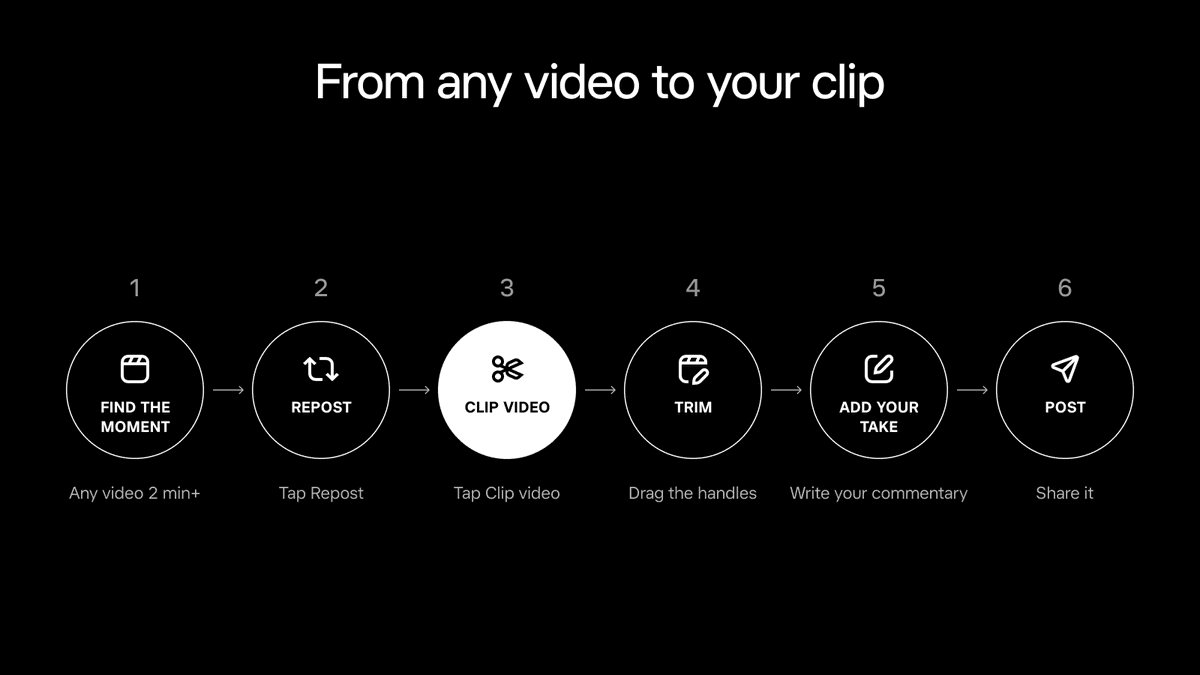
How to Clip Videos on X Step by Step
- Open an eligible video in the X app.
- Tap the Repost icon, then select "Clip video".
- Drag the handles on the trimmer to set the start and end points. The system will warn you if the clip exceeds 30%.
- Tap Next, write commentary or additional context, then post.
Choose a moment that can stand on its own without the full video context, and add an opinion or question that sparks discussion. A good clip works like a trailer that directs viewers to the original video.
Read Also: Crypto Events This Week: 9 Market Schedules November 23-29, 2026
How to Earn Money from Video Clipping on X
Income comes through Original Content Rewards, the program that replaced the old revenue-sharing scheme. According to ContentGrip, both parties, the clipper and the creator, must already be enrolled to receive payment.
Engagement on a clip is counted for the clipper like a regular post, while the original video owner earns income under the same calculation as when their content is reposted, according to the X Help Center. Clip income goes into the program's regular payments, but clips are not included in the Video Kickstart Bonus.
Program enrollment requirements generally include an active Premium subscription, at least 500 verified followers, and 500,000 impressions from verified users in the last 90 days, based on a Quasa report. X has not published the rate per view or the split between clipper and creator, according to Content Rewards, so income figures should not be used as a benchmark.
To protect your chances, avoid downloading and reuploading other people's videos. That practice is not original content and risks a copyright warning. While waiting for results from X, other digital opportunities can be explored through Bittime, which provides trading and earn features.
Read Also: Bitcoin Price Today Rp1.12 Billion, Fear & Greed 11: Rebound?
Conclusion
The clipping feature provides an official path for clippers and creators to both gain views and credit. As long as the video meets the requirements and the account is enrolled in Original Content Rewards, monetization opportunities are open. The amount of income is still unclear, so this feature is better regarded as a supplement, not a primary source of income.
FAQ
What are the requirements for a video that can be clipped on X?
The video must be pre-recorded and at least 2 minutes long. Livestreams are not yet supported.
How long is the permitted clip duration?
Between 5 and 60 seconds, but it cannot exceed 30% of the original video length.
Does the original video owner also earn money from the clip?
Yes, as long as they are enrolled in Original Content Rewards. The calculation follows how X calculates reposted content.
Can creators disable clipping on their videos?
Not yet. That option is not available at this time.
How much does one clip earn?
X has not published the rate per view or details of the split between clipper and creator.
Why doesn't the "Clip video" option appear?
Make sure the app is updated, the device is running iOS or Android, and the video meets the duration requirements.
Disclaimer: The views expressed belong exclusively to the author and do not reflect the views of this platform. This platform and its affiliates disclaim any responsibility for the accuracy or suitability of the information provided. It is for informational purposes only and not intended as financial or investment advice.

.png)