How to Delete Gemini AI History and Activity After Generating Photos
2026-02-12
Bittime - Every time someone uses Gemini AI to generate a photo, a trail of activity is automatically saved. This history includes the prompt text, the generated image, and the time of use.
Some users find this storage makes it easier to continue with previous work. However, for those concerned about privacy, storing history can be intrusive. Therefore, many are looking for ways to delete history and activity on Gemini AI. After generating the photo, keep your personal data safe.
The discussion of privacy in AI technology is increasingly important. Many people are accustomed to services that automatically store data, but not everyone is aware of the right to delete it.
In the context of Gemini AI, this history deletion feature gives users complete control over their interactions with the system.

Why Gemini AI History is Saved Automatically
Gemini AI, like other AI platforms, is designed to learn from user interactions. As someone types in a prompt and generates a photo, the system stores a history so users can access previous results.
This also allows AI to provide more relevant recommendations in the future.
For example, if a user frequently requests a retro or cyberpunk photo style, Gemini AI will more quickly provide options with a similar feel.
This history can be considered a short-term memory that helps make experiences feel more personal. However, there's another side to it that's worth considering.
The saved history belongs not only to the user, but also to the ecosystem of applications connected to the Google account.
This means this data can be viewed if someone else borrows the device or if the account is used on more than one device. This raises privacy concerns.
Read Also: How to Edit Photos to Look Like Real Faces Using Gemini AI
The Risks of Leaving History Undeleted
For some, storing history may seem trivial. But in practice, there are real risks involved. First, there's the issue of privacy. User-generated prompts can be personal or sensitive. If someone else opens them, the content of the conversation with the AI will be visible.
Second, data security risks. Although Gemini AI is designed with encryption, no system is completely immune to potential breaches. Digital footprints stored for too long can increase the risk of misuse.
Third, the issue of convenience. Accumulated history can make the interface feel cluttered. When searching for old results, users may have difficulty sorting through irrelevant history. By regularly clearing the history, the app's interface remains clean and easy to use.
Read Also: Gemini AI Photo Editing: From Pre-Wedding to Wedding
How to Delete Gemini AI History and Activity After Generating Photos
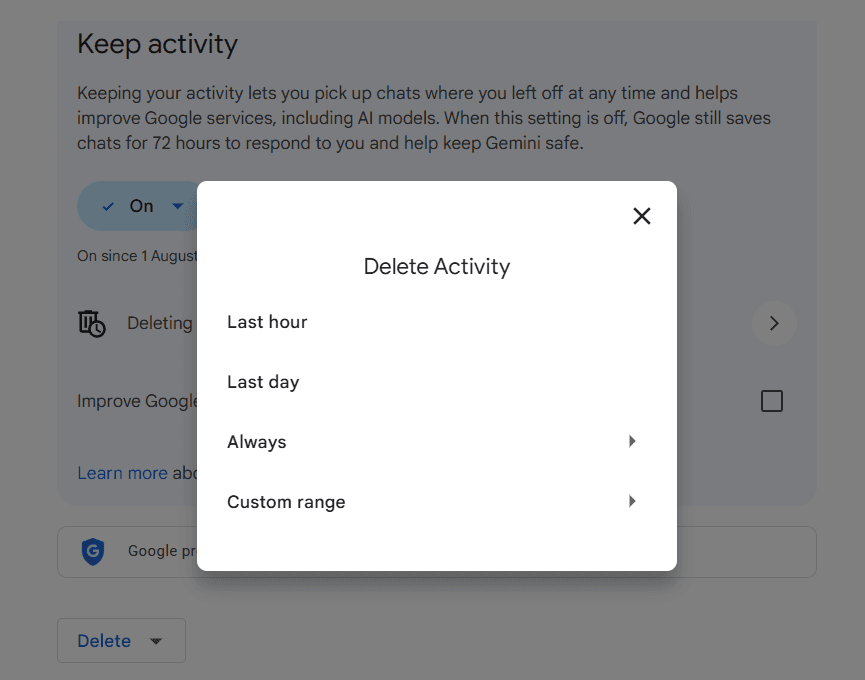
Deleting history in Gemini AI is quite easy, either through the mobile app or through a browser. The process doesn't require any complicated technical steps; simply follow the provided menu flow.
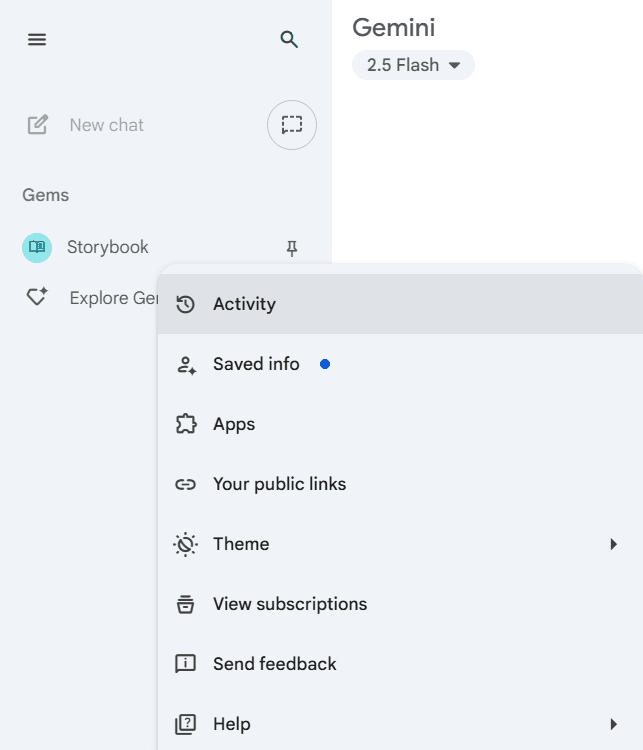
Steps to delete Gemini AI history:
- Open the Gemini AI app
Enter the menu Activity or History. All interactions ever made will be displayed chronologically.
- Select the entry you want to delete.
Tap the icon happyon certain history. The system will usually ask for confirmation before the data is actually deleted.
- Use the full wipe option
If you want to clear all history at once, selectClear All Activity. This feature will delete all interactions in just one action.
- Wait for synchronization between devices
The deletion process may take a few minutes to sync across all devices. If your history is still visible on other devices, wait until the update is complete.
- Delete directly from Google account
For more security, go to the pageMy ActivityIn the browser, select a filter for the Gemini AI service, then delete the history individually or completely.
Read Also: How to Fix Gemini AI Cannot Be Used to Create Images
What Happens After History Is Deleted
Deleting the history doesn't reduce Gemini AI's ability to generate new photos. The system still performs at the same quality because the AI model relies not on individual history but rather on broader training data.
The difference may be noticeable in the personalized experience. Without a long history, automated recommendations will be reduced. For example, if the AI previously frequently suggested photo styles based on user preferences, after deleting the history, the AI will need more time to adjust.
However, this can be considered an advantage. Users have the freedom to start fresh without legacy traces affecting the results. In a privacy context, this loss of personalization is offset by the sense of security that no data remains on the system.
Impact on Digital Privacy and Security
By deleting history, users prevent others from accessing their prompts, snapshots, and usage times. This simple step adds another layer of protection against data leaks.
Digital privacy is now a critical issue. Numerous data breaches on major platforms have resulted in financial and psychological losses. While Gemini AI maintains high security standards, the habit of deleting your history remains relevant as part of personal risk management.
Conclusion
Understanding how to delete Gemini AI's history and activity after generating photos gives users complete control over their personal data. This not only safeguards privacy but also ensures a secure experience free from unnecessary traces.
Gemini AI is designed to assist with visual intelligence, but the final decision remains with the user. By periodically deleting history, every interaction can take place without worrying about privacy.
FAQ
Are the photos deleted when the history is deleted?
No. Photos already downloaded or saved on the device are not deleted. Only the activity history from the app or account is deleted.
Can deleted history be restored?
No. Once history is deleted, the data cannot be recovered. Therefore, before deleting, please ensure that you still want to keep any history.
Does deleting history affect the Google account as a whole?
No. Deletion only applies to Gemini AI services, it does not affect other data in your Google account.
Does deleting history make AI less intelligent?
No. The AI model will still perform at full capacity. However, the personalization of recommendations may be reduced because the system no longer references past history.
How often should history be deleted?
There's no hard and fast rule. However, to maintain privacy, it's best to do this regularly, for example, after using Gemini AI to generate photos.
How to Buy Crypto on Bittime

Want to trade sell buy Bitcoins and crypto investment easily? Bittime is here to help! As an Indonesian crypto exchange officially registered with Bappebti, Bittime ensures every transaction is safe and fast.
Start with registration and identity verification, then make a minimum deposit of IDR 10,000. After that, you can immediately buy your favorite digital assets!
Check the exchange rate BTC to IDR, ETH to IDR, SOL to IDR and other crypto assets to find out today's crypto market trends in real-time on Bittime.
Also, visit the Bittime Blog for interesting updates and educational information about the crypto world. Find reliable articles about Web3, blockchain technology, and digital asset investment tips designed to enrich your crypto knowledge.
Disclaimer: The views expressed belong exclusively to the author and do not reflect the views of this platform. This platform and its affiliates disclaim any responsibility for the accuracy or suitability of the information provided. It is for informational purposes only and not intended as financial or investment advice.

.png)