What Is Slidesgo? AI Features, How to Use It, and Its Benefits
2026-07-15
What is Slidesgo? Slidesgo is a platform that provides presentation templates and AI-powered tools to help users create slides for PowerPoint and Google Slides.
In addition to offering thousands of ready-to-edit designs, Slidesgo AI can now create presentations from prompts, convert PDF documents to PPT, and generate various educational materials.
Key Takeaways
- Slidesgo provides presentation templates for education, business, marketing, health, technology, and various other needs.
- Slidesgo AI can turn topics into editable and downloadable presentations in PPTX format.
- Free accounts have usage limits and require maintaining attribution on templates, while paid plans provide broader access.
Understanding Slidesgo
Slidesgo is an online platform that provides presentation templates for PowerPoint, Google Slides, and several other design applications.
Initially, Slidesgo was better known as a site for finding templates. Users chose a design, downloaded it, and then replaced the text, images, colors, and data as needed.
The service has since expanded. Slidesgo now provides not only templates but also a suite of AI-powered tools.

Source Generated-AI Image
With Slidesgo AI, users can create presentations from a short description. The system will structure the material, select a design, generate initial text, and place visual elements on each slide.
Users can still edit the results before downloading the presentation. Therefore, Slidesgo doesn't completely replace PowerPoint or Google Slides. This platform is more suitable for speeding up the initial drafting and design process.
For readers who follow developments in artificial intelligence, the digital economy, and Web3, you can register at Bittime and read technology news updates. Developments in AI for presentations are rapid, so features, packages, and usage methods are subject to change.
What is Slidesgo AI?
Slidesgo AI is a collection of artificial intelligence tools available within the Slidesgo ecosystem.
The main features areAI Presentation MakerUsers simply write a topic, define a goal, choose a style, and adjust a few settings. The system then automatically creates the presentation.
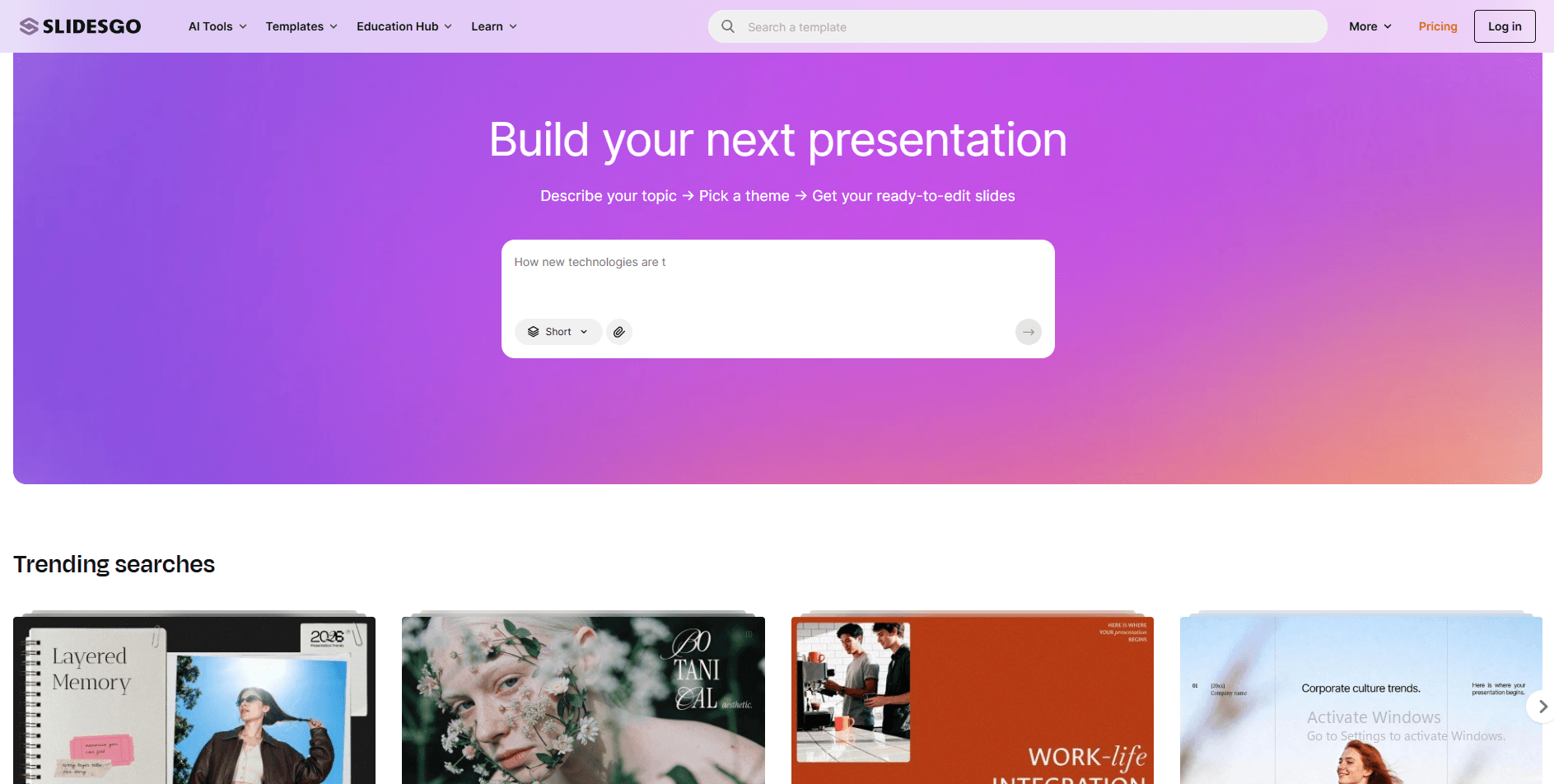
Source: Slidesgo.com
Besides the presentation generator, Slidesgo also provides several other AI tools, such as:
- AI PDF to PPT Converter.
- AI Lesson Plan Generator.
- AI Quiz Maker.
- AI Icebreaker Generator.
- AI Exit Ticket Generator.
- Learning support tools for teachers and students.
The presence of this feature makes Slidesgo relevant as one of theAI for the latest presentations, especially for users who don't have much time to build a design from scratch.
However, AI-generated content still needs to be reviewed. The system may produce generic sentences, inaccurate data, or structures that don't meet the audience's needs.
Read also:SpaceXAI's New AI Model & Cursor Ready for Launch July 8th
Main Functions of Slidesgo
Slidesgo can be used for several different needs.
1. Search for Presentation Templates
Slidesgo's most basic function is to provide ready-to-use presentation designs.
Templates are grouped by:
- Topic.
- Industry.
- Educational level.
- Gaya visual.
- Color.
- Type of presentation.
- Professional needs.
- Content format.
Users can find designs themed on business, technology, education, health, marketing, research, travel, history, and many more.
The visual style options are also diverse. Designs available include minimalist, professional, modern, aesthetic, simple, colorful, and even illustrative styles.
2. Create Presentations with AI
Slidesgo AI Presentation Maker can create presentations from text.
Users simply need to explain the topic. The AI then creates several slides with appropriate titles, content, and visuals.
This feature can be used to:
- Schoolwork.
- Course material.
- Business presentation.
- Project proposal.
- Marketing presentation.
- Training materials.
- Simple pitch.
- Activity Report.
- Product description.
- Learning materials.
The results can be customized before downloading. Users can edit text, change layouts, change colors, or delete unnecessary slides.
3. Convert PDF to PPT
Slidesgo provides AI PDF to PPT Converter tool.
This feature helps users convert PDF documents into presentations. The system reads the document, extracts important information, and then organizes it into slide format.
This feature is useful for processing:
- Report.
- Module.
- Proposal.
- Article.
- Research documents.
- Training materials.
- Policy summary.
The conversion results still need to be checked because AI is not always able to determine the most important parts perfectly.
4. Supporting Educational Activities
Slidesgo has a strong collection for education.
Teachers can find templates for:
- Lesson plan.
- Quiz.
- Presentation of material.
- Activity sheet.
- Class discussion.
- Icebreaker.
- Short evaluation.
- Project presentation.
- Material based on subject.
Education categories can also be filtered by school level, from early childhood education to university.
5. Provide Infographics
In addition to complete presentation templates, Slidesgo provides a collection of infographics.
The element can be used to display:
- Data.
- Process.
- Timeline.
- Organizational structure.
- Comparison.
- Project stages.
- Map.
- Statistics.
- Diagram.
Most elements are editable in PowerPoint or Google Slides. Users can change colors, text, icons, and data as needed.
Read also:10 Best AI Music Generators 2026 for Beginners
How to Use Slidesgo AI for Presentations
Here are the general steps for creating a presentation using Slidesgo AI.
1. Create a Slidesgo Account
Users need to create an account and log in before they can generate or download AI presentations.
Accounts also help save download history and favorite templates.
2. Open AI Presentation Maker
Go to the AI Tools menu, then select AI Presentation Maker.
Users will find a field to enter the topic or description of the presentation.
3. Write a Clear Prompt
Prompt determines the quality of the results.
Avoid writing instructions that are too short, such as:
Create a presentation about marketing.
The instructions are too general. The AI doesn't know the audience, purpose, number of slides, or desired key message.
Use a more specific prompt:
Create a 10-slide presentation on digital marketing strategies for culinary SMEs. The audience is start-up business owners. Use simple Indonesian. Discuss social media, Google Business Profile, paid promotions, customer retention, and a 30-day action plan.
A good prompt should contain:
- Main topic.
- Purpose of presentation.
- Profile audience.
- Number of slides.
- Language style.
- Mandatory points.
- Visual type.
- Expected action.
4. Set the Tone and Style
Adapt the tone of your presentation to your audience.
Academic presentations require a formal, data-driven style. School presentations can use simple language. Business pitches require concise, persuasive explanations.
5. Select a Template
Slidesgo provides a wide selection of designs.
Choose a template based on its purpose, not just its appearance. An attractive design may not be suitable for a formal report or research presentation.
Take note:
- Font readability.
- Color contrast.
- Number of elements.
- Space for data.
- Visual consistency.
- Audience suitability.
6. Check AI Results
Don't just download the presentation without checking.
Check the following things:
- The truth of the facts.
- Accuracy of numbers.
- Explanation structure.
- Spelling.
- Relationships between slides.
- Image relevance.
- Text length.
- Consistency of terms.
- Quality of conclusions.
AI can help create drafts, but the user remains responsible for the final content.
7. Customize Presentation
Users can adjust text, colors, visuals, and layout before downloading the results.
Add original data, personal experiences, case examples, and credible sources to keep your presentation from feeling generic.
8. Download in PPTX Format
AI results can be downloaded in editable PPTX format.
The file can be opened via PowerPoint, Google Slides, or any other application that supports the format.
Before presenting, double-check the file on the device you'll be using. Fonts, images, and object positions may shift after the export process.
Read also:How to Create Thumbnail Photos with Gemini AI, Including Prompt Examples!
How to Use Slidesgo Templates Without AI
Users don't have to use the AI generator. Regular templates remain one of Slidesgo's strengths.
The steps for using it are as follows:
- Open the Slidesgo website.
- Enter a topic in the search field.
- Use style, color, or category filters.
- Open the template page.
- Check out all the sample slides.
- Select PowerPoint or Google Slides.
- Download or copy the template.
- Replace text and images.
- Customize colors and fonts.
- Keep the credit slide if using a free account.
For Google Slides, the template can be copied to Google Drive. For PowerPoint, the file will be downloaded to the device.
Some templates can also be opened through Canva. The availability of these options depends on the design selected.
Read also: Meigen AI Prompt: How to Create Accurate AI Prompts
Is Slidesgo Free?
Slidesgo provides a free account and a Premium plan.
At the time of writing, free accounts provide limited access to:
- Maximum of three AI presentations per month.
- Maximum of three free template downloads per month.
- Access to a selection of free templates.
- Obligation to maintain Slidesgo attribution.
Usage limits are reset based on account cycles.
The Premium package offers broader access, including:
- Access to a larger template library.
- More generations of AI presentations.
- More downloads.
- Template Premium.
- Ad-free experience.
- Use without obligation of attribution.
- Features for team members.
- Early access to certain AI features.
Slidesgo touts its Premium plan as unlimited, but it still imposes a monthly security limit. At the time of writing, that limit was 150 AI generations and 150 template downloads per month.
Terms and conditions are subject to change. Users should check the package page before subscribing.
Read also:What Is Dola AI? An AI Assistant for Everyday Productivity
Are Slidesgo Templates Suitable for Business?
Slidesgo templates can be used for both personal and commercial purposes.
This means that users can use it for corporate presentations, marketing materials, training, proposals, and other professional needs.
However, there are some limitations.
Users cannot:
- Reselling Slidesgo templates.
- Renting templates.
- Offers modified versions for download.
- Inserting the template into the database.
- Claiming copyright on Slidesgo designs.
- Redistributing content without permission.
Free account users must also maintain the credits slide. Premium users can use the template without attribution, as per their plan's terms.
The license needs to be re-checked if the material will be used in large-scale projects or commercial products sold to customers.
Read also:What is Abacus AI? An Enterprise AI Platform with AI Agent and ChatLLM
Slidesgo Advantages
Huge Selection of Templates
Slidesgo has a wide collection for education, business, health, marketing, technology and other fields.
Users can find a suitable design without having to create all the elements from scratch.
Easy to Use
The search interface and download process are relatively simple. Beginners can choose templates, replace text, and customize colors without advanced design skills.
Supports PowerPoint and Google Slides
The templates can be used through these two popular presentation applications.
This flexibility makes it easy for users to work offline or collaborate via the cloud.
Have AI Presentation Generator
Slidesgo AI speeds up drafting. Users don't have to start from a blank page.
This feature is useful when preparation time is limited.
Strong for Educational Needs
Slidesgo's collection of educational materials is one of its distinguishing features. Teachers and students can find templates based on subject, school level, and activity type.
Editable Visual Elements
Most text, icons, graphics, and design elements can be changed.
Users can also edit certain elements through the Slide Master if they cannot be selected directly on the slide.
Read also:Get to Know the Claude Sonnet 5: Features, Price, and Latest Improvements from Anthropic
Disadvantages of Slidesgo
AI Results Still Need Improvement
AI-generated presentations may contain generic text, repetition, or unverified information.
Initial results should be treated as drafts.
Design Can Look Generic
Because templates are used by many people, presentations can look similar to other users' materials.
Visual identity needs to be reinforced through color, images, data, and its own style of delivery.
Free Accounts Are Very Limited
The limit of three downloads and three AI presentations per month may not be enough for active users.
Free accounts must also maintain attribution slides.
Not All Elements Are Easily Editable
Some elements are part of the Slide Master or background design. Users may need to understand the master settings to change them.
Font Issues May Occur
Fonts in PowerPoint may differ if they are not installed on your computer.
Users need to install the appropriate font or replace it with a standard font.
Uploading Your Own Images to the AI Generator Is Still Limited
At the time of writing, AI Presentation Maker does not yet provide a direct option to upload your own images during the generation process.
Users can add images after the file is downloaded and opened through the presentation application.
Professional Presentations Require Advanced Editing
Slidesgo is effective for quick drafts, but it doesn't necessarily produce client or investor presentations that are ready to go without revisions.
Users still have to refine the narrative, data, graphics, and brand identity.
Who is Slidesgo Suitable for?
Teachers and Lecturers
Slidesgo is perfect for creating learning materials, quizzes, class presentations, and educational activities.
A collection of educational templates can reduce preparation time.
Students and College Students
This platform can help create presentations for assignments, seminars, research, and trials.
However, users must still construct their own arguments and check their own sources.
MSME owners
Slidesgo can be used to create business profiles, proposals, promotional materials, and product presentations.
Templates can be customized to suit your brand identity.
Marketing Team
Marketing teams can use it to create campaign proposals, social media reports, and presentation materials.
Office workers
Slidesgo can speed up the creation of reports, project presentations, meeting materials, and strategy briefings.
Content Creator
Creators can use infographics and visual templates to develop educational materials or social media content.
Is Slidesgo Better Than Creating Manual PPTs?
Slidesgo is faster than creating the entire design manually.
However, speed isn't the only consideration. An effective presentation requires accurate content, a clear flow, and visuals that support the message.
Slidesgo excels when users:
- Need a quick draft.
- Have no design skills.
- Looking for layout inspiration.
- Requires educational materials.
- Requires ready to edit template.
- Don't want to start from a blank slide.
Manual manufacturing is superior when:
- Brand identity should be very specific.
- Data is complex.
- The presentation requires special animation.
- The material is confidential.
- The layout must follow company standards.
- Each element requires detailed control.
The best approach is often a combination of the two. Use Slidesgo for the initial design, then refine the material in PowerPoint or Google Slides.
Read Also: Gamma AI vs Presentations.AI: Which is Best for Making PPT?
Tips for Getting the Best Results from Slidesgo AI
Use some of the following tips:
- Write the audience clearly.
- Determine the purpose of the presentation.
- Limit one main idea per slide.
- Have AI create the structure before design.
- Use verifiable data.
- Replace generic images with your own visuals.
- Remove redundant text.
- Add real examples.
- Use a font that is easy to read.
- Check export results.
- Prepare a PDF version as a backup.
- Do not enter confidential information into the prompt.
Conclusion
Slidesgo is a platform that provides templates and AI tools for presentations. Users can search for ready-made designs, create presentations from prompts, convert PDFs to PPTs, and use educational support tools.
Its main advantages lie in the number of templates, ease of use, PowerPoint and Google Slides support, and the AI Presentation Maker feature.
However, Slidesgo isn't an all-in-one solution. AI results still need to be reviewed. Templates also need to be customized to avoid a generic look, while free accounts have download limits and attribution requirements.
Slidesgo is perfect for teachers, students, business owners, workers, and creators who want to speed up the design process. Use this platform to build the foundation of your presentation, then add your own data, experiences, and visual identity.

Now that you’ve learnt about the latest AI developments, it’s time to explore AI-based cryptocurrencies on Bittime, such as the digital assets AI, AGI, RENDER, TAO and many more AI coins.
Bittime is a licensed and regulated Digital Financial Asset Trader (PAKD) supervised by Indonesia’s Financial Services Authority (OJK) — where you can buy Bitcoin in Indonesia and hundreds of other crypto assets starting from just Rp10,000. The registration process is fast, secure, and you can get started today.
Track USDT to IDR conversions and monitor your favorite crypto assets in real time. Everything is available in one crypto investment app that you can download for free on the Play Store
Ready to start? Register now on Bittime and execute your investment strategy with a platform trusted by millions of users in Indonesia.
FAQ
What is Slidesgo?
Slidesgo is a platform that provides presentation templates and AI tools for creating slides. The templates can be used in PowerPoint, Google Slides, and several other design applications.
Is Slidesgo free?
Yes, Slidesgo offers a free account. However, the number of AI presentations and template downloads is limited, and users must maintain credit slides.
Can Slidesgo create presentations with AI?
Yes. Slidesgo AI Presentation Maker can create slides based on the user's topic and instructions. The results can be edited and downloaded as PPTX files.
Is Slidesgo safe to use?
Slidesgo is safe to use through its official website. Users should still be mindful of privacy and avoid entering sensitive data into the AI generator.
Can Slidesgo templates be used for business?
It's suitable for both personal and commercial use. However, users may not sell, rent, or redistribute Slidesgo templates.
Disclaimer: The views expressed belong exclusively to the author and do not reflect the views of this platform. This platform and its affiliates disclaim any responsibility for the accuracy or suitability of the information provided. It is for informational purposes only and not intended as financial or investment advice.

.png)