How to Edit Gemini AI Photos and Complete Prompts!
2025-09-24
Neat and unique photos are no longer the preserve of professional photographers. Gemini AI is here as a smart assistant capable of transforming a single photo into many interesting styles. The Gemini AI Photo Editing trend has gone viral on social media due to its fast process and creative results.
Users can change the background, blend multiple photos, and even keep the face the same for a natural look. We'll cover what Gemini AI Viral Photo Editing is, how to edit it on the web and in the app, examples of effective prompts, and practical tips for consistent, shareable results.
Read Also: 7 Effective Crypto Trading Methods for Beginners, Complete with Tips and Tricks
What is Gemini AI Viral Photo Editing?
Gemini AI is Google's artificial intelligence model that assists with a variety of tasks, including intelligent photo editing. Through the web interface and app, users can upload an image and then provide a brief prompt to help the system understand the editing intent.
Various popular styles emerged, such as Polaroid photographs, miniature displays, and compositions that combine multiple moments into a single, cohesive frame. The results felt fresh thanks to the combination of visual analysis and clear textual direction.
Gemini's capabilities have recently become even more flexible thanks to additional tools that facilitate collages, background replacement, and rearranging visual elements. Users can mix different photos, adjust clothing and hairstyles, and add a specific atmosphere.
To maintain authenticity, include instructions telling the system not to alter facial details. This approach preserves the subject's identity and avoids results that look out of place when compared to the original photo.
The key to Gemini AI Viral Photo Editing is the right prompt. Think of the prompt as a concise recipe for the final result. Include six core elements: subject, composition, action, location, style, and editing instructions.
If necessary, create a step-by-step process. Start with changing the background, then move on to adjusting the clothing, and finally, with the lighting. This method is more stable, easier to control, and minimizes repeated revisions.
How to Edit Gemini AI Photos on Web and APK?
Start on the official Gemini website. Sign in with your Google account and select the plus icon to upload a photo. Once the file appears, type a prompt in the command field. Use simple sentences that include all six elements.
For example, mention who the subject is, how they'll pose, where they'll be located, and the desired photo style. Include a note to avoid altering the face and request lighting that suits the mood.
For mobile users, download the official Gemini app from the app store. Open the app, tap the plus icon, then take a picture from your camera or gallery. Write the same concise prompt as on the web.
Press submit and wait a few moments for the process to complete. The results will appear as a preview. If it's not quite right, adjust the prompt slightly and run again. Short iterations often provide a noticeable jump in quality.
For greater direction, implement a step-by-step prompt pattern. First, request a background change to create a clean composition. Second, request adjustments to clothing and hairstyles to blend seamlessly. Third, request color and fine-grain adjustments for the final touches.
If you want a Polaroid style, ask for a distinctive white frame and a light grain effect. If you want a miniature look, ask for a small scale on a work table with soft lighting. Record small changes at each step to maintain consistency.
Read Also: IPO: Definition, Process, Benefits, and Risks
Complete Prompt for Editing Photos with Gemini AI
According to Geeks for Geeks, a prompt is a question, command, or query a person gives to AI to produce a specific response. In the context of photo editing, a prompt is a command to produce a specific edit. Here are some examples:
Prompt #1: Miniature Photo
(source: TikTok @tan.rap)
"Create a 1/7 scale commercialized figure of the character in the illustration, in a realistic style and environment. Place the figure on a computer desk, using a circular transparent acrylic base without any text. On the computer screen, display the Z Brush modeling process of the figure. Next to the computer screen, place a BANDAI-style toy packaging box printed with the original artwork."
Prompt #2: Polaroid Photo of Yourself
(source: TikTok @firstyadiba)
"[Role] Act as a portrait photographer with a vintage style. [Context] I want to produce an instant polaroid photo featuring a man using the photo I uploaded. [Task] Create a portrait photo of a man using the photo I uploaded. The man is wearing a plain black t-shirt. His facial expression is neutral, slightly smiling or "smirking" And looking directly at the camera. [Format] The photo must have a physical polaroid aesthetic, with a clearly visible white polaroid frame, and attached to a textured white wall using tape, tilted at a 6° angle to give a more natural impression. [Rules] Soft, slightly dim lighting (low-key lighting), with a plain and simple white or light gray background. Make sure there is a slight Natural "vignette" in the corners of the image, and the grain effect typical of polaroid photos. High resolution, clear details, and a candid yet stylish feel. Body position facing the camera, with hands slightly behind the back or other relaxed position that is not too obvious, and make it with super realistic results."
Prompt #3: Polaroid Photo of 2 People
(source: TikTok account @unmemories)
"Create a picture taken with a Polaroid camera. It should look like a regular photo, with no obvious subjects or props. It should have a slight blur effect and a consistent light source, such as a flash from a dark room, spread throughout the photo. Don't change the faces. Replace the background behind the two people with a white curtain. With the girl touching my head."
Prompt #4: Foto Formal CV
(source: TikTok account @cliper_129)
"A professionally styled formal photo of a young Asian man wearing a black suit, white shirt, and striped tie. Studio lighting, plain red background, symmetrical composition, sharp focus, calm and confident expression, high quality passport photo."
Prompt #5: Studio Photos
(source: TikTok account @bangjepsikumbang)
"This photo, edited into a black and white studio shot without changing the face, shows a young man sitting casually in a metal folding chair, legs crossed. He is wearing a black blazer, black trousers, sunglasses, and black boots. The lighting is soft and minimal, creating strong shadows and a moody atmosphere. The body pose is relaxed, leaning slightly with one hand on the back of the chair, his face turned to the side. The background is plain, the aesthetic is simple and modern."
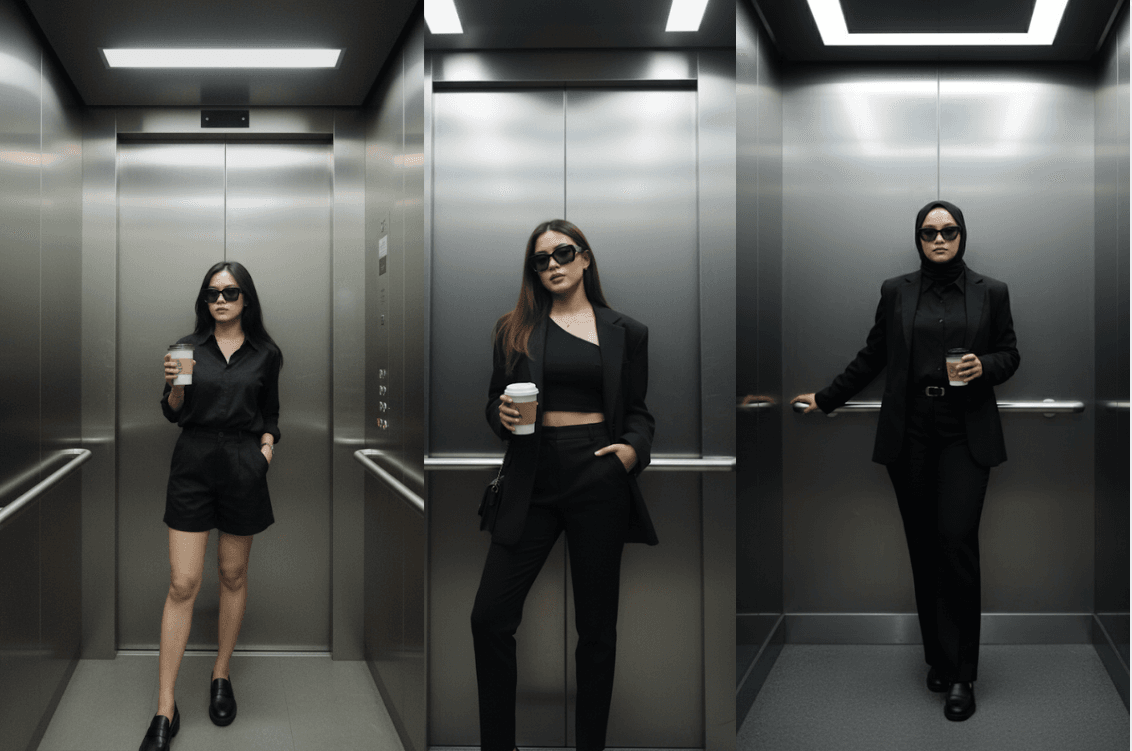
Prompt #6: Lift Photo
(source: TikTok account @issccooo7)
"Edit the photo to be standing casually inside a stylish elevator with reflective metal walls. He's wearing an all-black outfit: an oversized blazer and trousers. He's wearing sunglasses and holding a cup of takeout coffee. The style is elegant and edgy with a mysterious feel. The dim lighting from the neon lights on the ceiling creates subtle shadows."
Prompt #7: Photos of Yourself and Childhood
(source: TikTok account @egasugiarti)
"Take a photo with a Polaroid camera. It should look like a regular photo, with no obvious subject or props. It should have a clear, consistent light source, such as a flash from a dark room, spread throughout the photo. Don't change the faces. Replace the background behind the two people with a white curtain. While the older brother smiles and embraces the younger brother and the younger brother smiles, the photo looks intimate and cute. And clear."
Prompt #8: Indoor Pre-Wedding Photos
(source: TikTok account @inimanusiakamuapa)
"For an elegant mafia-style pre-wedding photo with a resolution of 9:16, a young Indonesian couple in their 20s poses formally in a luxurious room with a studio background, a tall, slim, slightly thin man sits upright in a full black suit, with a firm and authoritative expression, a slightly thin woman stands beside him wearing a long black dress with a matching hijab, soft glam makeup, warm cinematic studio lighting, a classy, elegant atmosphere, sharp, realistic details, high resolution, luxurious warm color tones, a mafia boss aesthetic vibe, a studio background, focusing on the poses and confident expressions of the couple."

Conclusion
Gemini AI Viral Photo Edit makes it easy for anyone to create clean, attractive images with simple instructions. The secret lies in clear prompts, a step-by-step process, and instructions for keeping the face consistent.
With practice, you'll find a favorite style that works for your profile, portfolio, or daily content. Want to keep up with other hot digital trends too? Read crypto news at Bittime Blogor start your chance at Bittime Exchange. Good luck with your work and I hope your edits go viral.
How to Buy Crypto on Bittime

Want to trade sell buy Bitcoins and crypto investment easily? Bittime is here to help! As an Indonesian crypto exchange officially registered with Bappebti, Bittime ensures every transaction is safe and fast.
Start with registration and identity verification, then make a minimum deposit of IDR 10,000. After that, you can immediately buy your favorite digital assets!
Check the exchange rate BTC to IDR, ETH to IDR, SOL to IDR and other crypto assets to find out today's crypto market trends in real-time on Bittime.
Also, visit the Bittime Blog for interesting updates and educational information about the crypto world. Find reliable articles about Web3, blockchain technology, and digital asset investment tips designed to enrich your crypto knowledge.
FAQ
What is Gemini AI Viral Photo Editing?
The trend of editing photos with Gemini AI uses short prompts to get unique and upload-ready results.
How to avoid facial changes?
Add clear commands like don't change the face to keep details authentic.
Is it possible to combine multiple photos?
Yes. Upload a few images and then arrange the prompts to neatly combine the elements.
What are the important elements in a prompt?
Subject, composition, action, location, style, and editing instructions are the foundation.
Is it better to edit once or in stages?
Step by step. Change the background first, then the clothing, then adjust the colors for consistency.
Disclaimer: The views expressed belong exclusively to the author and do not reflect the views of this platform. This platform and its affiliates disclaim any responsibility for the accuracy or suitability of the information provided. It is for informational purposes only and not intended as financial or investment advice.

.png)