How to Create a Character on PolyBuzz: Complete Guide from Avatar to Voice
2026-09-28
The first sentence of an AI character often determines whether people keep chatting or immediately close the screen. PolyBuzz, a chatbot app based on AI characters, leaves that matter entirely to its creator, and creating a character on PolyBuzz can apparently be completed in just a few minutes.
Key Takeaways
- A PolyBuzz character consists of three elements: avatar, profile, and voice.
- Only name, gender, intro, greeting, and permission are required.
- A finished character should be tested through chat, then refined if it does not yet fit.
Steps to Create a Character on PolyBuzz
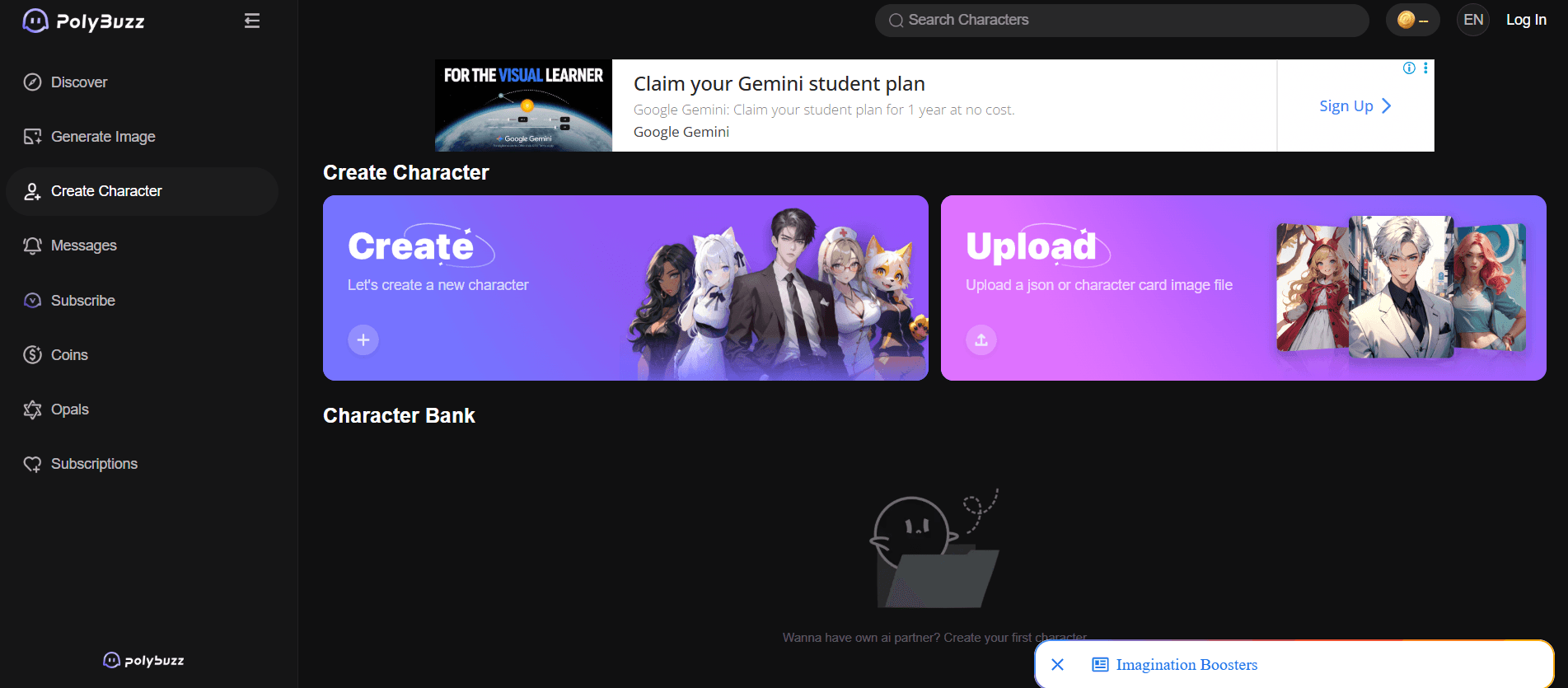
According to the official guide in PolyBuzz Book, the process is divided into four stages. The same stages are also listed on the PolyBuzz Creation Guide page.
- Create an avatar. You can create one with AI or upload your own image.
- Fill in the character profile. From name, gender, intro, and greeting to background.
- Set the voice. Choose from the voice library or mix your own.
- Test through chat. If the result does not yet fit, adjust the character information again until it does.
For those who already have characters from other platforms, PolyBuzz also provides an import option via JSON file or character card. The PolyBuzz page mentions Character.AI, Pygmalion, Zoltanai, TavernAI, and Chub as supported sources.
Also Read: BIS Reveals New Potential of XRP Ledger for Digital Financial Systems
Creating a Character Avatar
The avatar is the first impression users see. The first route is an AI-generated avatar:
- Upload a reference image (optional) so the AI better understands the look you want.
- Write a character description, covering physical features, clothing, accessories, mood, and pose. If you run out of ideas, the "optimize" button will generate a draft description at random.
- Choose up to three styles from the 18 available image styles.
- Choose one of the six generated avatars.
PolyBuzz Book states that AI-generated avatars get greater exposure on the platform. The second route is uploading your own image, which can be cropped for a profile photo, chat background, and cover. All uploaded images pass through a moderation filter.
Also Read: Popular Tokenized Stocks 2026: Technology Shares Become Investors' Favorite
Filling In the Character Profile
The profile determines how users interact with the character and the direction of the chat.
Required:
- Name. A name that carries more information is more interesting, for example "Scott---mafia" rather than just "Scott".
- Gender. The character's gender identity.
- Intro. A summary of the character's most interesting traits, such as profession, personality, or experience.
- Greeting. The character's opening line. Ideally it includes the character's relationship with the user, the situation at the time, and their first line.
- Permission. Choose Public so the character appears on the homepage and in search results, or Private so only you can chat with it.
Optional:
- Tag. Up to five tags so the character is easy to find.
- Background. Background such as family, important events, hobbies, weaknesses, and beliefs. The more detailed it is, the more unique the character.
- Dialogue Style. Language style, tone of voice, and signature words, complete with example dialogue.
Also Read: 10+ Best AI Coins 2026: Here Is the List of Artificial Intelligence-Themed Crypto!
Tips for Writing Greeting and Dialogue Style
Some technical tricks from PolyBuzz Book are worth trying:
- Use the {char} variable for the character's name and {user} for the user's name, so the text remains correct even if the name changes.
- Surround narration with asterisks (*) to make it appear italicized. The system will only read dialogue in the character's voice, not the narration.
- Leave a blank line between paragraphs to make it easier to read.
- Add example dialogue so the AI imitates the character's speaking style more accurately.
Example of a simple greeting:
Nyi Sekar lights the oil lamp, then turns toward {user}. Nyi Sekar: This museum is already closed, but you may come with me. There is a story that has not been finished.
Also Read: Legal Crypto Apps in Indonesia 2026: How to Check OJK-Licensed Platforms
Choose or Craft a Voice
Voice makes a character feel alive. You can choose one voice from the library or blend up to five tones, then adjust the ratio of each tone according to the character's age, personality, and situation.
One thing to remember: pornographic content, violence, or other prohibited content is forbidden. According to PolyBuzz Book, violations will cause the character to be hidden or deleted.
Conclusion
Creating a character on PolyBuzz is basically about four things: an attractive avatar, a clear profile, a suitable voice, and chat testing. Fill in the required fields first, then add background and example dialogue to make the character feel more alive.
Check the prices of Bitcoin (BTC), Ethereum (ETH), XRP, Solana (SOL), GRAM, and BNB, as well as leading memecoin DOGE. You can trade directly on Bittime!

Bittime is a licensed Digital Financial Asset Trader (PAKD) platform supervised by the Financial Services Authority — where you can buy Bitcoin in Indonesia and hundreds of other crypto assets starting from IDR 10,000. The registration process is fast, secure, and can be started today.
Monitor the conversion USDT to IDR and the price movements of your favorite crypto assets in real time. Everything is available in one crypto investment app that can be downloaded for free on the Play Store.
Ready to start? Register now on Bittime and execute your investment strategy with a platform trusted by millions of users in Indonesia.
FAQ
What fields are required when creating a character on PolyBuzz?
Name, gender, intro, greeting, and permission. Tag, background, and dialogue style fields are optional.
What is the difference between Public and Private in character permission?
A Public character appears on the homepage and in search results, while a Private character can only be talked to by its creator.
Can I import a character from another platform?
Yes, via a JSON file or character card. Supported platforms include Character.AI, Pygmalion, Zoltanai, TavernAI, and Chub.
What happens if a character violates the content rules?
The character will be hidden or deleted by the system. These rules prohibit pornographic content, violence, and other prohibited content.
Disclaimer: The views expressed belong exclusively to the author and do not reflect the views of this platform. This platform and its affiliates disclaim any responsibility for the accuracy or suitability of the information provided. It is for informational purposes only and not intended as financial or investment advice.

.png)