Prompt and How to Edit Photos into Giant Statues in Gemini AI
2025-09-18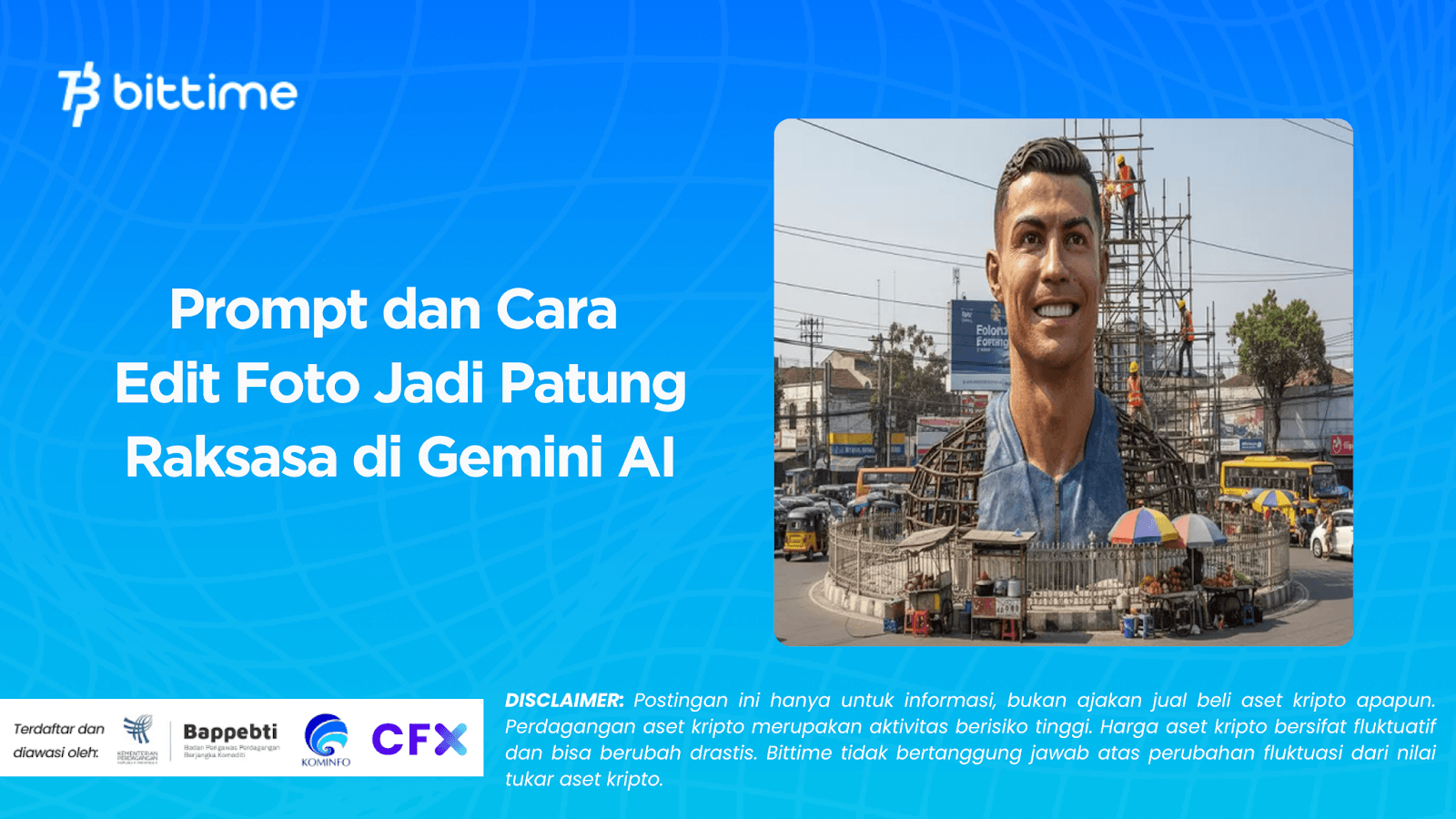
The trend of editing photos with artificial intelligence (AI) is currently trending on social media. One of the most viral features is theGemini AIwhich is able to transform ordinary photos into detailed and hyper-realistic visuals of giant statues, as if they were actually being built in the middle of the city.
This phenomenon isn't just a unique filter, but a work of digital art that combines imagination and advanced technology. Learn how to turn a photo into a giant statue in Gemini AI and the prompts you can use!
Edit Photos in Gemini AI
Gemini AI, a technology developed by Google, now holds a leading position in the realm of AI creativity. Gemini AI serves not only as a smart assistant but also as a creative partner for millions of users worldwide.
With the giant statue photo editing feature, users can see their own portrait standing majestically like a public monument under construction, complete with scaffolding, construction workers, and a busy city scene.
This phenomenon gives rise to a sense of amazement and curiosity, how can a simple photo be transformed into such a detailed digital masterpiece?
The secret lies in the prompts, or text commands, given to Gemini AI. These prompts are like the master formula for producing visual results that match your imagination.
Read Also: Roblox Untitled Boxing Game Codes September: Claim Your Prize
Prompt for Editing Giant Statues Photos
Many technology and digital art enthusiasts in Indonesia have begun experimenting with this feature. They use secret prompts to instruct Gemini AI to create hyper-realistic sculptures from personal photos.
Here are the prompts you can use:
“Photo is me, Using the uploaded photo as a reference, create a hyper-realistic scene of a giant 1/7 scale figurine designed as a monumental public artwork. The figurine shows only half of its body completed in a realistic finish resembling the character from the reference photo, while the other half remains an exposed construction framework made of steel and bamboo scaffolding. Workers can be seen climbing, assembling, and finishing the construction on the skeletal side. The figurine is placed at the center of a modern city roundabout, surrounded by skyscrapers, traffic, and pedestrians.”
This prompt will transform your photo into a giant statue that appears to be under construction in the middle of a modern city, complete with workers, scaffolding, and street life.
With the right guidance, anyone can create a giant-scale representation of themselves in the middle of a modern city.
Read Also: 4 Meme Coins with the Highest Market Caps Right Now: DOGE, SHIB, PEPE, PENGU
How to Edit Photos in Gemini AI
For those of you curious, here are the easy steps to turn a photo into a giant statue in Gemini AI. No graphic design skills required; just follow these instructions:
1. Access Gemini AI
Open a browser like Google Chrome on your phone or computer, then type "Gemini AI" in the search bar. Go to the official website or use the Gemini app if it's available on your device.your device.
2. Upload Reference Photo
After logging into the Gemini AI UI, click the plus (+) icon, then select and upload the photo you want to edit. A full-length photo usually produces the best results.

3. Enter the Prompt
Enter the complete text prompt or command above into Gemini AI's prompt field. This prompt will serve as the primary instruction for optimal results.
4. Experiment with Cities and Other Details
You can also add specific details, such as city names, famous landmarks, and even nearby activities. The more detailed your prompt, the better.realisticthe results.
5. Create a Cinematic Video Version
Some creators even combined Gemini AI's image processing with other editing tools to create 360° videos that showcase the giant statue in a cinematic way.
Read Also: The 7 Richest Crypto CEOs in the World 2025: Profiles and Net Worth
Conclusion
Feature Edit photos into giant statues in Gemini AInot just a passing trend, but proof of how AI is bringing humans closer to the world of digital art.
With the right prompt, anyone can create hyper-realistic works that look like public monuments under construction.
This trend opens up new opportunities for content creators, digital artists, and even ordinary users who want to express themselves uniquely on social media.
Read Also: Meteora ($MET) Airdrop for Jupiter ($JUP) Stakers, Here Are the Details!
How to Buy Crypto on Bittime
Want to trade sell and buy Bitcoins and easy crypto investing? Bittime is here to help! As an Indonesian crypto exchange officially registered with Bappebti, Bittime ensures every transaction is secure and fast.
Start by registering and verifying your identity, then make a minimum deposit of IDR 10,000. After that, you can immediately purchase your favorite digital assets!
Check the course BTC to IDR, ETH to IDR, SOL to IDR and other crypto assets to find out today's crypto market trends in real-time on Bittime.
Additionally, visit Bittime Blog to get various interesting updates and educational information about the world of crypto. Find trusted articles on Web3, blockchain technology, and digital asset investment tips designed to enrich your crypto knowledge.
FAQ
Is Gemini AI paid?
Gemini AI has both free and paid versions. Advanced features may require a premium subscription.
Can the edited photos be downloaded?
Yes, once the process is complete, the resulting image can be downloaded to your device.
Do you need graphic design skills?
No. Just upload a photo and enter the prompts as instructed, and the AI will process it.
Can the giant statue be made into a video?
Yes, with the help of additional applications to create animations or 360° videos based on AI images.
Does the prompt have to be in English?
It's recommended, as Gemini AI understands English instructions better. However, you can experiment with other languages.
Disclaimer: The views expressed belong exclusively to the author and do not reflect the views of this platform. This platform and its affiliates disclaim any responsibility for the accuracy or suitability of the information provided. It is for informational purposes only and not intended as financial or investment advice.

.png)