How to Download and Setup TrustWallet on PC, Hassle-Free!
2025-03-25
Bittime - TrustWallet is one of the most popular crypto wallets in the world. Many people are looking for how to download and setup TrustWallet on PC for wider access convenience. So, you can check the tutorial in this article!
Although originally designed for mobile devices, TrustWallet can now also be used on computers through a variety of methods. This article will discuss how to download and setup TrustWallet on PC using several methods. Keep following, OK?

What is TrustWallet?
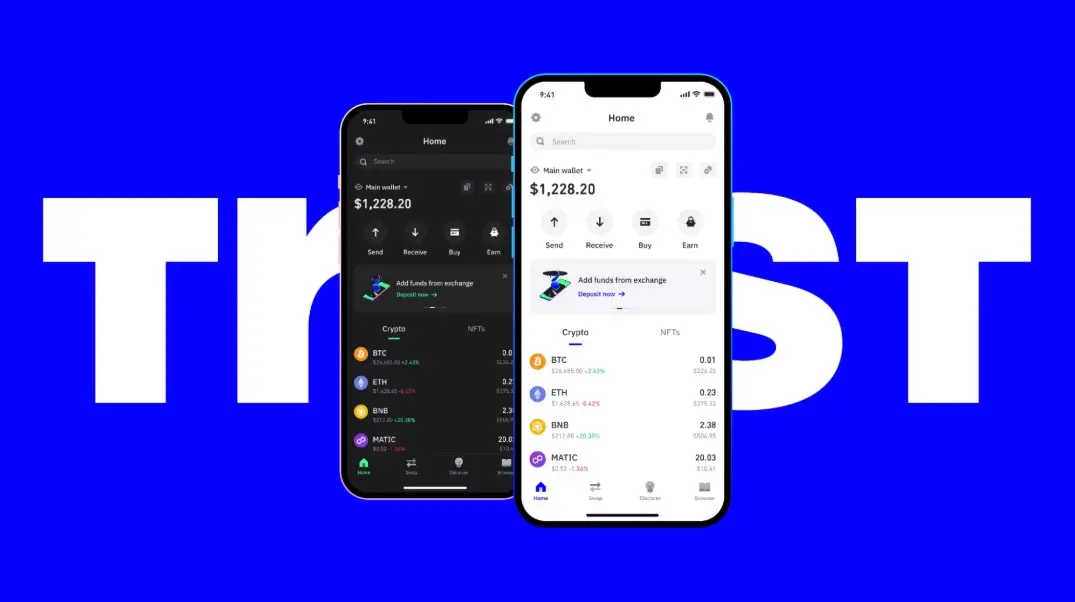
Source: TrustWallet
TrustWallet is a non-custodial crypto wallet. This crypto wallet allows users to store, send, receive and exchange various crypto assets and NFTs.
As the official wallet of Binance, TrustWallet supports more than 70 blockchains and 9 million digital assets. In addition, TrustWallet is also integrated with decentralized applications (DApps), making it easier for users to interact with various crypto platforms safely and comfortably.
Read also: 4 Best Physical Crypto Wallets for Safely Storing Coins
Is TrustWallet Available on PC?
At the moment, TrustWallet can be used on PC via the official browser extension compatible with Google Chrome, Brave, Opera, and Microsoft Edge.
This is the official and safest way to access TrustWallet on a computer. Additionally, there are alternative methods such as WalletConnect and Android emulators that can be used, although they have higher security risks.

Tutorial on How to Download and Setup TrustWallet on PC
After knowing the meaning of this crypto wallet, you must be curious about the tutorial for downloading and setting up TrustWallet on a PC? Well, bHere are three methods you can use to access TrustWallet on PC:
1. Cara Setup TrustWallet Browser Extension
Step 1: Download and Install the TrustWallet Extension
Go to the official TrustWallet site or go directly to the Chrome Web Store.
Search for "TrustWallet" and click the button Add to Browser.
Confirm by selecting Add Extensions.
Once installed, the TrustWallet icon will appear in your browser extension bar.
Step 2: Create or Import a Wallet
If you don't have TrustWallet, select it Create a New Wallet.
Set a strong password.
Save and recommend Secret Phrase (12 secret words).
Reconfirm the Secret Phrase.
Your wallet is ready to use!
If you already have TrustWallet, select it Impor Wallet.
Enter your Secret Phrase.
Wallet will be available on PC soon.
Step 3: Connect with DApps (Optional)
Visit the DApp site you want to use.
Click Connect Wallet, then select TrustWallet.
Your wallet is now ready to be used for crypto transactions!
Read also: Best Solana and Ethereum Crypto Wallets for Storing Coins in 2025
2. How to Set Up TrustWallet with WalletConnect
This method connects TrustWallet on PC with the TrustWallet mobile application.
Step 1: Open a WalletConnect Supported DApp
Example: Uniswap or PancakeSwap.
Click Connect Wallet and select WalletConnect.
Step 2: Connect with TrustWallet
Open the TrustWallet app on your phone.
Choose Arrangement > WalletConnect > New Connection.
Scan the QR Code that appears on the PC.
Confirm the connection in the TrustWallet app.
The wallet is now connected and ready to be used for transactions.
3. How to Set Up TrustWallet Via Android Emulator (Not Recommended)
This method allows TrustWallet to run on PC using an emulator like Bluestacks. However, this method has security risks.
Step 1: Install Android Emulator
Download and install Bluestacks or another trusted Android emulator.
Step 2: Download TrustWallet
Open Play Store in the emulator.
Search for "TrustWallet" and install the app.
Step 3: Login or Create a New Wallet
Enter the Secret Phrase if you want to import the old wallet.
Or create a new wallet according to the steps explained previously.
Since this method uses third-party software, users should be aware of potential security risks.
Read also: How to Choose a Dogecoin Wallet for Beginners, It's Easy!
Conclusion
TrustWallet can now be used on a PC using various methods. The safest way is through this crypto wallet's official browser extension. WalletConnect is also a practical option for users who want to access TrustWallet without installing an extension.
Meanwhile, using an Android emulator is not recommended because it has the potential to pose security risks. This is a review of how to download and setup TrustWallet on a PC from Bittime. Hopefully it's useful, OK!
FAQ
1. Is TrustWallet only for mobile devices?
No. Now TrustWallet can be used on a PC via a browser extension.
2. Is TrustWallet available for Windows 10?
TrustWallet doesn't have an official desktop app for Windows 10, but it can be accessed via a browser extension or WalletConnect.
3. Can I use TrustWallet on more than one device?
Yes, this crypto wallet can be used on multiple devices as long as you have the Secret Phrase to access it.
How to Buy Crypto on Bittime

Want to trade sell buy Bitcoins and crypto investment easily? Bittime is here to help! As an Indonesian crypto exchange officially registered with Bappebti, Bittime ensures every transaction is safe and fast.
Start with registration and identity verification, then make a minimum deposit of IDR 10,000. After that, you can immediately buy your favorite digital assets!
Check the exchange rate BTC to IDR, ETH to IDR, SOL to IDR and other crypto assets to find out today's crypto market trends in real-time on Bittime.
Also, visit the Bittime Blog for interesting updates and educational information about the crypto world. Find reliable articles about Web3, blockchain technology, and digital asset investment tips designed to enrich your crypto knowledge.
Reference
Coindoo, How to Download and Use Trust Wallet On PC: 3 Methods Explained Step by Step, accessed March 25, 2025.
TrustWallet, TrustWallet Official Website, accessed March 25, 2025.
Author: Y
Disclaimer: The views expressed belong exclusively to the author and do not reflect the views of this platform. This platform and its affiliates disclaim any responsibility for the accuracy or suitability of the information provided. It is for informational purposes only and not intended as financial or investment advice.

.png)


