How to Transfer USDT from Spot to a Bittime Futures Account: A Complete Guide
2026-08-20
Futures trading requires available margin funds in the futures account before users can open a position. For Bittime users, the process of transferring funds from Spot to Futures is now simpler through the Unified Futures Account.
Bittime uses a USDT-Margin format, allowing eligible users to transfer USDT directly from their Spot account to their Unified Futures Account after updating to the latest app version.
No manual upgrade process is required because the Futures account will be updated automatically.
For traders who are just starting to use perpetual futures, understanding how to transfer USDT to futures is important before moving on to selecting leverage, margin mode, and opening a Long or Short position.
This transfer is essentially not a buying or selling transaction, but rather an internal transfer of USDT balance from one account to another to be used as trading collateral.
Key Takeaways
- Transferring USDT from Spot to Futures on Bittime is done through the Transfer feature from the Spot account to the Unified Futures Account.
- Bittime's Unified Futures Account uses USDT as collateral and margin, making the USDT balance the basis for opening positions.
- Once the funds are available, traders still need to pay attention to available margin, maintenance margin, leverage, and liquidation risks before opening perpetual contracts.
What Is a Spot-to-Futures Transfer on Bittime?
A Spot-to-Futures transfer is the process of moving USDT from a Bittime Spot account to the Unified Futures Trading Account.
The transferred funds do not immediately become a trading position, but instead serve as margin for opening and maintaining futures positions.
Bittime explains that the Unified Futures Account is automatically available to eligible users. Users only need to ensure that the app is updated to the latest version, after which they can select USDT from their Spot account and transfer it to the Unified Futures Account.
With this system, users do not need to make a new blockchain deposit to the Futures account. The funds are simply transferred internally within the platform.
Read Also: How to Trade Futures on Bittime for Beginners
How to Transfer USDT to Bittime Futures
To transfer funds to your futures balance, follow these steps:
1. Make Sure the Bittime App Is Up to Date
Update the Bittime app to the latest version before making the transfer. According to the official guide, eligible Futures accounts will automatically use the Unified Futures format after the update.
No manual upgrade is required.
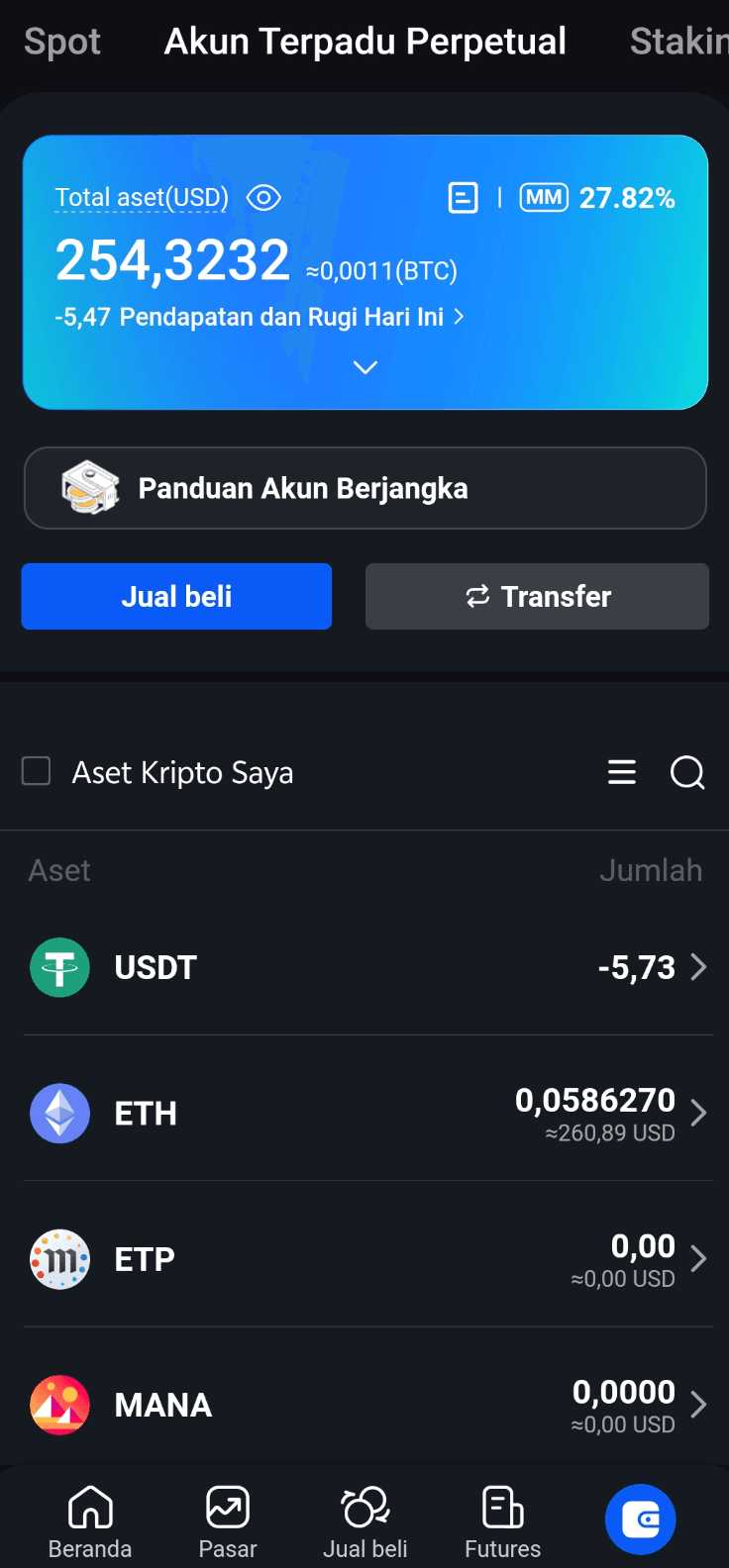
2. Make Sure You Have USDT in Your Spot Account
Before making the transfer, make sure the USDT you want to use is available in your Spot Account.
The amount transferred should be adjusted according to the funds that are actually ready to be used for futures trading. Do not transfer your entire balance simply because it is available, especially if those funds are still needed for Spot transactions or other purposes.
3. Open the Transfer Feature
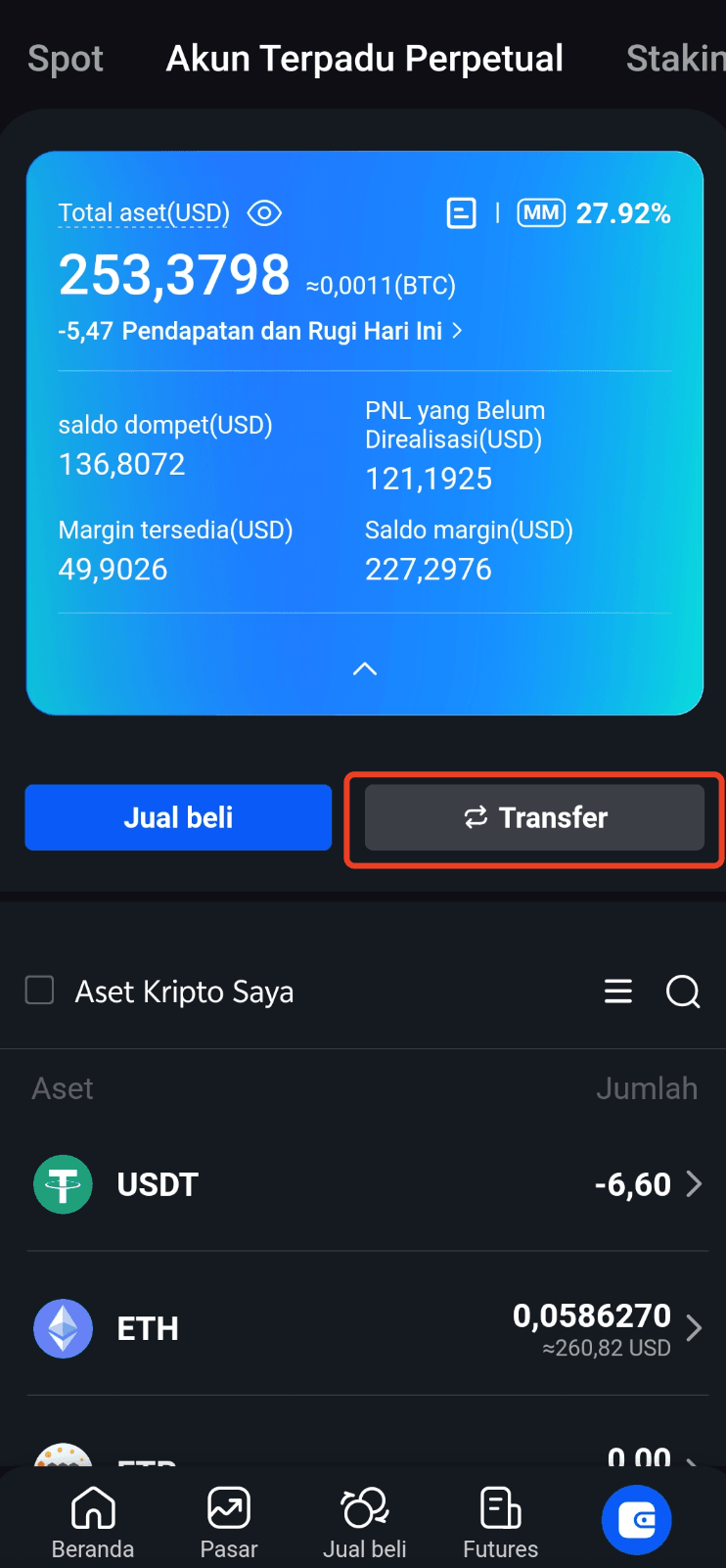
Go to the assets or funds account section in Bittime, then select the Transfer option.
Select the Spot Account as the source of funds and the Unified Futures Account as the destination. From the available assets, select USDT.
Bittime's official guide directly states that users can select USDT from their Spot Account to transfer it to their Unified Futures Account.
4. Enter the USDT Amount
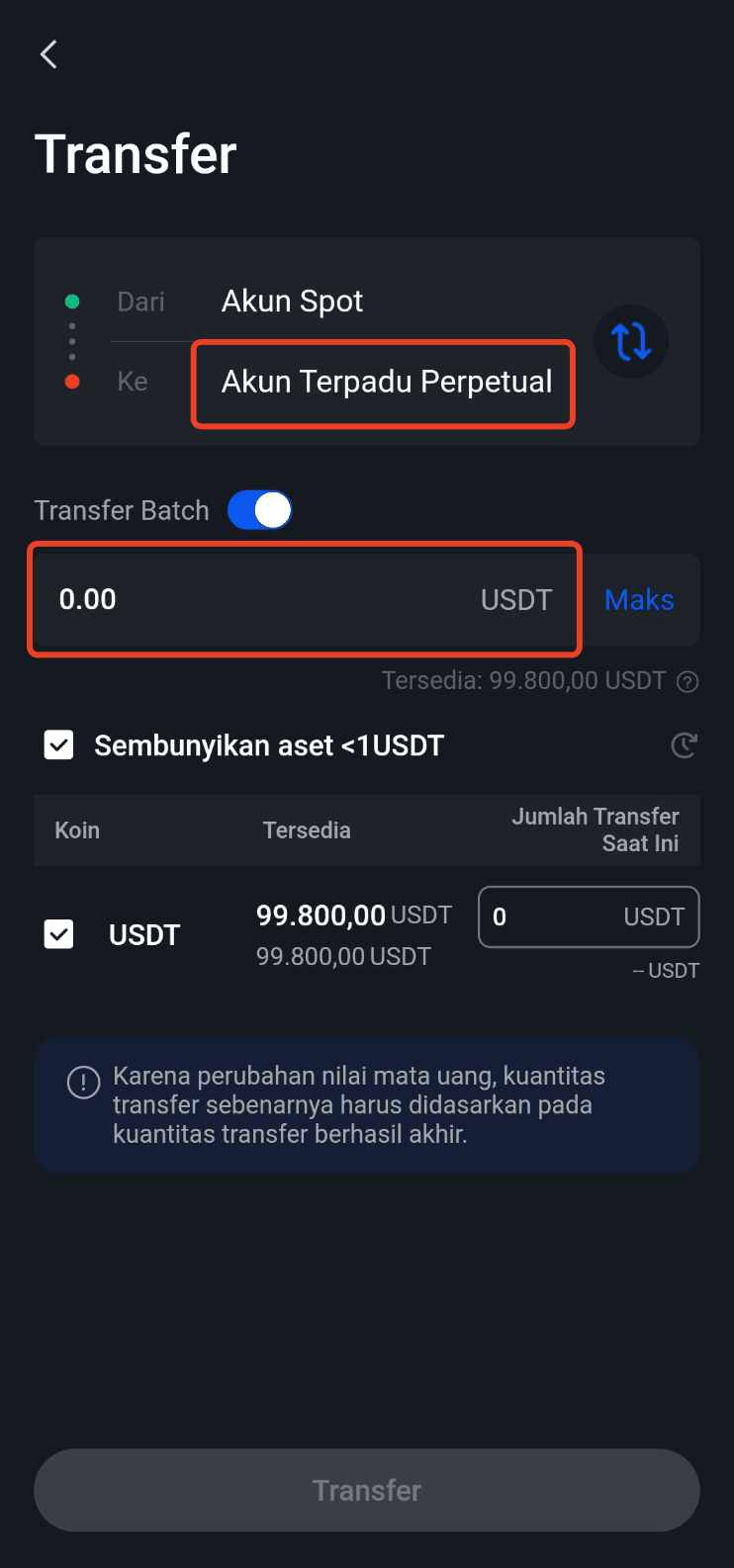
Enter the amount of USDT you want to transfer.
For example, if you have 1,000 USDT available in Spot and only want to use 300 USDT for futures, simply transfer 300 USDT to your Futures account.
After reviewing the details, confirm the transfer until the balance moves to the Unified Futures Account.
5. Check Your Futures Balance
After the transfer is complete, open the Futures assets page to make sure the USDT balance is available.
On this page, Bittime displays several important pieces of information, including:
- Total Assets, which is the total USDT balance in the unified account.
- Available Margin, which is the margin still available for opening positions.
- Initial Margin Ratio (IM), which indicates margin usage.
- Maintenance Margin Ratio (MM), which helps monitor account risk.
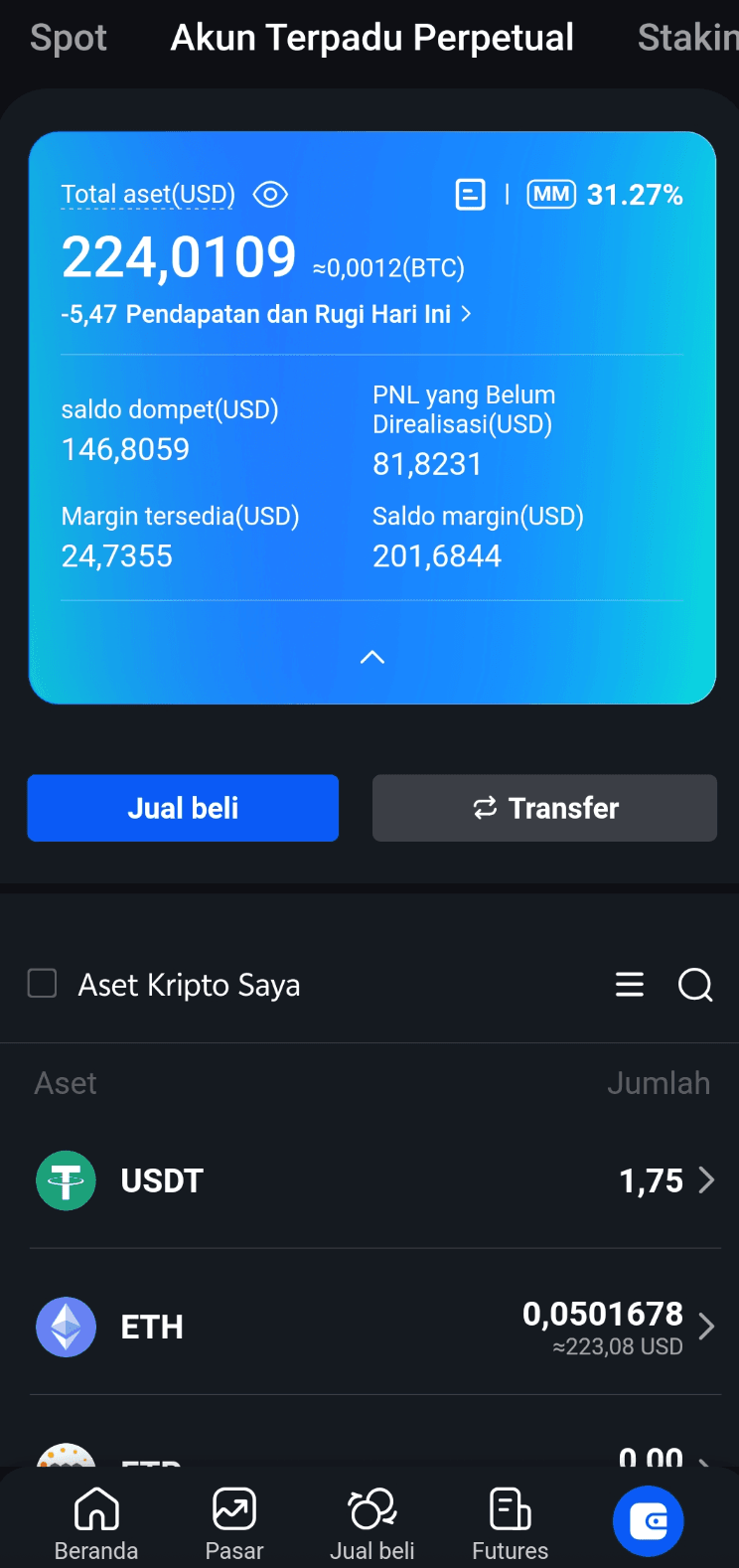
Therefore, a Bittime futures balance should not be evaluated solely based on the amount of USDT transferred. Available Margin also needs to be monitored because its value can be affected by positions and unrealized PnL.
Learn about the risks before you start trading. Sign up on Bittime and use futures strategies with PnL calculations and disciplined capital management.
How to Prepare Futures Margin Before Trading
After transferring funds to a Bittime futures account, users need to determine how much margin will be used for a position.
Margin is the collateral used to maintain a futures position. Bittime supports Cross Margin and Isolated Margin modes, each with different risk characteristics.
With Isolated Margin, the margin is allocated specifically to a particular position, so the risk of that position is more separated from the remaining balance. Meanwhile, Cross Margin uses the assets available in the account to support positions according to the account mechanism.
For beginner traders, understanding the difference between the two is important before determining position size.
Read Also: Margin Usage, IM Ratio, and MM Ratio: How to Read Them
How to Transfer to a Perpetual Account and Start Trading
After USDT enters the Unified Futures Account, users can access the Futures page and select the perpetual contract they want to trade.
For example, users can select a pair such as BTC/USDT Perpetual. After selecting the pair, traders can determine:
- Long, if they expect the price to rise.
- Short, if they expect the price to fall.
- The leverage used.
- The margin amount.
- Stop Loss and Take Profit.
Bittime explains that funds transferred to the Futures account are used as margin, while leverage determines how large a position can be opened compared with the available margin.

How Much USDT Should Be Transferred?
There is no universal amount for how to prepare futures margin. The amount of funds should be adjusted according to each trader's risk tolerance and strategy.
For example, a trader has 1,000 USDT in Spot but only wants to take limited exposure in futures. Instead of transferring the entire balance, the trader can transfer only part of the funds to maintain a reserve in the Spot account.
This approach also helps limit the amount of capital that could potentially be affected when a position experiences a significant loss.
Bittime itself emphasizes in its futures guide that traders should only transfer funds they are prepared to risk because futures carry higher risks than spot trading.
Read Also: Cross Margin vs Isolated Margin in Bittime Futures
What Should You Pay Attention to After the Transfer?
Transferring USDT to futures does not mean that a position is automatically opened. The main risk only arises when those funds are used as margin for a perpetual contract.
Leverage can amplify both potential profits and losses. If margin conditions deteriorate to a certain threshold, the position may be liquidated. In the Unified Futures Account, Bittime explains that an account is at risk of liquidation when the Maintenance Margin Ratio reaches 100%.
Traders also need to pay attention to the funding rate, which is a periodic payment mechanism between Long and Short positions. Bittime explains that funding for USDT perpetual contracts is conducted periodically every eight hours.
Therefore, understanding how to transfer to a perpetual account should be viewed as the first step, not the end, of risk management.
Tips for Safer Spot-to-Futures Transfers
Before transferring USDT from Spot to Futures, several simple habits can help:
- Make sure the Bittime app is updated.
- Double-check the transfer source and destination before confirming.
- Transfer only funds that are actually ready to be used for futures.
- Check the Available Margin after the transfer.
- Use leverage according to your ability to tolerate risk.
- Set a Stop Loss before opening a position if your strategy requires it.
Equally important, do not consider a futures balance to be risk-free funds simply because the funds are held on an exchange. Once they are used as margin, their value can change along with the movement of the position.
Start trading USDT/IDR with Bittime here!
Conclusion
Transferring USDT to futures on Bittime is generally quite simple. Users only need to make sure the app is up to date, have USDT in their Spot account, select the Transfer feature, choose USDT as the asset, and then move it to the Unified Futures Account.
Once the funds arrive, users can use them as margin for perpetual trading. However, understanding the mechanisms of margin, leverage, funding rates, and potential liquidation remains important before opening a position.
By properly understanding spot-to-futures transfers, traders can prepare their capital in a more structured manner and avoid mistakenly considering a fund transfer as a trading transaction itself.

Ready to trade with two-way opportunities? Try Bittime Futures and start trading crypto derivatives directly from the Bittime app
Bittime is a licensed Digital Financial Asset Trader (PAKD) platform authorized and supervised by the Financial Services Authority (OJK) — where you can buy Bitcoin in Indonesia and hundreds of other crypto assets starting from IDR 10,000. The registration process is fast, secure, and can be started today.
Monitor USDT to IDR conversion and the price movements of your favorite crypto assets in real time. Everything is available in one crypto investment app that can be downloaded for free from the Play Store.
Ready to get started? Register on Bittime now and execute your investment strategy with a platform trusted by millions of users in Indonesia.
FAQ
How do you transfer USDT from Spot to Bittime Futures?
Open the Transfer feature, select USDT from the Spot Account as the source of funds, then select the Unified Futures Account as the destination. Enter the amount and confirm the transfer.
Is a manual upgrade of the Bittime Futures account required?
No. Bittime states that the Unified Futures Account has been automatically upgraded for eligible users, as long as the app is using the latest version.
What is USDT transferred to the Futures account used for?
USDT is used as margin or collateral to open and maintain futures positions.
Does all USDT balance need to be transferred to Futures?
No. Users can determine the amount of USDT they want to transfer according to their respective strategies and risk limits.
What does Available Margin mean in Bittime Futures?
Available Margin is the USDT that remains available for use as margin after accounting for factors such as used margin and unrealized PnL.
Does transferring USDT to Futures immediately open a position?
No. The transfer only moves funds to the Futures account. Users still need to select a contract, determine the margin and leverage, and then submit an order to open a position.
Disclaimer: The views expressed belong exclusively to the author and do not reflect the views of this platform. This platform and its affiliates disclaim any responsibility for the accuracy or suitability of the information provided. It is for informational purposes only and not intended as financial or investment advice.

.png)