BlockDAG Coin Listing Soon: Guide to Setting Up BlockDAG on Trust Wallet
2026-03-11
BlockDAG (BDAG) has been gaining attention in the crypto community as the project prepares for potential listings on several major cryptocurrency exchanges after its presale phase. Early buyers who participated in the presale are now preparing to claim their tokens once the network becomes accessible.
For users who purchased BDAG during the presale using Trust Wallet, claiming tokens typically requires connecting the wallet to the BlockDAG network by adding a new RPC configuration. By adding this network manually, users can turn their wallet into a blockdag wallet that connects directly to the BlockDAG mainnet and allows them to view or manage their tokens.
This article explains the basics of blockdag coin, how the wallet works, and provides a clear step-by-step guide to setting up BlockDAG in Trust Wallet based on the official network documentation.
Key Takeaways
- BlockDAG coin is expected to be listed on several crypto exchanges following its presale phase.
- Early buyers can access their tokens through a blockdag wallet by connecting Trust Wallet to the BlockDAG network.
- The panduan setup BlockDAG di TrustWallet involves adding a custom network and entering the BlockDAG RPC details.
Understanding BlockDAG Coin and Its Technology
Before learning cara menambah blockdag ke trust wallet, it is important to understand what makes this project different from traditional blockchain networks.
BlockDAG stands for Directed Acyclic Graph, a network structure that processes transactions in parallel rather than sequentially. Traditional blockchains typically add transactions in a linear chain of blocks, which can sometimes slow down network performance.
With a DAG-based architecture, BlockDAG aims to improve:
- Transaction speed
- Network scalability
- Processing efficiency
Within this ecosystem, blockdag coin (BDAG) functions as the native token used for transaction fees, transfers, and other activities within the network.
As interest in the project grows, many users are looking for reliable ways to access the network through a compatible blockdag wallet.
What Is a BlockDAG Wallet and Why It Matters
A blockdag wallet is a crypto wallet configured to interact with the BlockDAG network. Like other crypto wallets, it allows users to manage digital assets securely.
In general, a wallet provides several key functions:
- Secure storage of digital assets
- Sending and receiving tokens
- Connecting users to blockchain or DAG-based networks
Trust Wallet is one of the most widely used wallets in the crypto ecosystem because it supports multiple networks and allows users to manually add new networks through a feature called Custom Network.
Understanding cara setup wallet is essential for users who want to connect Trust Wallet to the BlockDAG mainnet and manage their BDAG tokens.
Step-by-Step Guide: How to Add BlockDAG to Trust Wallet
Below is the panduan setup BlockDAG di TrustWallet based on the official setup instructions for connecting to the BlockDAG network.
Step 1 – Open the Trust Wallet Web Extension
Start by opening the Trust Wallet Web Extension in your browser. Make sure the wallet is already installed and that you are logged in.
If you do not yet have a wallet, create a new one and safely store your seed phrase, as it is essential for wallet recovery.
Step 2 – Go to Settings → Custom Networks
Once inside Trust Wallet, open the Settings menu.
From the settings page, select Custom Networks. This section allows users to add networks that are not included by default in the wallet.
Step 3 – Select Custom Network
Inside the Custom Networks section, choose Custom Network.
This feature allows users to manually connect their wallet to a new blockchain or DAG network by entering specific configuration details.
Step 4 – Click “Add Custom Network”
Next, click Add Custom Network.
A form will appear where users can enter the necessary network information to connect Trust Wallet to the BlockDAG mainnet.
Step 5 – Enter the BlockDAG Network Details
Fill in the BlockDAG network information provided in the official documentation. These fields typically include:
- Network Name: BlockDAG
- RPC URL: BlockDAG network RPC
- Chain ID: Network identifier
- Symbol: BDAG
- Block Explorer URL: Network explorer link
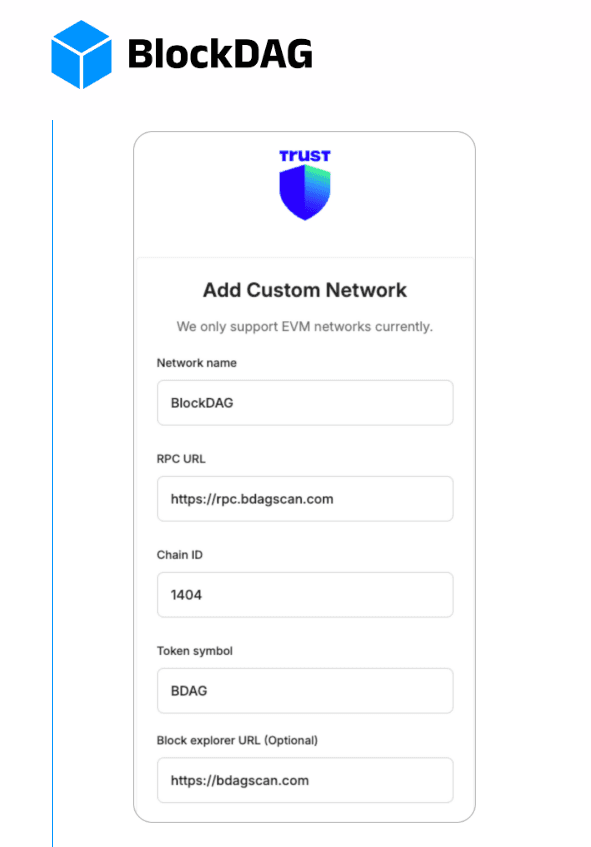
These details allow the wallet to recognize and connect to the BlockDAG network.
Step 6 – Tap Save
After entering all required details, click Save.
Once saved successfully, the BlockDAG network should appear in your wallet’s network list. At this point, your blockdag wallet is connected to the BlockDAG network and ready to interact with BDAG tokens.
Conclusion
BlockDAG coin has attracted increasing interest as the project moves closer to potential listings on major cryptocurrency exchanges. For early presale participants, connecting their wallet to the network is an important step in accessing and managing their tokens.
By following this panduan setup BlockDAG di TrustWallet, users can easily connect Trust Wallet to the BlockDAG mainnet by adding the RPC network manually through the Custom Network feature.
Although the setup process requires a few manual steps, it is relatively simple and allows users to turn their wallet into a fully functional blockdag wallet ready to manage BDAG tokens once the network becomes active.
FAQ
1. What is BlockDAG coin?
BlockDAG coin (BDAG) is a cryptocurrency that runs on a Directed Acyclic Graph (DAG) network designed to improve scalability and transaction speed.
2. Why do I need to add the BlockDAG network to Trust Wallet?
Because BlockDAG is not included by default, users must add the network manually using RPC settings.
3. How do I set up a BlockDAG wallet?
You can set up a wallet by opening Trust Wallet, navigating to Settings, selecting Custom Networks, and entering the BlockDAG network details.
4. Can Trust Wallet store BDAG tokens?
Yes, once the BlockDAG network is added manually, Trust Wallet can function as a blockdag wallet to store BDAG tokens.
5. When will BlockDAG be available for trading?
BDAG is expected to become available for trading after its presale phase and when the project begins listing on cryptocurrency exchanges.
How to Buy Crypto on Bittime?
Want to trade sell buy Bitcoins and crypto investment easily? Bittime is here to help! As an Indonesian crypto exchange officially registered with Bappebti, Bittime ensures every transaction is safe and fast.
Start with registration and identity verification, then make a minimum deposit of IDR 10,000. After that, you can immediately buy your favorite digital assets!
Check the exchange rate BTC to IDR, ETH to IDR, SOL to IDR and other crypto assets to find out today's crypto market trends in real-time on Bittime.
Also, visit the Bittime Blog for interesting updates and educational information about the crypto world. Find reliable articles about Web3, blockchain technology, and digital asset investment tips designed to enrich your crypto knowledge.
Disclaimer: The views expressed belong exclusively to the author and do not reflect the views of this platform. This platform and its affiliates disclaim any responsibility for the accuracy or suitability of the information provided. It is for informational purposes only and not intended as financial or investment advice.

.png)


