How to Withdraw Blast to Rupiah: A Guide Before Closing
2026-10-14
Understanding how to withdraw from Blast is important if you still hold assets on the network ahead of its shutdown. To cash out into rupiah, you need to withdraw supported assets to Ethereum, send them to a compatible exchange, and sell them before withdrawing your IDR balance to a bank account.
The standard withdrawal interface is available until October 26, 2026. Start preparing early so you have time to check your asset types, complete transactions, and resolve issues without rushing.
Key Takeaways
- Withdrawals through the standard interface have a deadline, so you should start the process before the final day.
- Assets on the Blast network and the BLAST token require checks to identify the appropriate withdrawal route.
- Cashing out into rupiah depends on deposit support, market availability, and the destination exchange’s fees.
Why Is Blast Shutting Down?
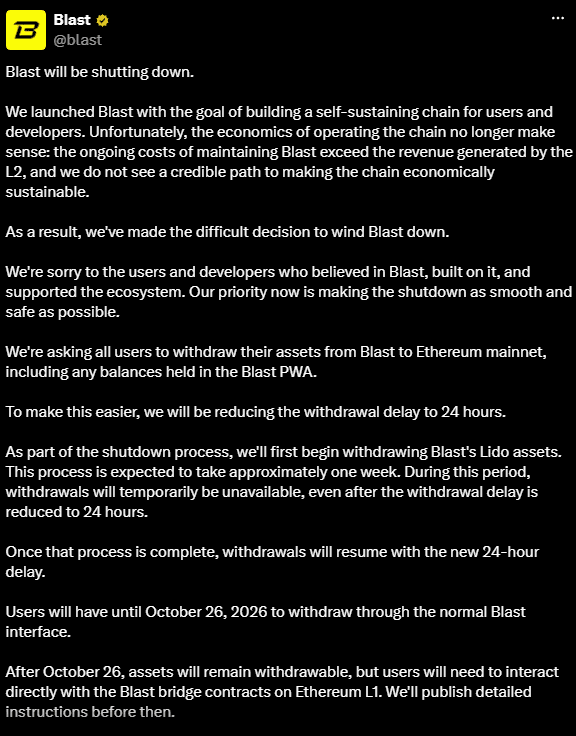
Blast is an Ethereum Layer 2 network that announced it would cease operations because maintenance costs exceed its revenue. The team stated that it had not identified a viable path to making the network economically sustainable.
Users were asked to move assets to Ethereum mainnet, including balances in the Blast web app. The announcement also mentioned a withdrawal pause of approximately one week to complete the withdrawal of assets from Lido.
That estimate does not prove that the service has resumed. Check the latest status before starting a transaction.
Read also: How to Mine Zcash (ZEC) on Zmine: A Complete Guide for 2026
Blast Withdrawal Deadline: What Changes Afterward?
The October 26, 2026 deadline applies to withdrawals through the standard interface. After that date, assets are reportedly still withdrawable by interacting directly with the bridge contracts on Ethereum.
The contract-based route requires greater technical knowledge. Do not run code or use contract addresses from private messages claiming to offer withdrawal assistance.
If your tokens are on an exchange, follow that exchange’s announcements. The platform’s withdrawal schedule may differ from the network’s schedule.
Check Where Your Assets Are Before Withdrawing
The first step is to confirm what you hold and where it is stored. “Blast assets” can refer to balances on the network, positions in applications, or BLAST tokens held on an exchange.
For assets in applications, check whether you need to close positions or withdraw app balances first. For tokens on an exchange, use the procedures of the platform holding them.
Make a short record of each asset’s name, amount, network, and storage location. This helps you identify the required transactions without mixing up balances held in different places.
Do not assume that an asset can be sold simply because it has been transferred successfully. Network support, token support, and trading pair availability are three separate checks.
Read also: How to Buy 1win Token (1WIN): A Guide to the Airdrop and Token Sale
How to Withdraw from Blast to Ethereum
The following steps focus on ETH in a standard wallet such as MetaMask or Rabby. Blast Mobile and smart contract wallet users need to follow the specific guidance for their wallet type.
Prepare ETH for gas on both Blast and Ethereum, and use the same wallet throughout the process.
- Open the official bridge through a verified Blast channel and connect your wallet.
- Select Withdraw, choose ETH, enter the amount, and confirm the transaction while leaving enough ETH for gas.
- Wait until the withdrawal is ready to be proven, which the guide estimates can take up to one hour.
- Switch to Ethereum and complete Prove Withdrawal.
- Wait through the one-day challenge period.
- Open History, select the transaction, and complete Claim Withdrawal.
Other assets have different requirements:
- WETH: must first be unwrapped into ETH.
- USDB: is received as DAI; after finalization, the claim process may take up to one additional day.
- BLAST: may require approval, followed by proving and finalization.
The one-day waiting period therefore does not guarantee the total duration of the entire process.
Read also: How to Buy Quant (QNT) with Rupiah in Indonesia: A Beginner’s Guide
How to Cash Out Withdrawn Assets into Rupiah
1. Make Sure the Exchange Accepts the Asset and Network
Open the destination exchange’s deposit page before sending funds. Match the asset name, receiving network, minimum deposit, and service status.
For example, ETH already on Ethereum requires an ETH deposit destination that accepts the Ethereum network. Do not select a different network simply because the coin name is the same.
For withdrawals received as DAI or BLAST, check support specifically. If the asset is unsupported, do not send it to another token’s deposit address.
2. Send the Asset to the Correct Deposit Address
Copy the address from your own exchange account, then check it again before signing the transaction. Avoid using destination addresses from chat history or old screenshots.
If fees permit, consider a test transfer that meets the minimum deposit requirement. Wait for the balance to be credited before transferring the remainder.
Save the transaction hash so you can track the transfer’s status. If funds have not reached the exchange, check the transaction and its confirmation requirements rather than immediately sending them again.
3. Sell the Asset Through an Available Market
Once your balance is credited, check whether an IDR trading pair is available. Review the selling price, the amount you will receive, and all deductions before confirming the order.
A market order prioritizes execution at available prices, while a limit order gives you control over the price but may not fill immediately. In markets with thin liquidity, pay attention to the spread and order book depth.
If you want to use Bittime, you can sign up for Bittime and complete account verification. Make sure the required asset and network are supported before making a deposit.
4. Withdraw Your Rupiah Balance to a Bank Account
In the Bittime app, open Assets/Wallet, select IDR, then Withdrawal. Add the bank and account number, enter the amount, and complete the required security verification.
Check the recipient details and net amount before submitting the request. Do not share your PIN, email verification code, or authentication code with anyone.
The guide estimates 1 × 24 hours within bank operating days, not a guarantee that funds will arrive at a specific time. Check the withdrawal status and contact official support if processing exceeds the estimate.
Read also: How to Buy XDP on Phantom: A Guide to Buying XDP Doppler on the Base Network
Blast Withdrawal Costs Until Funds Reach Your Bank Account
Calculate costs across the asset’s entire journey, not just the deduction when withdrawing rupiah. The net amount is also affected by the execution price when the asset is sold.
Cost components to check include:
- Transaction gas fees during the network withdrawal.
- Gas fees for the transfer from your wallet to the exchange.
- Additional conversion fees if the asset has no IDR market.
- Trading fees and applicable deductions.
- Fees for sending rupiah to your bank account.
The bank withdrawal fees listed in Bittime’s guide are IDR 2,522 for Mandiri, BRI, and BNI, and IDR 4,500 for several other banks. Compare these figures with the app’s display before treating them as actual fees.
For small balances, multiple transactions can significantly reduce the amount you cash out. Compare the estimated total costs with the asset’s value, then choose a route that is actually supported.
If Your Withdrawal Is Not Yet Complete
Identify which stage has a problem before taking action. An unsigned transaction, a pending blockchain transaction, and an exchange deposit that has not been credited require different responses.
Record the transaction hash, transfer time, asset, network, and error message. Send this information only through official support channels, without including your seed phrase or private key.
Do not approve “wallet verification” requests you do not understand. Withdrawal assistance does not require giving someone else full control over your wallet.
Conclusion
The process for withdrawing from Blast needs to match your asset type and where it is stored. Complete the withdrawal, confirm receipt of the assets, then proceed with selling and cashing out through a platform that supports them.
Before using Bittime, check account eligibility and deposit routes so the next steps meet your needs. Prioritize the net amount received and transaction accuracy, not just speed.

Bittime is a Digital Financial Asset Trader (PAKD) platform licensed and supervised by Indonesia’s Financial Services Authority (OJK), where you can buy Bitcoin in Indonesia and hundreds of other crypto assets starting from IDR 10,000. Registration is quick and secure, and you can get started today.
Track the USDT to IDR conversion rate and your favorite crypto assets’ price movements in real time. Everything is available in one crypto investment app that you can download for free from the Play Store.
Ready to get started? Sign up for Bittime now and execute your investment strategy on a platform trusted by millions of users in Indonesia.
FAQ
What is the Blast withdrawal deadline?
The standard interface is scheduled to remain available until October 26, 2026. Start early to allow time for every withdrawal stage.
How do you withdraw from Blast to Ethereum?
For ETH, the main stages are initiating the withdrawal, proving it, waiting, and claiming. Other assets and certain wallet types involve different steps.
Can assets from Blast be cashed out directly into rupiah?
Not through the bridge alone. The assets must be received by a supporting platform, sold for IDR, and then withdrawn to a bank account.
How much does a Blast withdrawal cost, and how long does it take?
The totals depend on the asset type, gas fees, withdrawal stages, and exchange and bank services. Check the details of each stage before approving transactions.
Can assets still be withdrawn after Blast shuts down?
The announcement states that withdrawals will remain possible through the bridge contracts after the standard interface is discontinued. Use official instructions appropriate to the conditions at that time.
Disclaimer: The views expressed belong exclusively to the author and do not reflect the views of this platform. This platform and its affiliates disclaim any responsibility for the accuracy or suitability of the information provided. It is for informational purposes only and not intended as financial or investment advice.

.png)