How to Prompt Gemini Retro AI Portrait, Make Your Posts Cool on Social Media!
2025-09-15
The retro photography trend is back. The old-school film style, warm colors, and soft shadows create a poetic feel. The good news is, you can create one from a regular selfie using Gemini. It's easy.
Prepare a clear photo, write the right command, and let the AI process it. Let's get straight to the point. You'll learn basic concepts, practical steps, and examples of retro prompts ready to copy and paste.
Everything is written in simple language so that it is quickly understood and can be put into practice immediately.
Read Also: 7 Effective Crypto Trading Methods for Beginners, Complete with Tips and Tricks
Why Retro AI Portrait is So Popular
The retro style combines warm tones, soft textures, and subtle contrasts. The result is nostalgic yet modern. Gemini helped achieve this through prompts that controlled lighting, background, color, and expression.
The original face is preserved, while the atmosphere is created to resemble an analog-era studio portrait. This is perfect for solo photos, two-person photos, or themed shots for professional profiles.
The main strength of retro style lies in light and color. Side lighting casts soft shadows on the walls. Warm tones like golden yellow or light brown create a healthy-looking complexion.
A plain background helps keep the focus on the subject. Small details like a flower in the ear, sheer fabric, or simple jewelry add a touch of elegance.
Another advantage is flexibility. You can choose a glamorous, magazine-style feel, a warm family portrait, or a bold editorial style. All can be arranged through concise but specific prompts.
The clearer the description, the more consistent the results. If you want consistent results across multiple photos, use the same prompt format and then change small details like color or pose.
Practical Steps to Create Retro AI Portraits
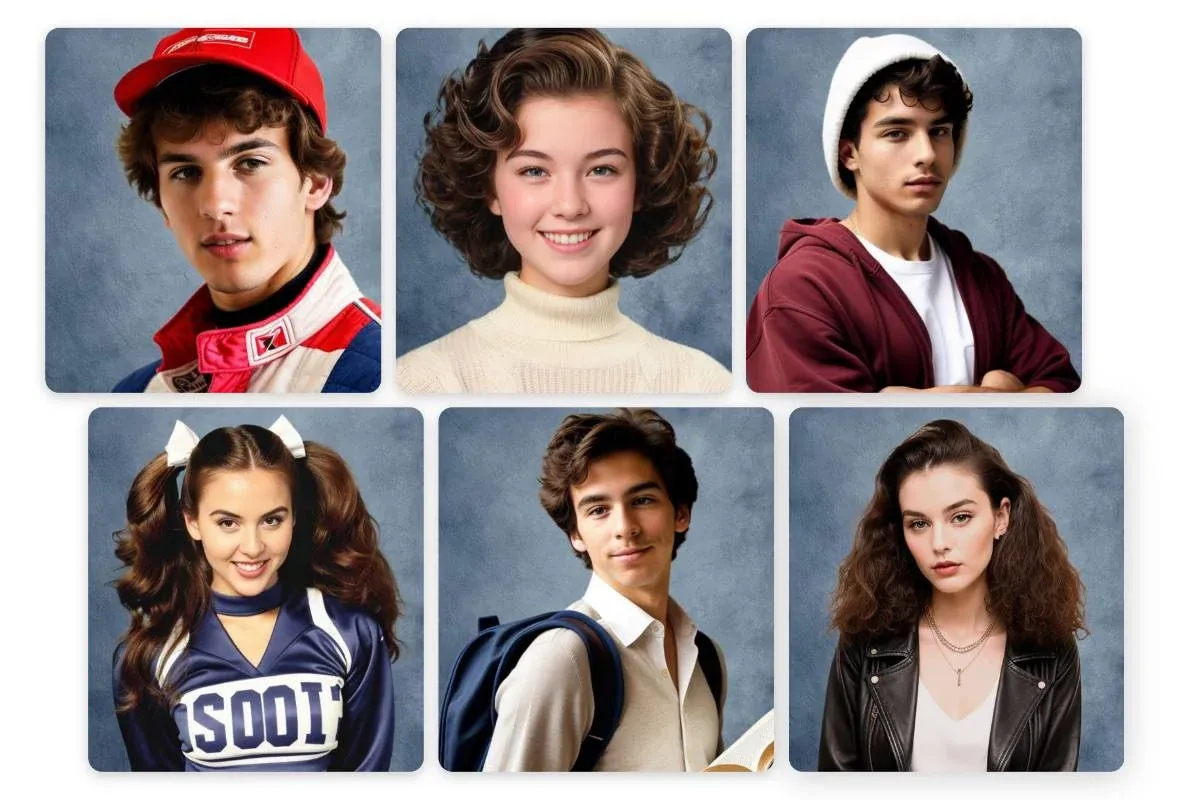
Open the Gemini app or use the web version. Sign in with your Google account to ensure the feature runs smoothly. Prepare a solo photo, or two photos for a couple pose. Make sure your faces are facing the camera and not too dark.
Avoid heavy filters to allow the AI to properly interpret skin and hair details. A clean photo produces more realistic results.
Enter commands with a simple structure. Write the image format, lighting direction, background color, and expression. Use easy-to-understand language.
For example, warm light from the right, a plain cream background, soft shadows on the wall, and a calm sideways gaze. If you want the texture of the fabric to be visible, use a tangible material like cotton or linen.
Before exporting, ensure the results retain the same face. Add a statement to emphasize the identity and save it at high resolution. If the colors are too intense, repeat one iteration by lowering the contrast.
Create a single preset folder for easy reuse. This way, you can create a consistent style for multiple photos.
Ready-to-Use Retro Prompt Examples
- “Realistic retro portrait. Face identical to the uploaded photo. Portrait ratio. Warm, plain background. Soft light from the right casts subtle shadows on the wall. Calm expression, looking slightly to the side. Natural skin texture. Analog film-like tones.”
- “Romantic vintage style. Keep the face natural. A sheer maroon dress or sheer saree. A small flower in the right ear. A warm wall backdrop. A spotlight from the top right. Soft shadows on the profile face and hair. A poetic mood.”
- “Retro editorial. Unchanged face. Black blazer and white shirt. Warm gray background. Soft peripheral lighting. Moderate contrast. Sharp eye focus. Light, film-like grain. Classic and elegant feel.”
- “A retro couple. Two faces identical to the photo. Soft twilight lighting. A plain cream backdrop. Facing each other with faint smiles. Warm colors. Details of the fabric are visible. A nostalgic and intimate atmosphere.”
- “Vintage studio portrait. Same face. Neatly combed hair. White shirt and simple jewelry. Light brown background. Light from the right creates a delicate silhouette. Soft colors. Smooth texture like an old magazine photo.”
Read Also: Understanding Crypto Lending: Interest, Collateral & the Right Way to Borrow
Technical Tips for Stable Results
Use sharp, evenly lit photos. Avoid harsh backlighting that darkens faces. If wearing glasses, angle your head slightly to minimize distracting reflections.
For accurate skin tones, add a neutral white balance and natural skin tone. This helps the AI maintain a realistic skin appearance.
Include only important details. Three to five sentences is sufficient. Too much detail can distort the results. If you want to vary your results, change one parameter per experiment. For example, change the light direction or background color.
This method makes it easier for you to find the right combination without losing style consistency.
Maintain ethics and privacy. Use your own photos or those of someone who has given permission. Save the results to local storage. If posting to social media, you can include a note that the image was generated with AI so your audience understands the context.
This practice is good for transparency as well as building trust.

Conclusion
Creating a Gemini Retro AI Portrait is simple. Focus on warm light, a plain background, and a calm expression. Write a short, clear prompt. Test several times until you find a color and contrast combination you like.
With a neat flow, you can produce elegant retro portraits for profiles, albums, or other creative purposes.
Want to broaden your knowledge about digital assets while enjoying creative trends? Read the latest news at Bittime Blogor start your investment journey in Bittime Exchange.
FAQ
What is Gemini Retro AI Portrait?
Vintage-style portraits created from regular photos using text commands in Gemini.
How to write an effective prompt?
Describe the setting, light direction, color, and expression in simple, clear words.
Will the face change?
You can confirm that you still use the same face so that your identity does not change.
How to adjust skin tone?
Add a natural skin tone and neutral white balance to keep the skin looking realistic.
Do you need a professional camera?
No. A cell phone camera is sufficient. The important thing is that the photo is sharp and the lighting is even.
Disclaimer: The views expressed belong exclusively to the author and do not reflect the views of this platform. This platform and its affiliates disclaim any responsibility for the accuracy or suitability of the information provided. It is for informational purposes only and not intended as financial or investment advice.

.png)