How to Buy Build on Bitcoin (BOB): A Complete Guide for Beginners in Indonesia (2025)
2025-11-26
Bittime - Interested in easily purchasing Build on Bitcoin? Well, at Bittime, you can buy BOB starting from just IDR 10,000. Follow this article for an easy tutorial!
What is BOB?
BOB is a crypto token from Build on Bitcoin. This network is a layer-two blockchain that combines the security of Bitcoin with the programmability of Ethereum to unlock Bitcoin's potential in decentralized finance (DeFi). BOB currently has a market capitalization of around 39.63 million USD.
BOB price is trading around0,01785USD per token, with the last 24 hours trading volume reaching around 52.11 million USD, indicating active liquidity in the market.
Read also: BTC Layer 2 (L2) Network BOB Integrates BTC Connect, Boosting dApp Usage and Chain Abstraction
Why Buy Build on Bitcoin (BOB)?
Here are the main reasons why many Indonesians buy Build on Bitcoin:
Bridging Bitcoin to DeFi & multichain — BOB is designed as a DeFi gateway for Bitcoin (BTC) users, allowing BTC holders to participate in DeFi services such as staking, yield, or cross-chain swaps, without having to wrap BTC into other tokens.
Hybrid-chain & ZK rollups technology + broad interoperability — BOB's hybrid structure combines Bitcoin's security, Ethereum's smart contract flexibility, and ZK-rollups for efficiency and interoperability across 11+ chains, meaning access to cross-ecosystem DeFi is easier and faster.
Tokenomics with fixed supply & some tokens already in circulation — The total supply of BOB is capped at 10 billion tokens, with a circulating supply of around 2.22 billion tokens currently, supply transparency could be a consideration for long-term investors.
The growth potential of the BTC-DeFi (BTCFi) ecosystem — If BOB's adoption as a Bitcoin gateway to DeFi increases, it has the potential to gain significant “utility value” due to its function as a liquidity bridge and BTC integrator to the smart-contract ecosystem.
Read also: BOB Build on Bitcoin price prediction
How to Buy BOB in Indonesia (Step by Step)
Step 1: Choose an Official Platform
Step 2: Account Verification (KYC)
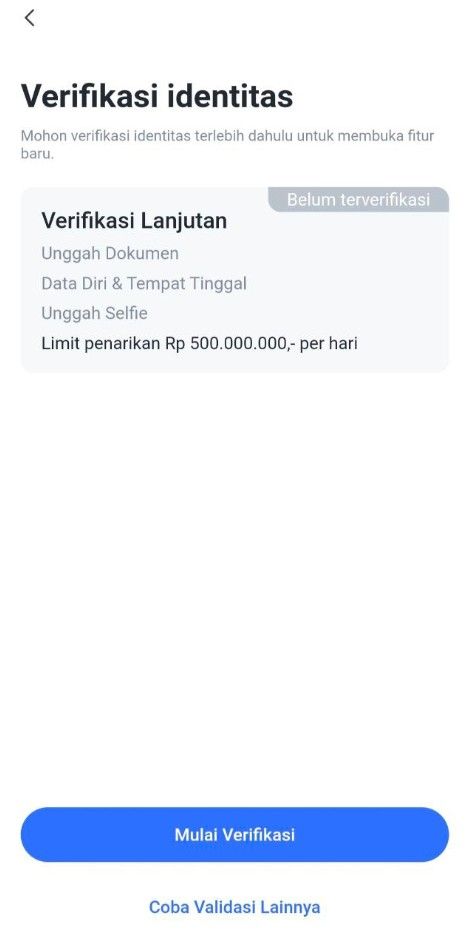
1. Access the Verification Page
Option 1:On the login page, select Step 2: "To KYC Verify".
Option 2:Click the "Me" menu, then select "ID Verification" and click the "Start Verification" button.
2. Verify Phone Number
The system will ask you to verify your phone number first.
Enter your phone number, then follow the instructions to receive an OTP (One-Time Password) code via SMS.
Enter the OTP code into the app to complete phone number verification.
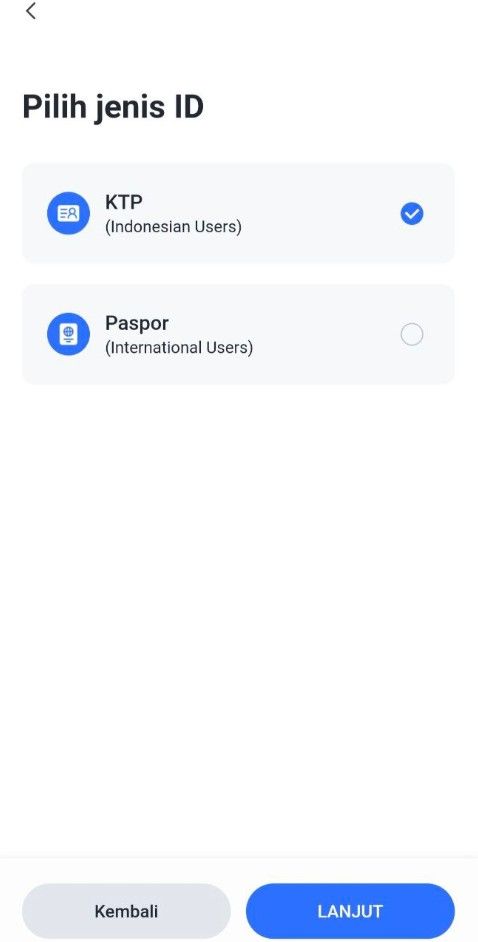
3. Select Identity Type
Select the type of identity document to be used:
KTP (Resident Identity Card) or
Passport / KITAS (For Foreign Citizens Only)
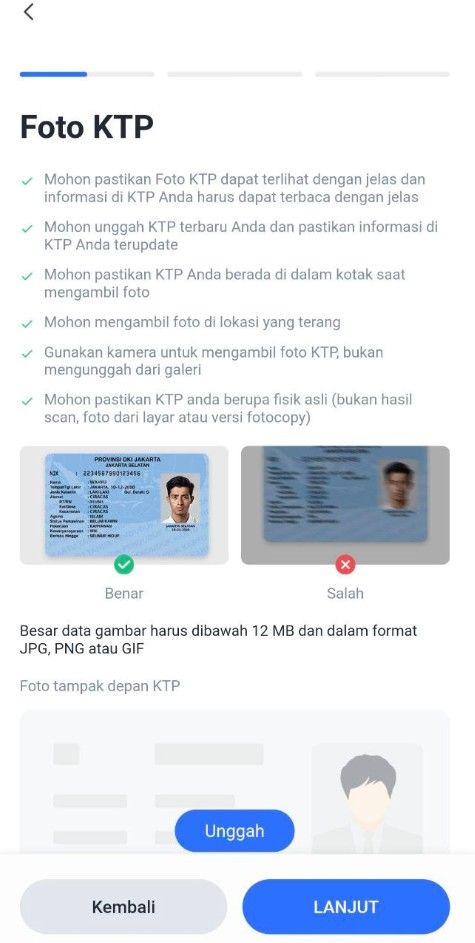
Upload a photo of your identity document:
Make sure the document photo is clear and complete.
There are no cut off or blurry parts.
4. Verify and Edit Personal Data
After the document is uploaded, the system will display your data.
Check and ensure the following data is correct:
Full name
ID card/passport number
Date of birth
Place of birth
Work
If there is any data that is not appropriate, edit it directly on that page.
If the data is correct, click the "Next" button to proceed to the next step.
5. Upload a Selfie Photo
Take a selfie using your device's camera:
Make sure the face is clearly visible.
Do not use accessories such as sunglasses or masks.
Once completed, click the "Submit" button to send your data and documents to the Verification Service.
6. Verification Process
Verification requests will be processed in a queue.
Estimated verification time is 1x24 hours.
You will receive a notification once the process is complete.
Step 3: Deposit Funds
Common payment methods:
Step 4: Buy BOB
You can buy Build on Bitcoin with Rupiah by following this tutorial:
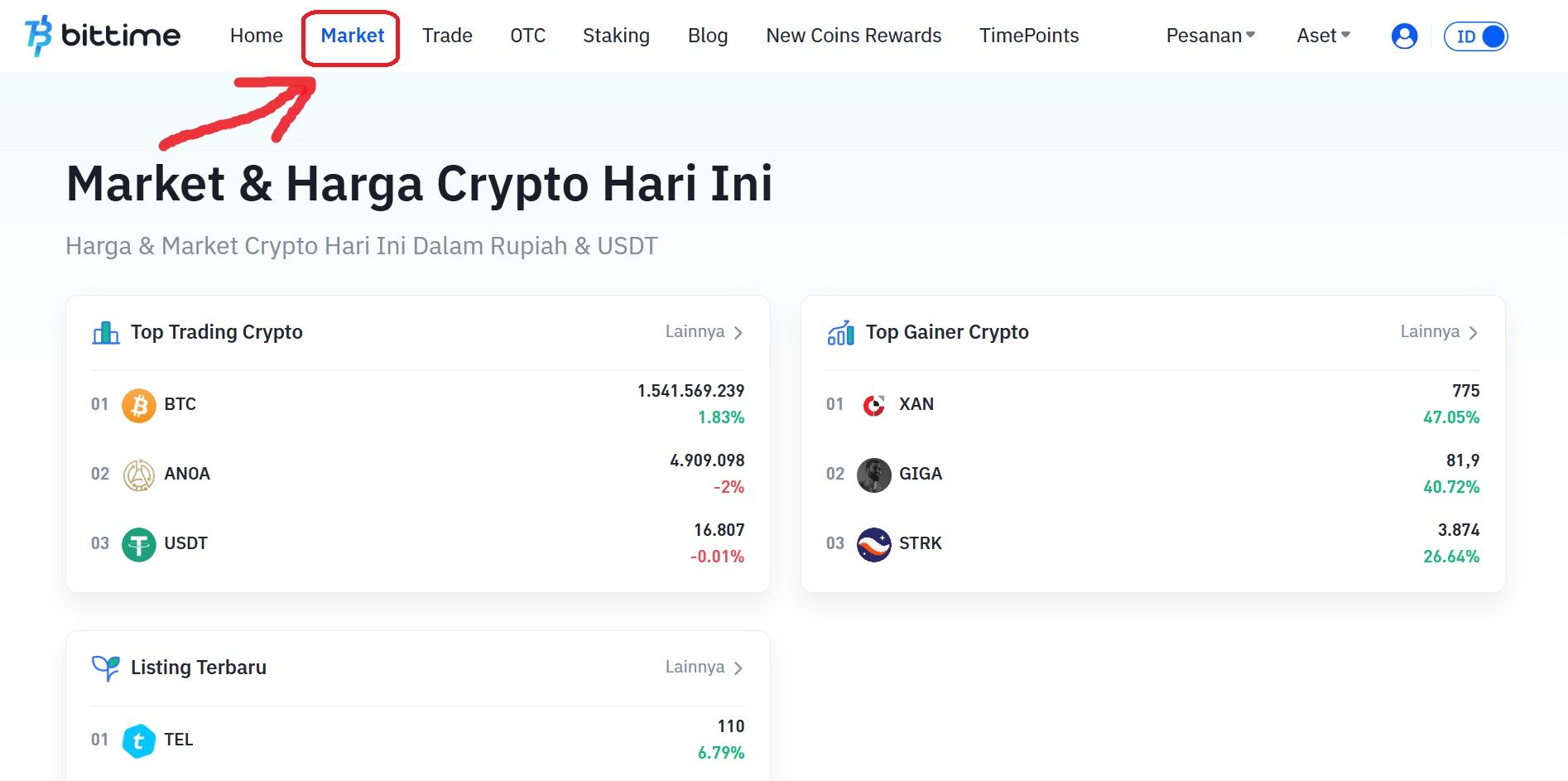
Open your Bittime account.
Select menu Market or click the icon with a graphic image.
Select the currency pair you want to use. Select IDR if you want to buy Build on Bitcoin (BOB) with Rupiah.
Scroll down and click ‘Buy’.
Select the order type you want to use. Limit orders, market orders, and stop orders are available.
Enter the rupiah amount to buy BOB. The minimum purchase of crypto assets on Bittime is IDR 10,000.
Click the 'Buy BOB' button.
A pop-up notification will appear. Read it carefully and click 'Confirm'.
Enter the six-digit Transaction PIN.
The application will display a successful order notification.
Your order will appear in the open orders section if you select a limit order.
Then if the purchase is successful, you can check it in the order history.
As soon as the order is successfully executed, you can see the Build on Bitcoin (BOB) available in the Assets menu or the wallet icon.
Step 5: Save Your BOB
You can:
Store in exchange wallet (easier for trading)
Transfer to personal wallet such as MetaMask, Trust Wallet, Ledger
Read also: What is BOB (Build on Bitcoin)?
Safe Tips for Buying BOB
Use Bittime Exchange official & regulated
Never buy through unofficial Telegram/WhatsApp groups
Enable 2FA (Google Authenticator)
Beware of scams discount BOB
Where Can I Buy BOB?
Bittime is the best platform to buy and sell BOB with competitive prices and local payment methods.
Buy directly using IDR
Low transaction fees
Spot & Futures Trading Support
The application is available at iOS & Android
➡ Starting now: Buy BOB in seconds
FAQ
Do I need a new wallet for BOB?
Your existing Ethereum wallet (such as MetaMask, Rabby, or Ledger) can be used on BOB. The only exception is Safe, where you have to create a new Safe on the BOB network.
What if my wallet's RPC doesn't work?
Try using the Tenderly public RPC provided by BOB explorer to solve connection problems.
Can I use a custodian like Fireblocks or Anchorage?
BOB supports institutional-grade custody solutions, such as Fireblocks and Anchorage.
What is the best wallet for beginners?
MetaMask:ChoiceWhich most popular and easy to use by beginners.
Rabby:Offers enhanced security features while remaining easy to use.
What is the most secure wallet option?
Hardware wallet (Hardware wallets) such as Ledger or Trezor, which provide highest security.
Wallet Multi-signature (Safe), which is ideal for teams and large asset holdings.
Disclaimer: The views expressed belong exclusively to the author and do not reflect the views of this platform. This platform and its affiliates disclaim any responsibility for the accuracy or suitability of the information provided. It is for informational purposes only and not intended as financial or investment advice.

.png)


