How to Read the Coinglass Heatmap: A Guide to Liquidations, Magnet Zones, and the RSI Heatmap
2026-10-15
Bittime - The Coinglass heatmap is one of the most popular analysis tools among professional crypto traders — and for good reason.
This tool visualizes two crucial pieces of information simultaneously: where liquidation pressure is concentrated, and where market order activity is densest. The result is a colored map that, if read correctly, can reveal price "magnets" that are invisible on ordinary charts.
This article discusses how to read a Coinglass crypto heatmap from scratch: from understanding colors, identifying liquidation zones, reading magnetic zones, to combining them with other indicators for sharper trading decisions.
Key Points
• The Coinglass heatmap displays liquidation concentrations and market liquidity in one colored chart — the brighter the color, the higher the pressure.
• Bright yellow zones on the liquidation heatmap often become price "magnets," because whales and trading algorithms tend to push the price there to trigger cascading liquidations.
• Heatmaps are most effective when used together with other indicators such as open interest, market depth, and technical analysis — not as a single signal.

Register on Bittime now and start trading crypto with a fast, secure, and easy process in the app.
What Is Coinglass Heatmap and How Does It Work?
Coinglass provides two types of heatmaps that are often confused: liquidation heatmap and liquidity heatmap. The two are different. The liquidation heatmap maps where leveraged positions are likely to be forcibly liquidated based on trading volume data, leverage usage, and long-short positions from major exchanges.
Meanwhile, the liquidity heatmap displays the distribution of active orders in the order book, showing where trading activity is densest. On both charts, the vertical axis represents price levels and the horizontal axis represents time.
The color scale is consistent: dark purple means low intensity, while bright yellow marks the highest concentration that traders should watch.
Read Also: What Is Crypto RSI Heatmap? A Guide to Understanding Crypto Market Conditions
How to Read Colors and Liquidation Zones on the Coinglass Heatmap
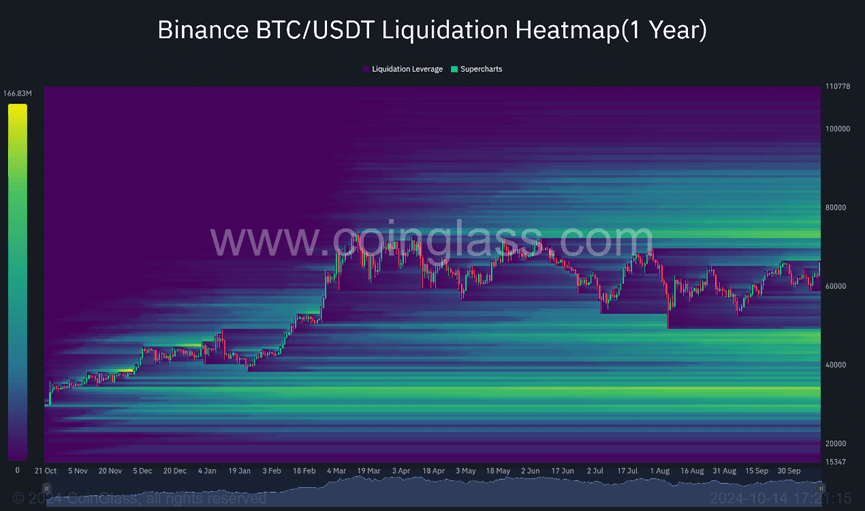
The key to reading a Coinglass heatmap lies in the gradient color scale. Purple or dark blue indicates areas with little liquidation potential — relatively safe. Conversely, bright yellow or pink areas are critical zones, where a large number of leveraged positions face the risk of simultaneous liquidation.
Zones above the current price usually represent short positions; if the price rises there, a short squeeze could be triggered. Zones below the price represent long positions; if the price falls there, a wave of long liquidations could push the price even lower.
Coinglass also provides time ranges from 12 hours to 1 year, so short-term traders can focus on the 12–24 hour timeframe, while long-term investors are better suited to analyzing 30-day or longer data.
Read Also: How to Convert IDR to USDT on Bittime, a Guide for Beginners
Magnetic Zones: A Key Concept Often Overlooked by Traders
One of the most important concepts in how to read a Coinglass liquidation heatmap is the "magnetic zone." A magnetic zone is a price area with high liquidation concentration that tends to "pull" price movement toward it.
This phenomenon occurs because of the large number of open contracts and leveraged positions in that zone — once the price approaches, the probability of liquidation increases drastically, which then pushes the price further in that direction.
The implication for traders: if there is a bright yellow magnetic zone near the current price, there is a chance the price will move toward that zone before reversing.
A common strategy is to avoid entering exactly in front of a magnetic zone, or instead to take advantage of the momentum it creates to enter in the same direction.
Read Also: The Most Accurate and Best Crypto Trading Indicator Combinations 2026
How to Read Coinglass RSI Heatmap
Unlike the liquidation heatmap which maps liquidation potential, Coinglass RSI Heatmap displays the Relative Strength Index (RSI) values of many cryptos in one view.
This feature helps traders quickly see which assets are in overbought or oversold conditions on a given timeframe.
How to read it:
- Choose a timeframe that matches your trading style. Coinglass provides RSI for 15-minute, 1-hour, 4-hour, 12-hour, and 24-hour periods; scalpers usually look at 15 minutes–1 hour, while swing traders more relevantly use 4 hours–24 hours.
- Pay attention to RSI levels 70 and 30. RSI above 70 generally indicates strong buying pressure or overbought conditions, while RSI below 30 indicates high selling pressure or oversold conditions. However, these numbers are not automatic reversal signals.
- Read colors as momentum intensity. On the RSI heatmap, colors help visualize RSI values across assets, so traders can find coins that are "hot" or oversold without opening charts one by one.
- Compare multiple timeframes. If the 1-hour RSI is overbought but the 4-hour RSI is still neutral, the short-term reversal signal is usually not as strong as if the 4-hour RSI were also extreme.
- Confirm with trend context. In a strong uptrend, RSI can stay above 70 for quite a while; conversely, in a downtrend, RSI can remain low longer than expected. Use volume support, price structure, and support-resistance levels before taking a position.
A practical example: if BTC shows a 1-hour RSI above 70, but the price is still holding above important support and buying volume is strong, that condition is better read as strong bullish momentum—not immediately a sell signal.
Conversely, an RSI below 30 only becomes more meaningful if reversal confirmation appears, such as a reversal candle or increased buying volume.
Read Also: Bittime Highlights Strengthening Crypto Custody and Futures Trading Security
Conclusion
The Coinglass heatmap is a powerful trading aid, not a substitute for strategy. By understanding the difference between liquidation and liquidity heatmaps, reading the color gradient correctly, and recognizing the concept of magnetic zones, traders can gain a much more complete picture of the market.
The key is to always combine heatmap data with other indicators and maintain risk management discipline — because heatmaps show probabilities, not certainties.
Check the prices of Bitcoin (BTC), Ethereum (ETH), XRP, Solana (SOL), GRAM, and BNB as well as the leading memecoin DOGE. You can trade directly on Bittime!
Bittime is a licensed Digital Financial Asset Trader (PAKD) platform supervised by the Financial Services Authority — where you can buy Bitcoin in Indonesia and hundreds of other crypto assets starting from Rp10,000. The registration process is fast, secure, and can be started today.
Monitor the conversion USDT to IDR and the price movements of your favorite crypto assets in real time. All are available in one crypto investment app that can be downloaded for free on the Play Store.
Ready to start? Register now on Bittime and execute your investment strategy with a platform trusted by millions of users in Indonesia.
FAQ — Frequently Asked Questions
1. What is the difference between a liquidation heatmap and a liquidity heatmap on Coinglass?
The liquidation heatmap displays the concentration of leveraged positions at risk of liquidation, while the liquidity heatmap displays the distribution of active orders in the market. Both use a similar color scale, but their data sources are different.
2. What does bright yellow mean on a Coinglass heatmap?
Bright yellow marks zones with the highest concentration of liquidations or orders. These are areas to watch because price is often attracted there and can trigger sharp movements.
3. Which timeframe should be used for daily trading?
For daily trading, the 12-hour or 24-hour timeframe is most relevant. Swing traders can use 7 days, while long-term investors are better suited to 30 days to 1 year.
4. Can the Coinglass heatmap be used for all crypto coins?
Coinglass provides heatmaps for major assets such as BTC and ETH, as well as several large altcoins traded in the futures markets of major exchanges.
5. How accurate are predictions from the Coinglass crypto heatmap?
Heatmaps show relative intensity — not the exact amount of liquidations. Their accuracy improves when combined with technical analysis, open interest data, and an overall understanding of market sentiment.
Disclaimer: The views expressed belong exclusively to the author and do not reflect the views of this platform. This platform and its affiliates disclaim any responsibility for the accuracy or suitability of the information provided. It is for informational purposes only and not intended as financial or investment advice.

.png)