What Is Oreate AI? An All-in-One AI Platform for Writing, Presenting, and Design
2026-07-16
What is Oreate AI? Oreate AI is an artificial intelligence-powered workspace that combines writing, presentation creation, research, design, drawing, video, and learning tools into one platform. This all-in-one concept aims to reduce the need to switch between applications while working on projects.
Key Takeaways
- Oreate AI brings together AI Writer, AI PPT, AI Image, AI Design, AI Video, AI Tutor, and Deep Research in one workspace.
- This platform can be used by students, educators, working professionals, researchers, marketers, and content creators.
- AI results still need to be checked because the text, references, visuals, and conclusions generated may contain errors.
What is Oreate AI?
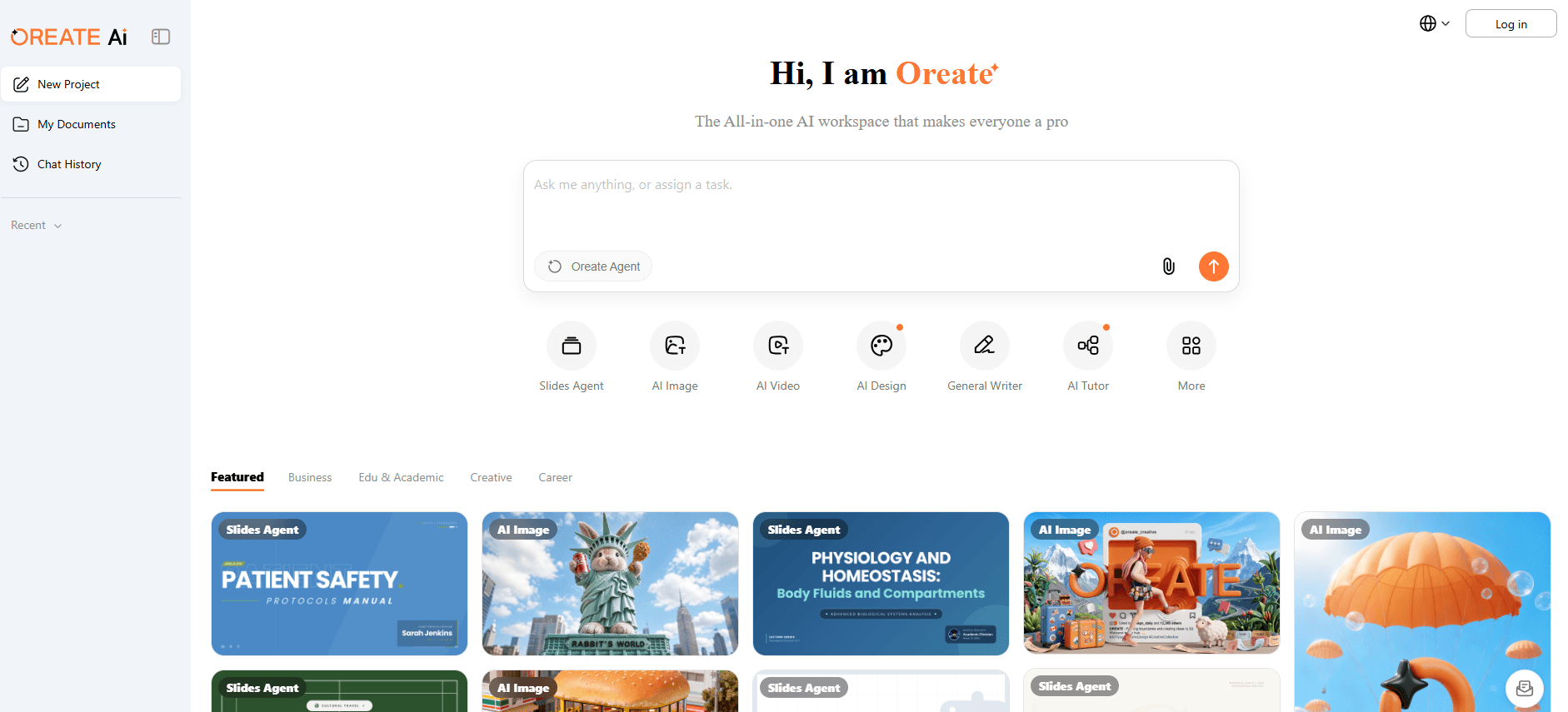
Oreate AI is a multimodal AI platform that provides a variety of creative and productivity tools in a single interface. Users can start projects, create documents, save work, and review conversation history without having to use multiple separate services.
The term multimodal means a platform can handle more than one form of content. Users can work not only with text but also create presentations, images, designs, videos, audio, and learning materials.
Source oreateai.com
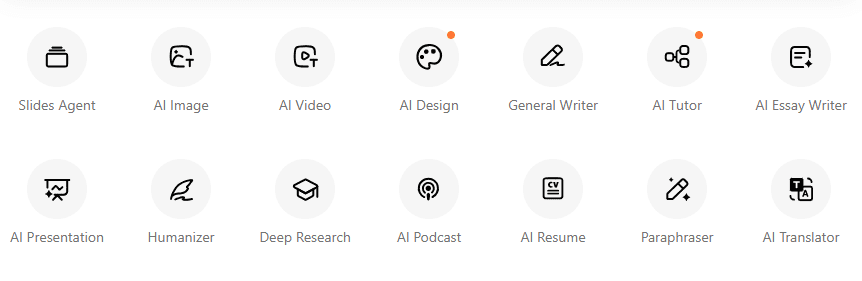
Some of the tool categories available in Oreate AI include:
- AI Writing for professional articles, essays, and documents.
- AI PPT to create presentation structure and content.
- AI Image to generate images from text commands.
- AI Design for creating visual materials.
- AI Video to generate videos from text or images.
- AI Tutor to help the learning process.
- Deep Research to summarize and organize information.
- AI Resume to create professional resumes.
- AI Translator to translate content.
- AI Podcast to convert text material into conversational audio.
With this arrangement, Oreate AI tries to become a work center that can be used from the idea search stage to the creation of the final result.
Read also:What Is Claudia AI? A Learning Coach for More Consistent Learning
How Does the Oreate AI Workspace Work?
The Oreate AI workspace operates on a project-based approach. Users select tools according to their needs, provide instructions, and the AI then processes those instructions into drafts or initial content.
The general flow of use can be described as follows:
- User creates a new project.
- The user selects the type of tool required.
- Users enter topics, instructions, documents, or initial materials.
- AI generates text, slides, images, designs, or other formats.
- Users check and edit results.
- Documents can be saved in the workspace for reuse.
The advantage of this approach is that the entire process can be conducted within a single ecosystem. For example, Deep Research results can be used as material for articles, then transformed into presentations and visual materials.
However, integration between functions still needs to be tested directly. Users should ensure that the results from one tool can be transferred, edited, and exported in the required format.
Source oreateai.com
Read also:SweetAI: Make Virtual Girlfriend AI, Suitable For Singles?
Oreate AI Features You Need to Know
1. Oreate AI Writer
Oreate AI Writer helps users create various types of text, such as blog articles, essays, professional emails, reports, product descriptions, and marketing content.
The platform's writing features don't just consist of a single generator. Oreate AI also offers several tools with more specific functions, including:
- General Writer for creating general texts.
- Essay Writer to compose essays in a structured manner.
- Humanizer to make text feel more natural.
- Paraphraser to rephrase sentences.
- AI Translator to translate text.
- AI Resume to help with resume creation.
Users still need to provide a clear brief. Instructions that only contain one or two words often result in generic content.
A better prompt would include:
- Purpose of writing.
- Target readers.
- Content length.
- Language style.
- Desired structure.
- Required information to be entered.
- Things to avoid.
- Output format.
For example, the request "write an article about AI" is too broad. Instructions would be more effective if they specified the title, target audience, search intent, keywords, article length, heading structure, and publication purpose.
2. Oreate AI PPT
Oreate AI PPT is designed to transform topics, ideas, or text into presentations. This feature can help users organize slide outlines, titles, discussion points, and the order of information.
This function is useful for:
- School or college presentations.
- Teaching materials.
- Company reports.
- Project proposal.
- Initial pitch deck.
- Research presentation.
- Meeting summary.
- Webinar content.
AI PPT can speed up drafting, but users still need to check the balance of each slide's content. A good presentation not only contains the right text but also has visual hierarchy, a storyline, and a balanced amount of information.
Also, check the export format before using it for important work. Certain elements may change when the presentation is moved to another application or opened on a different device.
3. Oreate AI Image
Create AI Image allows users to generate images based on text prompts. Users can describe the desired object, composition, mood, perspective, visual style, lighting, and image ratio.
This feature can be used to create:
- Article illustration.
- Concept drawing.
- Thumbnail.
- Social media visuals.
- Learning materials.
- Simple mockup.
- Presentation background.
- A starting reference for designers.
AI images don't always come out right on the first try. Prompts often need to be tweaked to address inappropriate composition, missing object details, or overly generic appearances.
Users should also exercise caution when requesting logos, public figures, brands, copyrighted characters, and human faces. Ensure that the use of visuals does not infringe on intellectual property rights or mislead the audience.
4. Oreate AI Design
Oreate AI Design focuses on creating visual materials such as posters, banners, social media content, and thumbnails. This feature is aimed at users who need a quick design without having to start from a blank canvas.
The main difference with AI Image lies in the output objective. AI Image focuses on image creation, while AI Design is more focused on creating visual communication materials.
Before publishing a design, check:
- Spelling accuracy.
- Text readability.
- Color contrast.
- Brand identity consistency.
- Logo position.
- Sizes for each platform.
- License and rights to use elements.
- Message suitability to the target audience.
AI can produce initial compositions quickly, but the final visual result still requires human judgment.
5. Oreate AI Video
Create AI Video is used to create videos from text or images. This feature can help create short video concepts, promotional materials, social content, or presentation visuals.
The results depend heavily on the quality of the instructions. The prompt should explain:
- Duration.
- Video ratio.
- Main subject.
- Camera movement.
- Gaya visual.
- Atmosphere.
- Background.
- Scene sequence.
- Movement speed.
- Use of text or no text.
AI videos can still experience issues such as unnatural movement, object deformation, incorrect text, or character inconsistencies. Therefore, the resulting videos should be reviewed before being used for advertising or official communications.
6. Oreate AI Tutor
Oreate AI Tutor helps transform learning topics into more interactive materials. The platform boasts the ability to create slides, flashcards, quizzes, and mind maps from a given topic.
This feature can help:
- Students understand the concept.
- Students review lecture material.
- Teachers create teaching materials.
- Tutor prepares training.
- Parents accompany the learning process.
- Professionals learn new skills.
AI Tutor should be used as a learning companion, not the sole source of truth. Answers in math, science, law, health, or technical fields should still be compared with textbooks, journals, standards, and expert explanations.
7. Oreate AI Deep Research
Oreate AI Deep Research is designed to help users process long materials, find key points, and organize research results in a more structured way.
This feature can be useful for:
- Summarizing long articles.
- Develop an initial outline of a topic.
- Identify important subtopics.
- Organizing findings.
- Create a report framework.
- Prepare presentation materials.
- Comparing several ideas.
Deep research should not be treated as a substitute for source verification. Users should consult the original references, check publication dates, evaluate the author's credibility, and ensure that the citations truly support the claims.
In academic work, seemingly convincing references aren't necessarily real or accurate. Every title, author name, DOI, year, and citation must be manually verified.
Read also:What Is Slidesgo? AI for Fast, Free PPT Creation
Who is Suitable for Using Oreate AI?
Students and College Students
Students can use Oreate AI to create essay outlines, summaries, flashcards, quizzes, mind maps, and presentations.
This platform should be used to help students understand and organize material, not to submit assignments without any learning process. Users should follow school or university regulations regarding the use of AI.
Teachers and Instructors
Teachers can use it to create:
- Initial lesson plan.
- Presentation materials.
- Question practice.
- Quiz.
- Worksheet.
- Learning illustration.
- Summary of material.
- Differentiation material.
All materials need to be reviewed based on the curriculum, student development level, and learning objectives.
Professional
Professionals can use Oreate AI to create reports, proposals, emails, resumes, meeting materials, and presentations.
AI can save time during the drafting stage. However, documents involving business decisions, internal data, contracts, or confidential information require greater care.
Researchers
Researchers can use Deep Research to map topics and develop an initial outline. The writing feature can also help improve clarity.
However, AI does not replace systematic literature review, methodological assessment, data analysis, and reference verification.
Content Creator and Marketer
Creators can combine AI Writer, AI Image, AI Design, AI Video, and AI Podcast to develop one idea into multiple content formats.
One article, for example, can be processed into:
- Social media carousel.
- Short video.
- Infographics.
- Thumbnail.
- Podcast script.
- Presentation.
- Promotional caption.
This model helps speed up content repurposing, but brand consistency must still be maintained.
Read also:Meigen AI Prompt: How to Create Accurate AI Prompts
Is Oreate AI Available for Indonesian Users?
Oreate AI is accessible through a web-based platform so it can be tried by Indonesian users as long as the service is available in the region.
However, users need to check a few things before making it part of their routine workflow:
- Ability to produce Indonesian language.
- Grammatical quality and local context.
- Support for Indonesian technical terms.
- Available payment methods.
- Package prices and credit systems.
- Export format.
- Free usage limit.
- Terms of data use.
- Customer support.
- Availability of features on the account.
Not all AI tools perform equally well in Indonesian. Results that sound grammatically correct may not be appropriate for the Indonesian legal, cultural, educational, and market contexts.
Read also:What Is Dola AI? An AI Assistant for Everyday Productivity
Advantages of Oreate AI
Some advantages that can be considered are:
Many Tools in One Platform
Users don't need to open different applications to write, create slides, generate images, and do initial research.
Suitable for Multiformat Workflow
One idea can be developed into articles, presentations, designs, videos, and learning materials.
Speed Up Drafting
AI can reduce the time it takes to start from a blank page.
Friendly for Non-Technical Users
Users do not need to write code to access the main content creation functions.
Free Tools and Advanced Features Available
Users can try out a number of features before considering premium features. Credit limits and features are subject to change, so please check directly with your account.
Read also:Get to Know the Claude Sonnet 5: Features, Price, and Latest Improvements from Anthropic
Disadvantages and Risks of Oreate AI
Accuracy Not Always Guaranteed
AI can create misinformation, omit context, or generate invalid references.
The Quality of Each Feature May Vary
All-in-one platforms offer a lot of functionality, but the depth of each tool doesn't necessarily match that of a dedicated service.
Results Can Look Generic
Content created without a strong brief tends to use uniform language and visual patterns.
Requires Human Revision
Text, presentations, images, and videos still require editing before publication.
Data Privacy Needs to be Checked
Do not upload personal data, business strategies, contract documents, medical records, or confidential information before understanding the privacy policy and terms of service.
Fees May Depend on Credit
Certain AI features typically use credits based on the type and volume of processing. Users need to estimate their needs to keep costs under control.
Read also:What is Abacus AI? An Enterprise AI Platform with AI Agent and ChatLLM
Tips for Using Oreate AI for Better Results
Use the following steps to improve the output quality:
- Set one clear goal for each project.
- Provide context, target audience, and output format.
- Enter an example of the desired style.
- Break complex work into stages.
- Check all facts, figures, quotes, and references.
- Edit the language to match the brand identity.
- Avoid uploading sensitive information.
- Save the original version before making major changes.
- Compare AI results with trusted sources.
- Use AI as an assistant, not a substitute for human decisions.
Monitor AI and Technology Developments through Bittime
The development of AI platforms is increasingly intertwined with computing, blockchain, digital assets, and the technology economy. Changes in features, business models, and integration between services can occur rapidly.
You can register at Bittime to monitor available digital asset markets and read the latest news on AI, blockchain, and technology. Always conduct your own research before using a new platform or making any decisions regarding crypto assets.
Now that you’ve learned about the latest developments in AI, it’s time to explore AI-based cryptocurrencies on Bittime, such as AI digital assets, AI, AGI, RENDER, TAO, VVV, and many more AI coins.
Conclusion
What is Oreate AI? Oreate AI is an all-in-one AI workspace that combines tools for writing, presentations, drawing, design, video, learning, research, resumes, translation, and podcasts.
Its main strength lies in the convenience of working with multiple content types within a single platform. Oreate AI can help students, teachers, researchers, professionals, and creators accelerate the process from idea to first draft.
However, this platform doesn't eliminate the need for human review. Users must still verify facts, edit results, maintain data privacy, and ensure content complies with applicable requirements and regulations.
Try the most relevant features first, measure the quality of the results, and then determine whether Oreate AI is truly more efficient than the combination of tools you're already using.

Bittime is a licensed and regulated Digital Financial Asset Trader (PAKD) supervised by Indonesia’s Financial Services Authority (OJK) — where you can buy Bitcoin in Indonesia and hundreds of other crypto assets starting from just Rp10,000. The registration process is fast, secure, and you can get started today.
Track USDT to IDR conversions and monitor your favorite crypto assets in real time. Everything is available in one crypto investment app that you can download for free on the Play Store
Ready to start? Register now on Bittime and execute your investment strategy with a platform trusted by millions of users in Indonesia.
FAQ
What is Oreate AI?
Oreate AI is a multimodal workspace that combines writing, presentation, drawing, design, video, learning, and research tools. The platform is designed for academic, professional, and creative needs.
Is Oreate AI free?
Oreate AI offers a number of free tools and advanced paid features. Credit limits, plans, and feature access are subject to change, so please check directly on the platform.
Can Oreate AI create PPT?
Yes, Oreate AI PPT can convert ideas or text into a presentation draft. Users still need to check the structure, design, facts, and export format compatibility.
Does Oreate AI support Indonesian?
Users can try giving instructions and requesting output in Indonesian. The quality needs to be checked, especially for technical terms, local context, and formal grammar.
Is Oreate AI safe to use?
Security depends on the type of data entered and the platform's policies. Avoid uploading confidential information before reading the privacy policy and terms of service.
Disclaimer: The views expressed belong exclusively to the author and do not reflect the views of this platform. This platform and its affiliates disclaim any responsibility for the accuracy or suitability of the information provided. It is for informational purposes only and not intended as financial or investment advice.

.png)