Cursor AI: Definition and How to Use It for Coding
2026-07-30
The capabilities of AI coding assistants have grown very rapidly in recent years. One of the tools widely used by developers is Cursor AI, an artificial intelligence-based code editor designed to help the process of developing applications more efficiently.
If you are new to Cursor AI or want to know how to use Cursor AI, this article covers everything from the definition, main features, to the steps for creating your first project.
Key Takeaways
- Cursor AI is an AI-based code editor that understands the context of the entire project, not just a single file.
- Cursor provides AI Chat, Agent Mode, Inline Edit, and AI Autocomplete features to speed up the coding process.
- Both beginners and professional developers can use Cursor to create, fix, and document code more quickly.
What is Cursor AI?
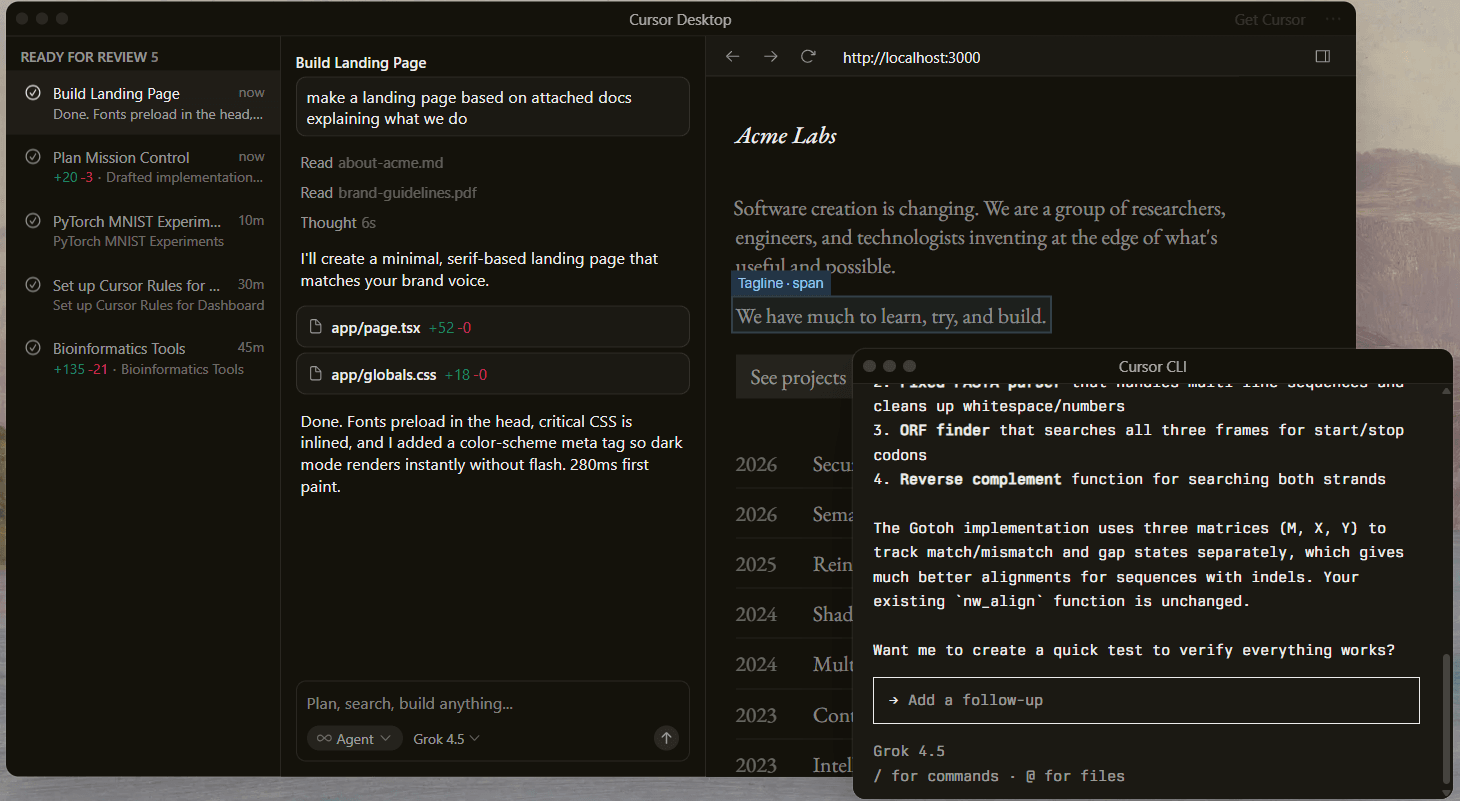
Cursor AI is an artificial intelligence (AI)-based code editor developed on the foundation of Visual Studio Code (VS Code).
Because it uses the same foundation, its appearance feels familiar to VS Code users while still supporting many extensions, themes, and shortcuts that have been used before.
Unlike conventional code editors, Cursor AI is able to understand the project context comprehensively.
The AI does not only read the file currently open, but also analyzes the folder structure, functions, and relationships between components in the project. This capability makes the code suggestions provided more relevant compared to ordinary autocomplete.
Cursor also supports various Large Language Models (LLM), including models from OpenAI, Anthropic, Google, and other AI providers. Users can choose the model that best suits their application development needs.
According to the official Cursor documentation, this editor is designed to help developers build new features, perform debugging, refactoring, and generate documentation using natural language commands.
Source: Cursor AI
Read Also: What Is Cursor? An AI Coding Agent That Can Build Apps Without Manual Coding
Outstanding Features of Cursor AI
Cursor AI offers various features that make the coding process faster and more practical.
AI Chat
Developers can discuss directly with the AI about the code they are working on. For example, asking for an explanation of a specific function, finding the cause of a bug, or requesting a solution for implementing a feature.
AI Autocomplete
Autocomplete in Cursor does not only complete a single line of code, but is also capable of generating complete code blocks based on the context of the project being built.
Inline Edit
This feature allows users to change code using natural language instructions. For example, simply write "change this function to make it more efficient", then Cursor will automatically propose the changes.
Read Also: Create an App in 5 Minutes Using Emergent AI, Turns Out This Is How?
Agent Mode
Agent Mode is one of the most widely used features. The AI can create new files, edit multiple files at once, run the terminal, and help with debugging without having to switch applications.
Codebase Search
Cursor is able to understand the entire repository structure so that searching for functions, variables, or files becomes faster compared to ordinary text search.
Multi-file Editing
If a change affects many files, Cursor can apply those modifications simultaneously so that the refactoring work becomes much more efficient.
If you are also interested in following the development of AI and blockchain technology, don't forget to register at Bittime to start exploring various digital assets.
How to Use Cursor AI for Beginners
For new users, the process of using Cursor AI is quite simple.
1. Install Cursor AI
Visit the official Cursor website, then download the installer according to the operating system used, such as Windows, macOS, or Linux. After the installation process is complete, run the application like a regular code editor.
2. Log in to Your Cursor Account
Sign in using a Cursor account to access AI features. Users can also choose a free package or a subscription according to their needs.
3. Import VS Code Settings
When first launched, Cursor offers the option to import themes, keyboard shortcuts, and extensions from Visual Studio Code so that the migration process becomes easier.
Read Also: 10+ Best AI Coins 2026: Here's the List of Artificial Intelligence-Themed Cryptocurrencies!
4. Open or Create a Project
Select an existing project folder or create a new project. After the folder is opened, Cursor will begin the indexing process so that the AI understands the existing code structure.
5. Start Using the AI
After indexing is complete, users can start utilizing various AI features. For example:
- asking the AI to create a new function;
- explaining a code snippet;
- fixing bugs;
- creating documentation;
- generating unit tests.
All instructions are simply given using natural language so that the development process becomes faster.
Advantages and Disadvantages of Cursor AI
Before using Cursor AI, it is important to understand its advantages and limitations.
Advantages
- Understands the context of the entire project.
- Speeds up the coding and debugging process.
- Supports many AI models.
- Compatible with the VS Code ecosystem.
- Helps create documentation and unit tests automatically.
Disadvantages
- AI results still need to be reviewed before being used in production projects.
- Some advanced features require a paid package.
- AI performance depends on the quality of the prompt and the available project structure.
Don’t miss out on price updates for AI coins like Bittensor (TAO), Venice Token (VVV), NEAR Protocol (NEAR), and Internet Computer (ICP) on Bittime.
Conclusion
Cursor AI is a modern code editor that utilizes artificial intelligence to help developers work faster and more efficiently. Thanks to features such as AI Chat, Agent Mode, Inline Edit, and Codebase Search, Cursor is able to help from writing code to debugging in a single application.
For beginners, the installation and usage process of Cursor is also quite easy because its interface is similar to Visual Studio Code. Nevertheless, every result provided by the AI still needs to be reviewed again to ensure it matches the project needs and software development quality standards.

After learning about AI developments, now is the time to find out about AI-based crypto on Bittime such as digital assets AI, AGI, RENDER, TAO, VVV, and many more AI coins.
Bittime is a Digital Financial Asset Trader (PAKD) platform licensed and supervised by the Financial Services Authority — a place where you can buy Bitcoin in Indonesia and hundreds of other crypto assets starting from Rp10,000. The registration process is fast, secure, and can be started today.
Monitor the conversion of USDT to IDR and the price movements of your favorite crypto assets in real-time. Everything is available in one crypto investment app that can be downloaded for free on the Play Store.
Ready to start? Register now at Bittime and execute your investment strategy with a platform already trusted by millions of users in Indonesia.
FAQ
What is Cursor AI?
Cursor AI is an artificial intelligence-based code editor built on Visual Studio Code to help with the coding, debugging, and application development process.
Is Cursor AI free?
Cursor provides a free package with basic features as well as paid packages that offer greater access to AI features and premium models.
Is Cursor AI suitable for beginners?
Yes. Its interface is easy to understand, especially for Visual Studio Code users, so beginners can start learning to code with the help of AI.
Can Cursor AI be used on Windows?
Yes. Cursor AI is available for Windows, macOS, and Linux through the official installer.
Are the code results from Cursor AI always correct?
Not always. Although it is capable of generating relevant code, developers still need to perform testing and review before using it in a production environment.
Disclaimer: The views expressed belong exclusively to the author and do not reflect the views of this platform. This platform and its affiliates disclaim any responsibility for the accuracy or suitability of the information provided. It is for informational purposes only and not intended as financial or investment advice.

.png)