Tips for Safe Trading Institutional Oil Fund (IOF)
2026-10-12
Buying Institutional Oil Fund (IOF) on DEX requires precision from selecting tokens to approving transactions.
Mistakes in mint addresses, fake sites, or too much slippage tolerance can make purchases different from what you planned.
This guide uses Phantom as an example wallet Solana and Jupiter as a swap interface that searches for trade routes.
Purchases can only be continued if a route is available for IOF tokens with the correct address.
Using popular apps does not eliminate the risk of traded assets.
Key Takeaways
Search for IOF using the full mint address, not just the name or symbol.
Use Phantom from official sources and leave SOL for transaction fees.
Check the swap estimate, make a small purchase, then test a partial sale.
Match IOF Token Address Before Purchasing
The IOF mint address on the given source is:
2sY7rkMCQyFNcSpHm3fciJf2ptYRg3cYpn4srN6Bpump
Copy the full address when searching for tokens in a trading app. The CMC snapshot shows several assets named IOF, or Institutional Oil Fund.
The same logo and symbol don't necessarily indicate that you've selected the asset in question.
DEX Screener displays the IOF/SOL pair on PumpSwap.
Trading pool address is different from mint address, use mint to find the token you want to buy.
The name "Oil Fund" doesn't necessarily support oil reserves. Available sources haven't confirmed the collateral, so IOF crypto purchases should still be considered speculative transactions.
Read Also:Is IOF Coin Legit or a Scam? Check Institutional Oil Fund Data
Prepare Phantom and SOL Balance
Download Phantom via the link at official website (https://phantom.com/).
Use a dedicated trading wallet to ensure the balance connected to the app matches your transaction needs.
Keep recovery information private and do not give it to anyone offering help.
To top up your balance, copy the Solana receiving address from Phantom.
If sending SOL from an exchange, select the Solana network and match the destination address.
Make a test transfer before sending a larger amount.
Leave SOL for buying and selling costs.
For example, if your balance is 0.1 SOL, don't automatically enter the entire amount as a swap amount.
Check the cost requirements displayed by the application before determining the purchase amount.
Read Also: How to Download Phantom Wallet and Create a Crypto Wallet Account for Beginners
Check IOF Market Conditions Before Connecting Wallet
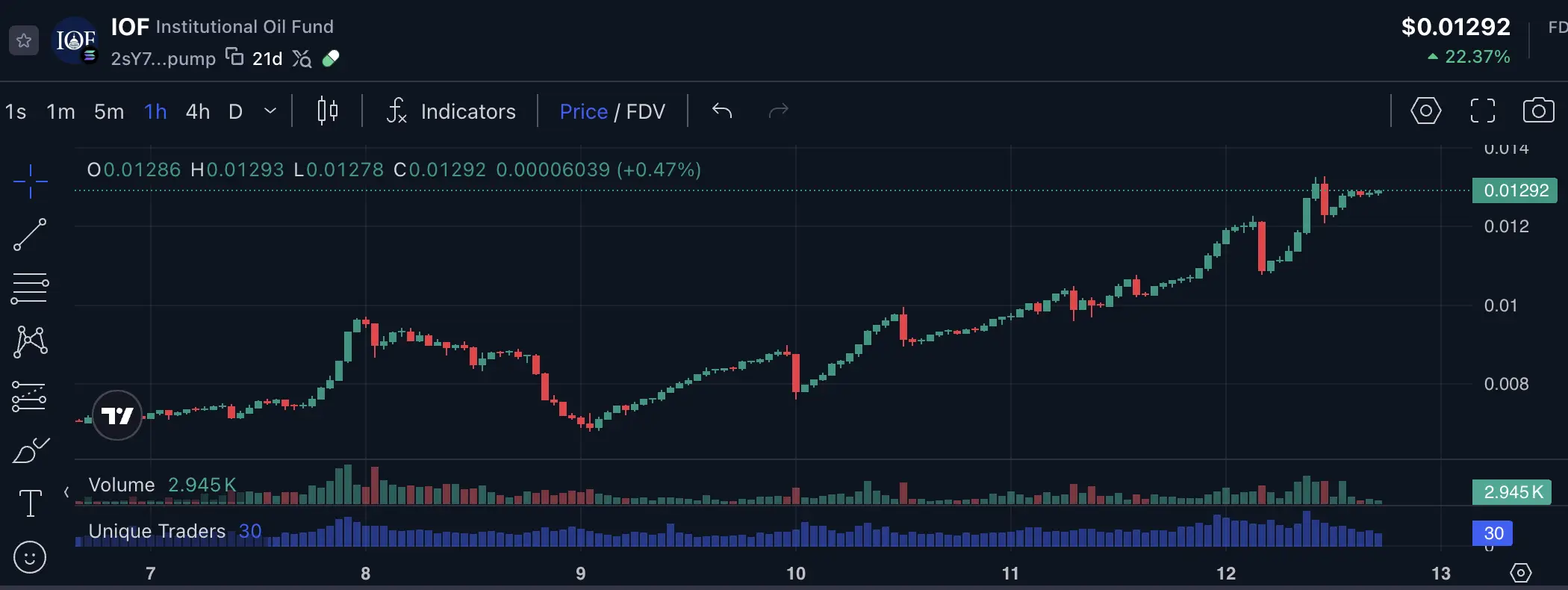
The CMC snapshot provided shows a price of US$0.01282, a 24-hour increase of 21.64%, liquidity of US$319,400, and volume of US$247,700.
FDV recorded US$12.8 million. This figure represents the source snapshot, not the execution price at the time of purchase.
In Solana memecoin trading, liquidity is more relevant to assessing execution than FDV alone. FDV is not the available balance to accommodate holder sales.
The CMC snapshot also displays “Security Scan: Normal” and “Rug Pull: No”.
The label is not a guarantee that the risk of IOF rug pull is gone.
Check holder distribution, liquidity control, and token authority before proceeding.
Read Also:Institutional Oil Fund (IOF) Price Prediction: Is the $0.01 Target Realistic?
Connect Phantom to Jupiter with the Correct Domain
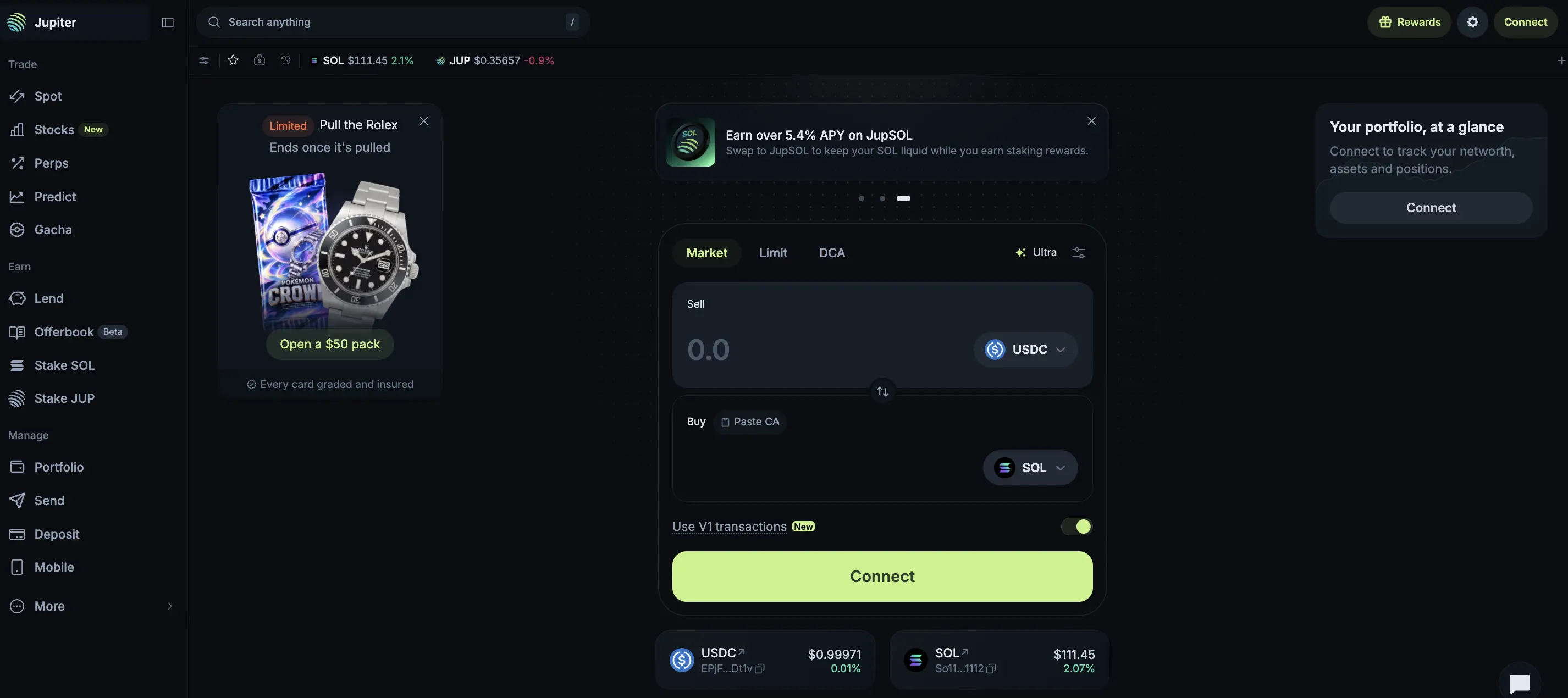
Source : jup.ag/
Open Jupiter (https://jup.ag/) and select the Spot page for swap.
ClickConnect, select Phantom, then check the connection request on the wallet.
On Phantom mobile, use the tab Explore to open the site in the application's internal browser.
Make sure the domain that appears matches the target application.
Connecting a wallet allows the app to see the public address and request approval for the action, the connection does not yet execute the purchase.
Do not enter seed phrases into Jupiter pages or other sites.
Phantom documentation confirms that the application connection is done via a request in the wallet, without typing a recovery phrase.
Enter Mint IOF and Review Swap Details
Select SOL as the payment asset, then paste the IOF mint address into the destination token search.
Please double-check the address before entering the amount.
If a token or route is not available, stop the process, do not replace it with a similarly named token.
Start with a small amount.
Read the estimated IOF received, fees, price impact, and minimum tokens received if displayed.
Chart prices may differ from purchase prices due to pool conditions and transaction size.
Slippage is the difference between the estimated and executed prices.
The tolerance determines the deviation you allow.
Large transactions relative to liquidity can also move prices against buyers.
Don't keep increasing the tolerance to ensure the swap is successful. Reduce the amount or wait for conditions to change if the estimate worsens.
Safe IOF trading involves having the courage to cancel a transaction.
Purchase Confirmation and Partial Test Sale
Check the transaction details in Phantom before approving the swap. Once confirmed, compare the received IOF amount with the estimate and view the actual fees.
Next, try selling a small portion through the available channels. Testing helps verify the current exit process, but it doesn't guarantee successful subsequent sales.
Disciplined IOF trading limits the amount you can afford to lose. Memecoin trading tips also include an exit plan before adding to a position.
To complete a crypto transaction, register on Bittimeand check SOL availability and withdrawal options. This guide does not confirm IOF's listing on Bittime.

Bittime is a licensed and regulated Digital Financial Asset Trader (PAKD) supervised by Indonesia’s Financial Services Authority (OJK) — where you can buy Bitcoin in Indonesia and hundreds of other crypto assets starting from just Rp10,000. The registration process is fast, secure, and you can get started today.
Track USDT to IDR conversions and monitor your favorite crypto assets in real time. Everything is available in one crypto investment app that you can download for free on the Play Store
Ready to start? Register now on Bittime and execute your investment strategy with a platform trusted by millions of users in Indonesia.
FAQ about Purchasing IOF Using Phantom
How do I buy IOF using Phantom?
Connect Phantom to Jupiter, look for mint IOF, then check and confirm swap if route is available.
Is IOF Coin available directly on Phantom?
Availability has not been verified. Use full mint and check route support before purchasing.
How many SOLs are needed to buy IOF?
Prepare the purchase amount and reserve funds according to the application's estimates. Requirements may change.
Does the Rug Pull: No status guarantee IOF safety?
No. Continue to evaluate liquidity, token authority, and ownership concentration.
Why is it necessary to try to sell IOF after purchasing?
To check the actual output process and results at the time of testing, without guaranteeing subsequent conditions.
Disclaimer: The views expressed belong exclusively to the author and do not reflect the views of this platform. This platform and its affiliates disclaim any responsibility for the accuracy or suitability of the information provided. It is for informational purposes only and not intended as financial or investment advice.

.png)