How to Stake POL on Bittime in 4 Easy Steps
2025-11-19
The POL token introduces a new phase to the Polygon 2.0 ecosystem, and more and more users are looking for ways to stake POL to earn returns while supporting the network.
In this context, the concept of POL staking—either through an on-chain wallet or through a centralized platform like Bittime—becomes a straightforward and easily accessible option via mobile.
This article provides a clear, step-by-step guide, focusing on how to stake POL, calculating APR, and best practices to ensure a smooth and hassle-free staking experience when using the mobile app.
What is POL and its role in Polygon 2.0
POL is the core token in the Polygon 2.0 evolution that replaces some of the legacy functions of previous tokens.
POL serves as a tool for staking, network security, and participates in the restaking mechanism that allows validators to secure multiple chains in the ecosystem.
With this design, POL holders can earn rewards from participating in consensus and from restaking opportunities that provide additional income potential.
For users looking to understand the macro impact, POL staking helps strengthen the security and sustainability of the network and opens access to applications that require cross-chain security assurance.
Benefits and Mechanism of POL Staking on Bittime
Staking POL through platforms like Bittime offers a simpler experience than direct on-chain staking. Users don't need to set up validators or manually manage gas fees.
In the app, staking products display the estimated APR, lockup period, minimum stake, and additional features like auto-renewal and a detailed timeline that's easy to read on a smartphone screen.
Specifically, staking POL on Bittime offers:
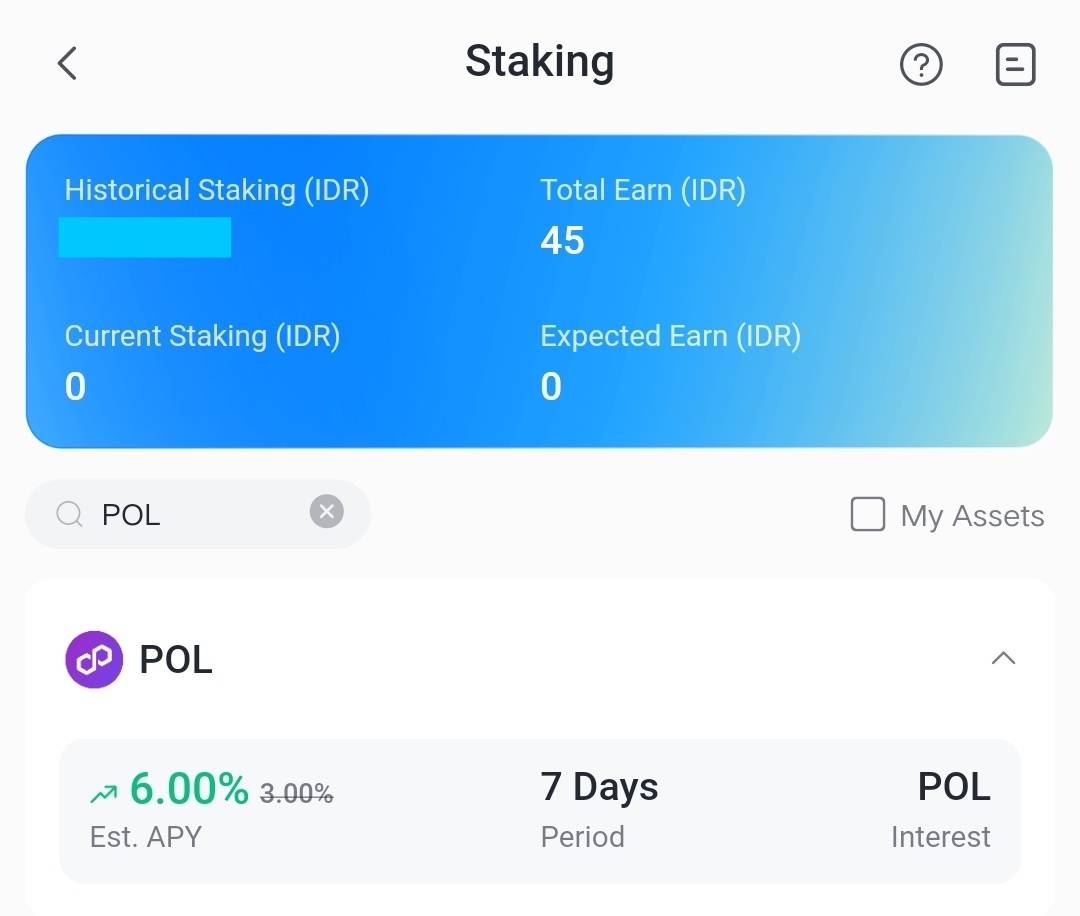
- APY 6.00%
- 7 day lockout period
- Minimum staking 15 POL
- Maximum 390,625 POL
- Estimated interest (Est. Interest)automatically calculated
- Auto-Renew for automatic extension of the staking period
- Clear timeline starting from start date, accrual, to redemption
Users simply determine the amount, confirm the minimum requirements, and then confirm on one simple page.
How to Top Up IDR to Buy POL on Bittime
Top Up Via Bank
Top up Bittime IDR very easy, follow these steps:
- Make sure your Bittime account is verified.
- Open Bittime App, open deposit IDR on the Home page or open the wallet menu and select IDR deposit
- Select a Virtual Bank account, copy one of the bank VAs you will transfer to.
- Make sure you transfer using a real-time/online transfer method so that your deposit can be credited immediately.
- Minimum deposit starts from 10,000 rupiah.
- The funds you transfer will be credited to your IDR wallet.
Top Up IDR Via E-wallet
Top up IDR on Bittime is very easy, follow these steps:
- Make sure your account is verified.
- Open the Bittime App, go to IDR deposit on the homepage or open your wallet and choose IDR deposit
- Select Ewallet such as OVO, DOKU and follow the instructions to top up IDR
- Make sure you transfer using a real-time/online transfer method so that your deposit can be credited immediately.
- Minimum deposit starts from 10,000 rupiah.
- The funds you transfer will be credited to your IDR wallet.
How to Stake POL on Bittime in 4 Easy Steps
1. Open the Bittime App and Login to Your Account
Open the Bittime app on your phone and log in. If you don't have an account, register quickly via the signup menu and complete KYC verification.
Make sure you have a POL balance in your Spot wallet. If you don't have one, purchase it directly from the menu.Trade or Purchase POLto be more practical.
2. Enter the Staking Feature and Select POL
From the app homepage, select the menu Staking. Search for assets POL, then open the product page.
3. Start to Stake POL Coins
Enter the amount of POL you wish to stake. The system will immediately displayInterest Estimateaccording to the amount you input.
Check the agreement of Bittime Staking Agreement, then activateAuto-RenewIf you want the results + principal to be automatically rolled back to the next period.
TapConfirmto start staking.
4. Receive Rewards After the Staking Period Ends
Monitor your staking status via the timeline on the product page. Rewards are calculated starting the following day at 6:00 AM and ending at 11:00 AM.day 7.
When the period ends:
- Assets and rewards will automatically return,or
- If Auto-Renew is active, the system immediately extends the staking to the next period.
You can turn off auto-renew at any time before the period ends.
How to Check Staking Assets
- Login akun Bittime.
- Select the Assets menu on the Homepage.
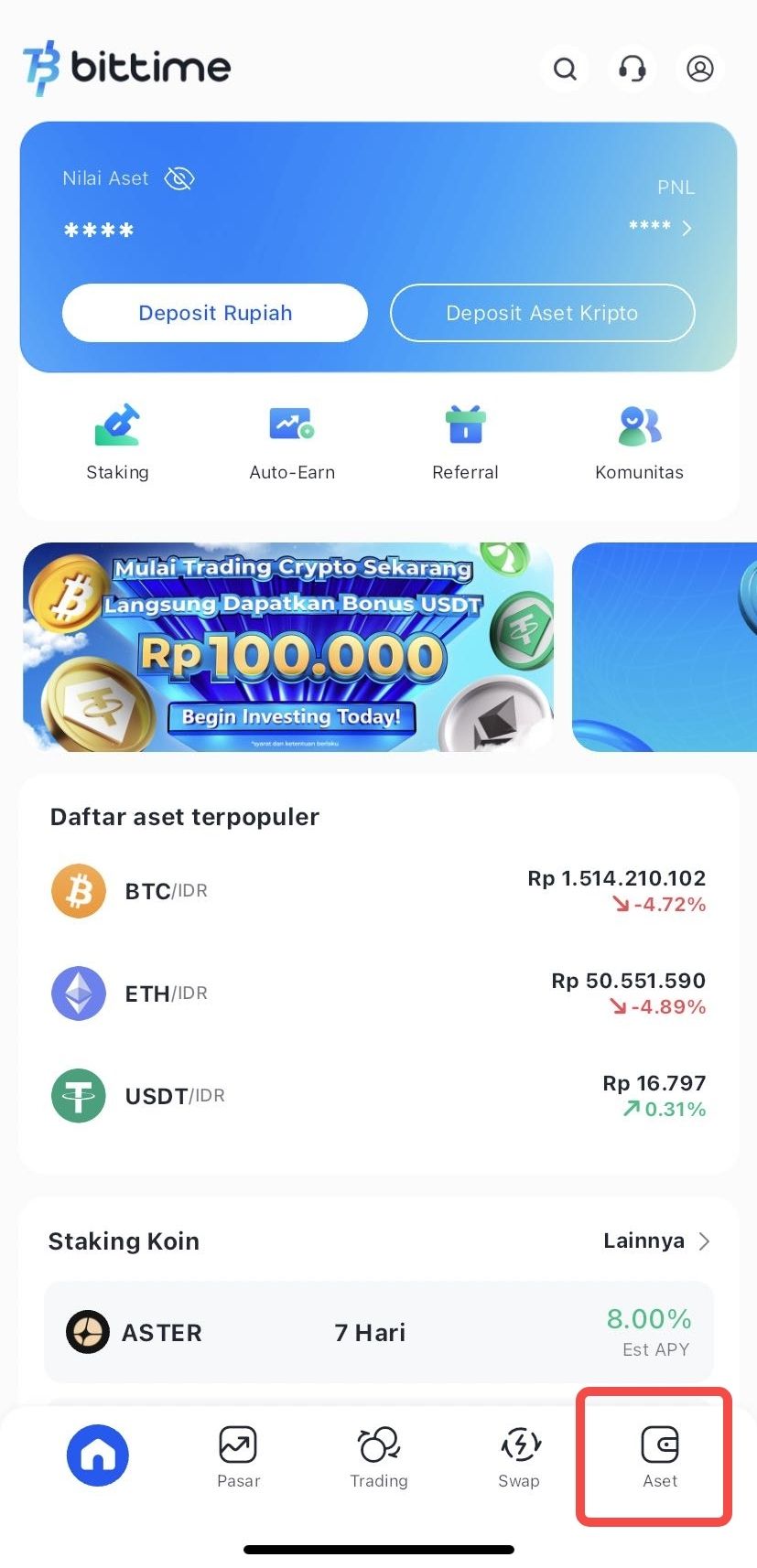
- Click Staking to see the amount of your staking assets.
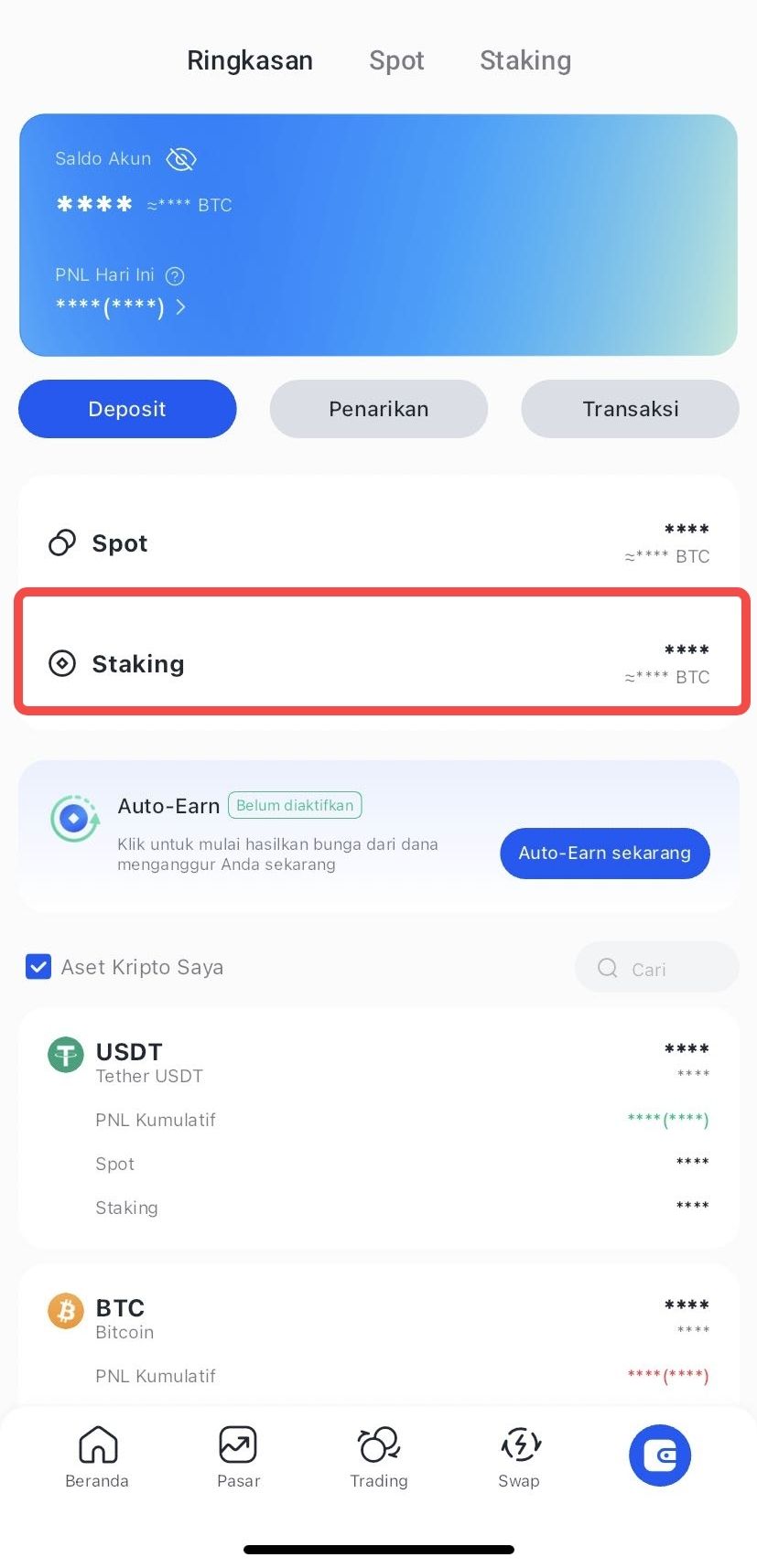
How to Do Early Redeem Staking
- Login Bittime account.
- Select the Assets menu on the Homepage.
- Select the crypto asset you wish to redeem.
- Click Choose Early Redeem
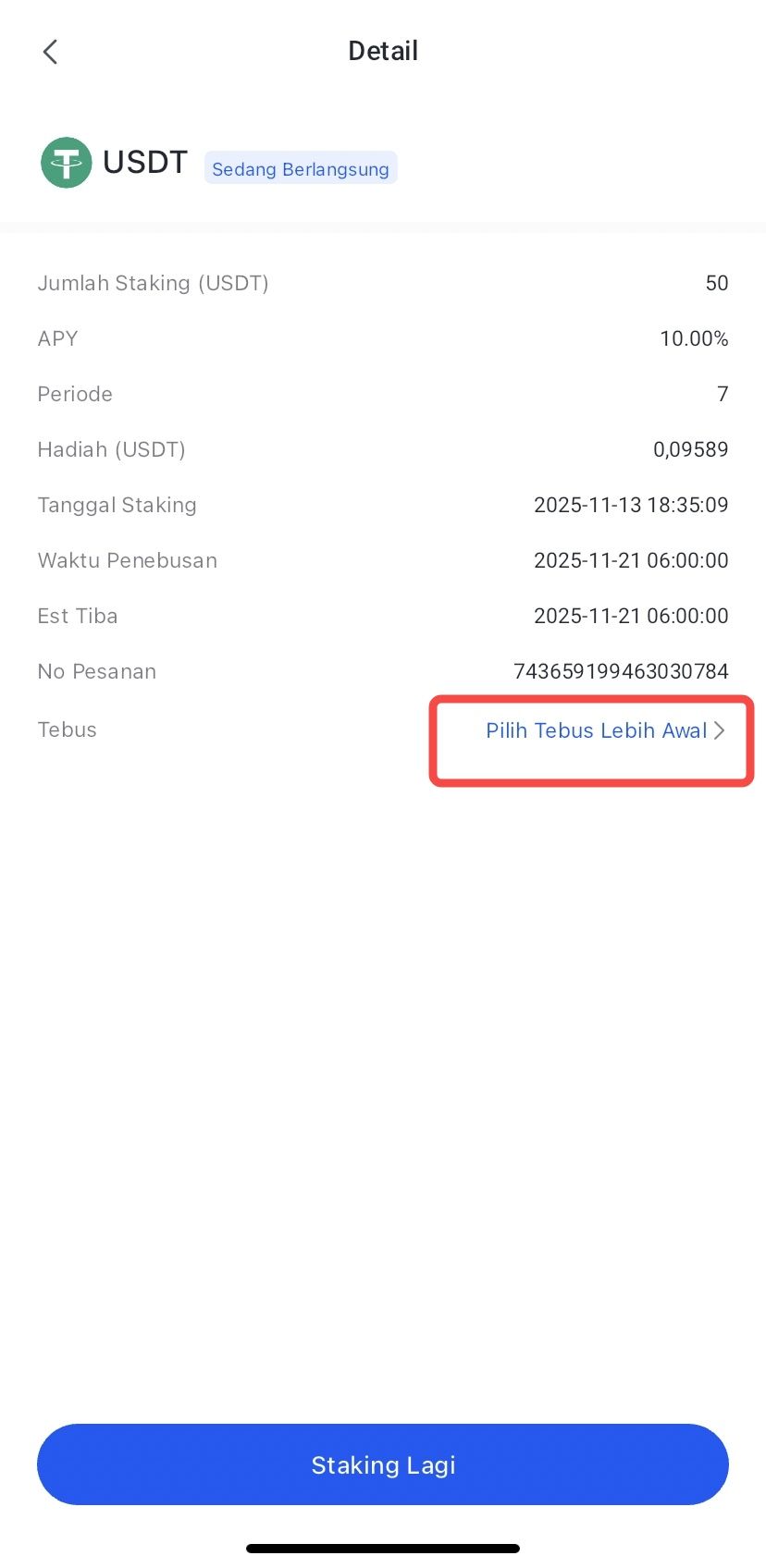
- Confirm by clicking Redeem.
- The redemption process has been completed, and your crypto asset funds will be processed according to the arrival time.
Conclusion
Staking POL on Bittime offers a fast, simple, and mobile-friendly path to earning returns on Polygon 2.0.
With APY6%, short period7 days, light minimum, and auto-renew feature, the staking process is very easy even for beginners.
Follow four simple steps—login, select staking, specify the amount, and confirm—and you'll be ready to receive your rewards once the period is over.
FAQ
What is the estimated APR for POL staking?
Staking POL on Bittime currently offersAPY 6.00%for a 7-day period. This number is subject to change, so always check the app.
Do I need to purchase POL first?
Yes. Make sure you have a POL balance. If you don't have one, open the menu.Tradeand buy POL directly from the app.
What is the difference between on-chain staking and staking via exchange?
On-chain provides full control and requires network fees. Exchanges like Bittime offer convenience and a more user-friendly mobile interface.
What is auto-renew?
Auto-renew will automatically re-enter the principal + reward into the next staking period without the need for manual confirmation.
Disclaimer: The views expressed belong exclusively to the author and do not reflect the views of this platform. This platform and its affiliates disclaim any responsibility for the accuracy or suitability of the information provided. It is for informational purposes only and not intended as financial or investment advice.

.png)