How to Stake PEPE on Bittime in 4 Easy Steps
2025-11-24
PEPE staking and meme coin staking practices are increasingly being chosen by users who want to maximize community tokens through weekly returns.
Bittime offers a staking option with a simple interface, allowing deposit, period selection, and confirmation to be completed in minutes.
Recent data from the Bittime app also shows that PEPE has a fixed-return staking option, allowing users to estimate the rewards they will receive over a specific period before locking up their assets.
What is PEPE staking on Bittime and how does the reward scheme work?
PEPE staking on Bittime is done through a periodic staking product that provides rewards based on a percentage of the APY. Currently, Bittime offers a seven-day PEPE staking option with a fixed return throughout the duration.
When a user stakes tokens, the assets will be locked until the period ends, and rewards are calculated based on the amount of PEPE staked and the applicable APY percentage.
Bittime displays product details such as minimum staking, maximum staking, interest calculation start schedule, period end schedule, and redemption time.
This information helps users make a clear decision before pressing the confirmation button.
The PEPE market price can also be monitored through the Bittime price page, allowing users to assess the token's volatility risk before locking in assets.
Read Also:PEPE Coin: Definition, History, and Everything You Need to Know
PEPE yield forecast on Bittime
The latest data from the Bittime app shows the details of PEPE staking products as follows:
• Est. APY: 5.00%
• Period:7 days
• Minimum staking:750.000 BABY
• Maximum strike:28.224.751.066 BABY
• Estimated reward:displayed automatically after the user enters the staking amount
• Auto-renew:available, can be activated to extend staking to the next period
• Rewards start to be calculated:one day after staking starts
• Complete timeline based on app views:
– Staking Start Date
– Start of Interest Accrual
– Staking Period: 7 day(s)
– Staking End Date
– Redemption Period: 0 day(s)
– Auto-renew Start Date
With a 5% APY for seven days, users can calculate their estimated weekly rewards without having to wait for product fluctuations. Rates are subject to change at any time, according to Bittime's policy, so double-checking before confirming is still recommended.
How to stake PEPE on Bittime — 4 easy steps
Here is the complete flow based on the original appearance of the Bittime application:
1. Open the Staking menu from the main page
Tap the iconStakingOn the dashboard, you can select from the list of assets or go directly to the menu that displays all staking options.
2. Select PEPE asset from the list
On the Staking page, scroll until you find PEPE and select a product with a seven-day period. Bittime will display an Estimated APY of 5%, a minimum staking of 750,000 PEPE, and a maximum limit.
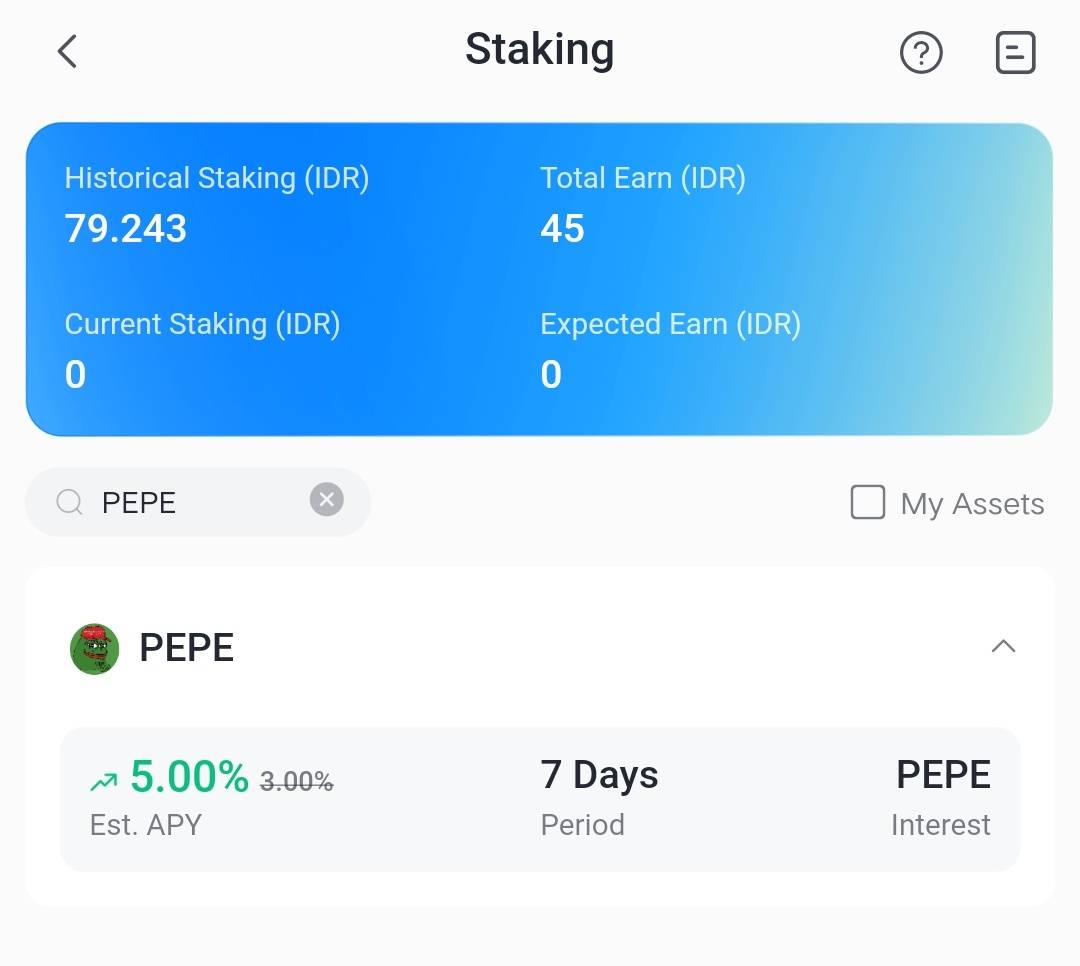
3. Enter the amount of PEPE you wish to stake.
In the "Enter the quantity" field, enter the number of tokens. The following information will appear automatically:
• Est. Interest (reward)
• Complete staking timeline
• Start to finish schedule
• Auto-renew option
For those who don't have a balance, there is a buttonPurchase PEPEto buy tokens first.
4. Read the agreement, tick the agreement, then confirm staking.
Enable the consent boxI have read and agree…, then press the confirm button. Once staking is active, you can check the status via Wallet >> Staking. If auto-renew is enabled, staking will automatically renew after the period ends.
How to Check PEPE Staking Assets
Users can monitor all staking activity directly through the app. Here are the complete steps:
- Login to your Bittime account
- Select menuAssetin the Home section
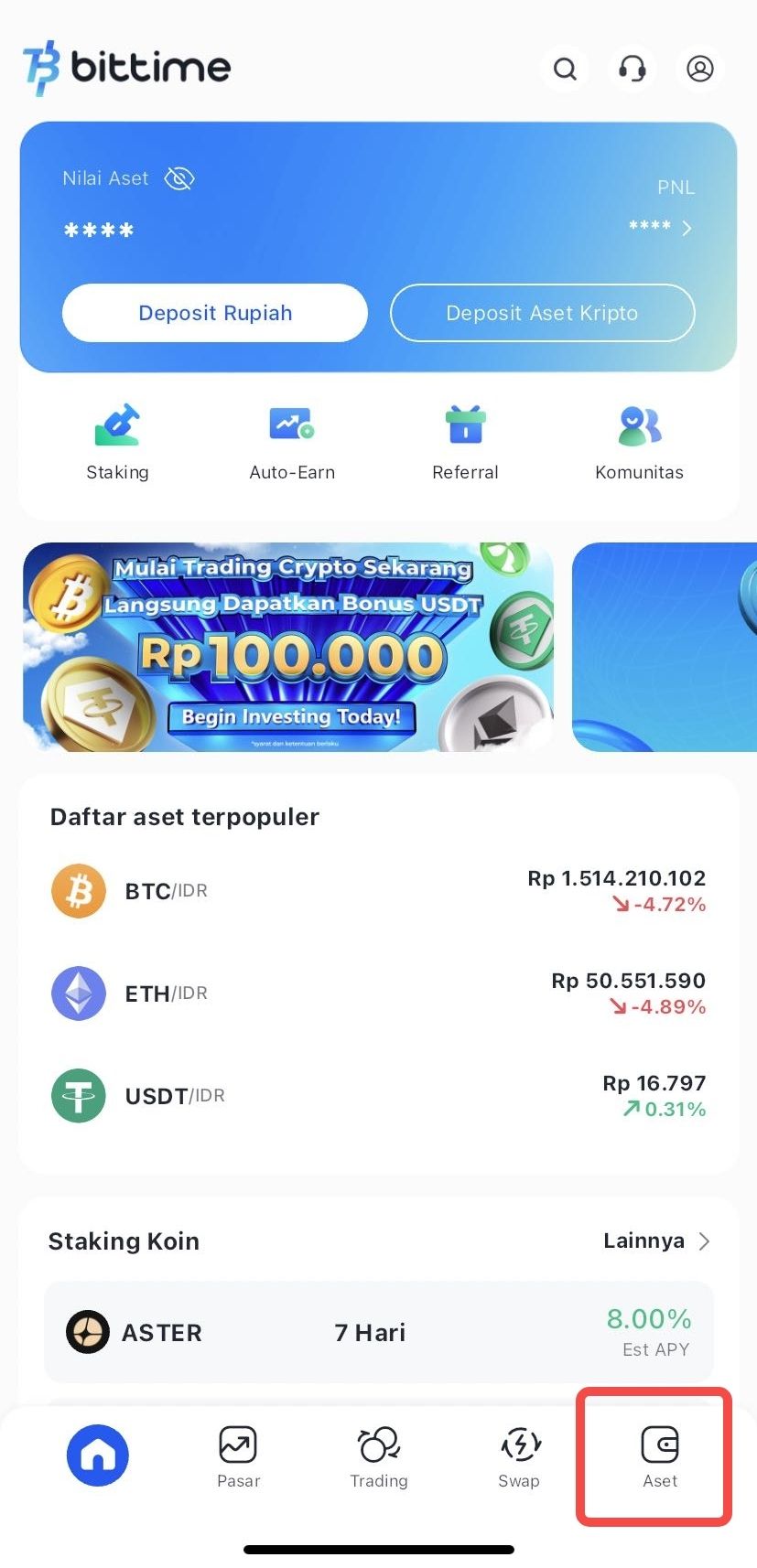
- Press optionsStakingto see the total PEPE currently being staked, current rewards, and staking period status
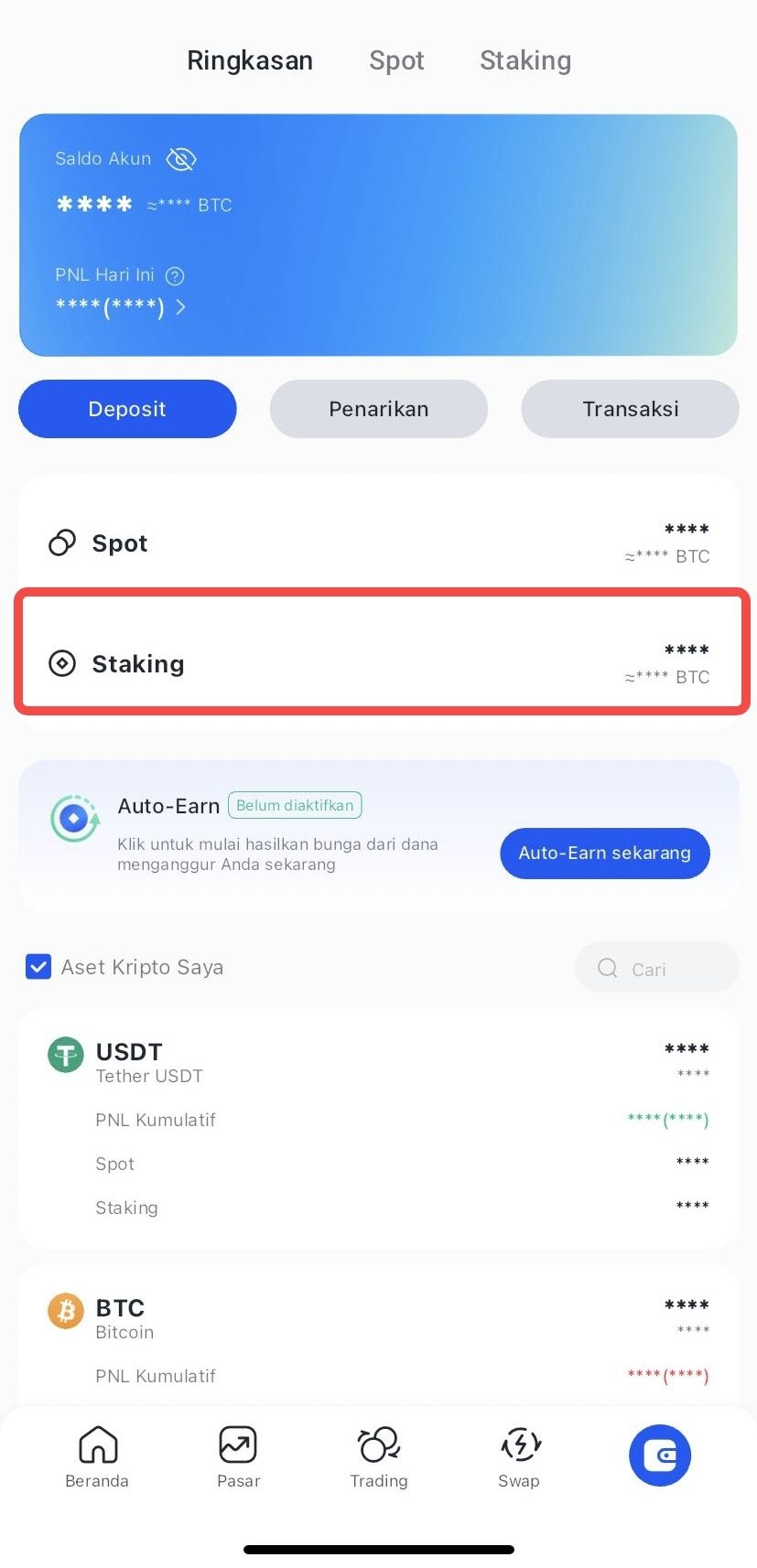
This menu makes it easy for users to monitor the development of yields and ensure that all tokens are in active staking status.
How to Do Early Redeem for PEPE Staking
Feature early redeemThis is available for users who wish to withdraw their stakes before the period ends. To do so:
- Login to your Bittime account
- Access menuAsseton Home
- Select the PEPE asset you want to redeem
- Press Choose Early Redeem / Choose Early Redeem
- Confirm by clickingRedeem / Tebus
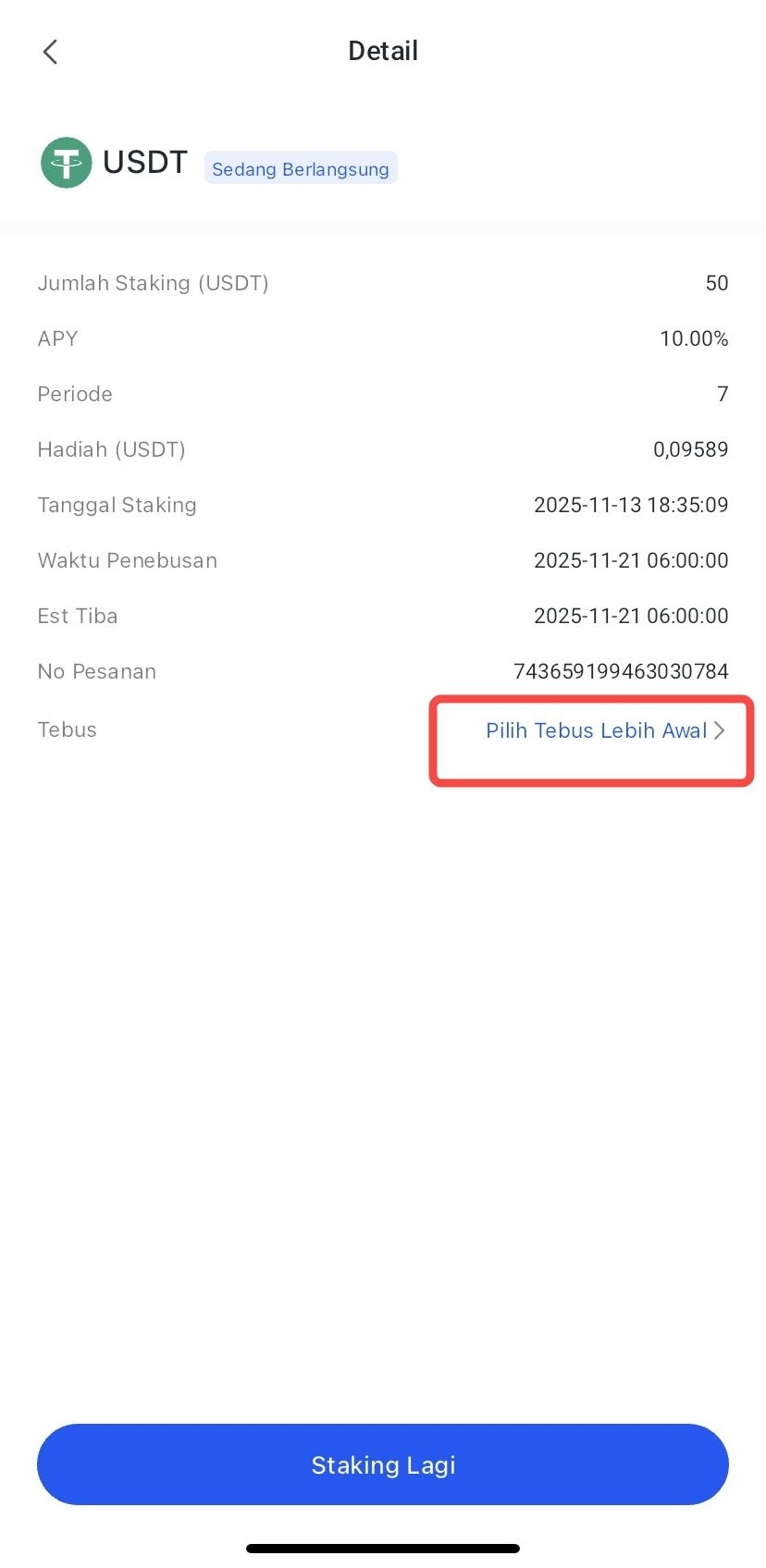
After confirmation, the redeem process will proceed as followsarrival timelisted. Assets will return to the spot balance once processing is complete.
How to monitor and cash out PEPE staking rewards
All staking details can be accessed through the Assets menu. In the Staking section, users can view:
• Amount of PEPE currently staked
• Reward estimation
• Schedule of period ending
• Status auto-renew
Once the seven day period is over, the tokens and rewards will be available for redemption forRedemption Period 0 days, meaning assets can be immediately liquidated. If auto-renew is enabled, staking will automatically renew to the next cycle without requiring new confirmation.
Conclusion
PEPE staking on Bittime offers a simple scheme with a fixed APY of 5% for a seven-day period. The process is fast, information is transparent, and rewards are calculated upfront.
However, PEPE volatility remains an important factor in assessing potential net returns.
By understanding the product requirements, minimum staking value, timeline, and auto-renew option, users can determine a staking strategy that suits their individual goals and needs.
FAQ
What is the minimum PEPE staking on Bittime?
The current minimum is750.000 BABY.
Are staking rewards paid in PEPE?
Yes, rewards are paid in PEPE tokens.
Are tokens locked during the staking period?
Yes, the tokens will be locked for seven days until the redemption time arrives.
Can I unstake before the period ends?
No. For fixed period products, unstake before maturity is not available.
What is the current APY for PEPE staking?
APY real-time: 5.00%for the period7 days, based on the latest app view.
Disclaimer: The views expressed belong exclusively to the author and do not reflect the views of this platform. This platform and its affiliates disclaim any responsibility for the accuracy or suitability of the information provided. It is for informational purposes only and not intended as financial or investment advice.

.png)