How to Use Dola AI for Work and Study: A Complete Guide
2026-09-10
The development of AI technology has led many people to look for tools that can help make work and learning activities faster. One of the tools that has attracted attention is Dola AI, an AI assistant that can help users organize activities, find information, generate ideas, and improve productivity.
Understanding how to use Dola AI can help you complete various tasks more efficiently. Not only for workers, Dola AI for students can also be a solution to support the learning process, manage schedules, and understand study materials.
Key Takeaways
- Dola AI can be used as a productivity assistant for work and study.
- Using Dola AI is fairly simple through commands or conversations with the AI.
- Dola AI helps save time when organizing tasks, finding ideas, and completing work.
What Is Dola AI?
Dola AI is an artificial intelligence-based assistant designed to help users carry out various digital activities through simple conversations.
Unlike regular productivity applications, an AI assistant such as Dola AI can understand user instructions and help generate solutions based on their needs.
You can use Dola AI for various activities, such as creating task lists, making plans, finding ideas, and helping understand specific information.
Read also: Pintarly Id vs Pelajarin AI: Which Is the Best AI Learning App for Indonesian Students?
How to Use Dola AI for Beginners
For new users, the Dola AI guide can begin with understanding how to provide clear instructions.
The more specific the command, the more relevant the results provided by the AI.
Here are the basic steps for using Dola AI:
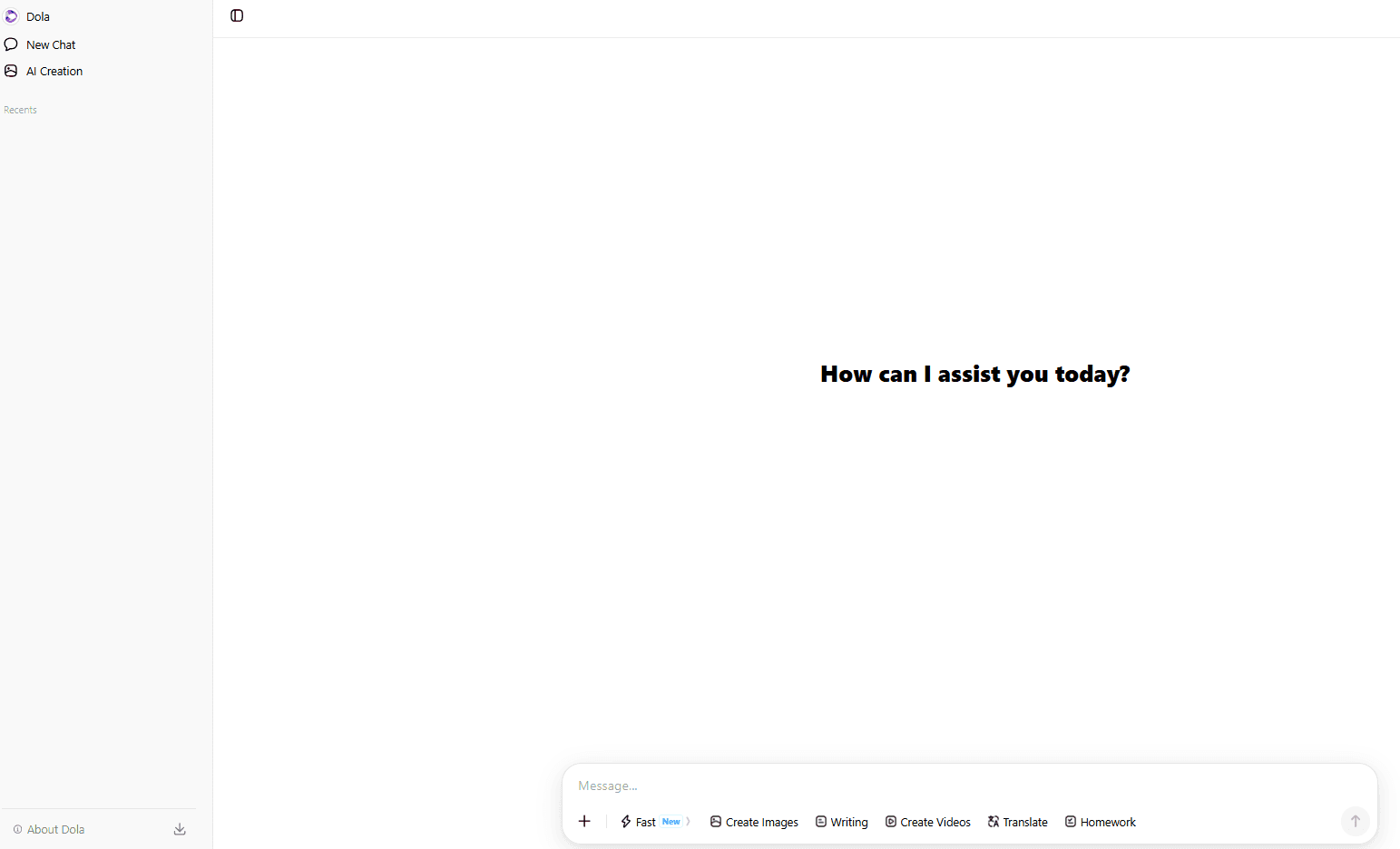
1. Access Dola AI
The first step is to open the Dola AI platform through the device you are using. Make sure your internet connection is stable so that the interaction with the AI runs smoothly. Once logged in, you can start giving commands through chat or the available features.
2. Give Clear Instructions
AI works based on the instructions provided by the user.
Example commands:
- "Create a one-week study schedule."
- "Help me create a list of today's tasks."
- "Explain this material in simple language."
Detailed instructions will help Dola AI provide answers that better match your needs.
3. Evaluate and Improve the Results
AI-generated results should still be reviewed before being used.
You can provide additional instructions to improve the answer, change the language style, or request a more detailed explanation.
How to Use Dola AI for Work
For professional workers, Dola AI for work can help with various activities that require time efficiency.
Some of the benefits include:
1. Helps Manage Schedules
One of the functions of an AI assistant is to help manage daily activities.
You can ask Dola AI to create a list of work priorities, remind you of deadlines, or organize an agenda.
This helps reduce repetitive administrative tasks.
2. Generate Ideas and Content Drafts
Dola AI can help creative professionals and businesses generate initial ideas.
For example:
- Create article concepts.
- Develop marketing campaign ideas.
- Create presentation outlines.
- Develop business ideas.
However, AI-generated results still need to be adapted to the brand's needs and character.
3. Helps Analyze Information
Workers often need time to understand large amounts of information.
With the help of Dola AI, you can request summaries, simple explanations, or key points from a piece of information.
Read also: 11 Best AI Humanizers in 2026: Make AI Text More Natural and Human-Like
How to Use Dola AI for Study
In addition to work, Dola AI for students can make the learning process more flexible.
Here are several ways to use Dola AI for studying:
1. Create a Study Schedule
Students can use Dola AI to create a study plan based on specific goals.
For example:
- Exam preparation schedule.
- Foreign language study plan.
- Allocating time between assignments and other activities.
2. Explain Difficult Topics
One of the benefits of AI is helping explain concepts that are difficult to understand.
You can ask Dola AI to explain material in simple language or provide examples of its application.
This makes the learning process easier to understand.
3. Help Find Assignment Ideas
Dola AI can help provide inspiration for school and college assignments.
For example:
- Research ideas.
- Paper structure.
- Discussion questions.
- Material summaries.
However, students still need to understand the material and should not simply copy AI-generated results.
Read also: What Is Ethos AI? An Expert Network Powered by Voice AI
Tips for Using Dola AI More Effectively
To get the best results, follow these tips:
Use Specific Prompts
Do not provide only general commands.
Example:
Less effective:
"Write an article."
More effective:
"Write a 500-word article about the benefits of AI for university students using a formal writing style."
Provide Context
The more information you provide, the more relevant the AI's results will be.
Add the target audience, format, writing style, and objective.
Use AI as a Support Tool
AI should be used as a support tool, not as a replacement for human capabilities.
Always verify the information to ensure that the information used is accurate and relevant.
Read also: What Is Stitch AI? Get to Know Google Stitch for UI/UX Design
Benefits of Using Dola AI for Productivity
Some of the benefits of using Dola AI include:
- Save time completing tasks.
- Help generate new ideas.
- Make activity management easier.
- Help understand complex information.
- Support work and the learning process.
When used properly, an AI assistant can become a digital partner that supports everyday activities.
Dola AI vs. Regular Digital Assistants
The main difference between Dola AI and regular digital assistants is its ability to understand conversational context.
AI does not simply execute basic commands but can also help create solutions based on the user's needs.
For this reason, many users are beginning to use AI to improve productivity at work and in their studies.
Read also: What Is ChatGPT for Teens? OpenAI's New Feature for Ages 13–17
Is Dola AI Suitable for Everyone?
Dola AI can be used by various groups, including students, university students, office workers, and business professionals.
However, its effectiveness still depends on how users provide instructions.
The better users understand how to communicate with AI, the greater the benefits they can gain.
If you want to keep up with the latest developments in AI technology and other productivity tools, follow the latest information through Bittime so you do not miss the latest digital technology updates.
Conclusion
Using Dola AI is actually quite simple: provide clear instructions according to your needs. This tool can help with various activities, from managing work and generating ideas to supporting the learning process.
For workers, using Dola AI for work can help increase productivity and reduce repetitive tasks. Meanwhile, for students, using Dola AI for study can help them understand study materials and organize their study schedules.

Bittime is a licensed and supervised Digital Financial Asset Trader (PAKD) platform regulated by the Financial Services Authority (OJK) — where you can buy Bitcoin in Indonesia and hundreds of other crypto assets starting from IDR 10,000. The registration process is fast, secure, and can be started today.
Monitor USDT to IDR conversions and your favorite crypto asset price movements in real time. Everything is available in a single crypto investment app that can be downloaded for free from the Play Store.
Ready to get started? Register now on Bittime and execute your investment strategy with a platform trusted by millions of users in Indonesia.
FAQ
What is Dola AI?
Dola AI is an artificial intelligence-based assistant that helps users complete various activities through conversational commands.
How do you use Dola AI?
Using Dola AI starts with opening the platform, providing clear instructions, and then adjusting the results according to your needs.
Can Dola AI be used for studying?
Yes, Dola AI for students can help create study schedules, explain materials, and provide assignment ideas.
Can Dola AI help with work?
Yes, Dola AI for work can help manage schedules, generate ideas, create drafts, and assist with information analysis.
Does Dola AI replace humans?
No. Dola AI should be used as a support tool to improve productivity, while final decisions remain with the user.
Disclaimer: The views expressed belong exclusively to the author and do not reflect the views of this platform. This platform and its affiliates disclaim any responsibility for the accuracy or suitability of the information provided. It is for informational purposes only and not intended as financial or investment advice.

.png)