How to Use Bitgold Testnet Faucet: Token Claim Guide
2026-10-28
On October 27, 2026, the official Openverse Global account on X announced that the Bitgold Testnet Faucet was officially opened to the community. The tweet invited community members to try the network, claim tokens, and test Bitgold Network features.
This article covers how to use the Bitgold Testnet Faucet, from adding the network to a wallet to ensuring tBTG tokens arrive, including the claim limits that apply on the Bitgold testnet.
Key Takeaways
- The faucet distributes 0.5 tBTG per claim on the Bitgold Testnet network (Chain ID 617) for testing and dApp development.
- One address can claim 3 times per 24 hours, and one IP is limited to 3 addresses.
- The faucet balance was recorded at 0 tBTG in the screenshot, so claims may fail and need to be retried later.
What Is Bitgold Testnet Faucet?
Bitgold Testnet Faucet is an official service that distributes tBTG test tokens for free. According to its page, this token is intended for contract deployment, testing, and dApp development, not for investment.
The Bitgold faucet runs on a network separate from mainnet. The main Bitgold site describes BTG as a native coin with a fixed supply of 200 million, a gas fee of 0.000005 BTG per transaction, and PoSA consensus. Therefore, tBTG only applies on the testnet and cannot be used on mainnet.
Readers who want to get to know real crypto assets through a regulated platform can buy Bitcoin after registering at Bittime, a Digital Financial Asset Trader supervised by OJK.
Read Also: Impact of the AI Bubble on Crypto: Can Bitcoin Survive?
Bitgold Testnet Network Data
Before claiming, prepare the following network data listed on the faucet page:
- Network name: Bitgold Testnet
- Chain ID: 617 (0x269)
- Native token: tBTG, 18 decimals
- RPC endpoint: https://testnet1.bitgold.network
- Block explorer: testnet.bitgold.live
The faucet page provides an Add network to wallet button that writes this data to the wallet automatically, so manual input is usually not needed.
How to Use Bitgold Testnet Faucet
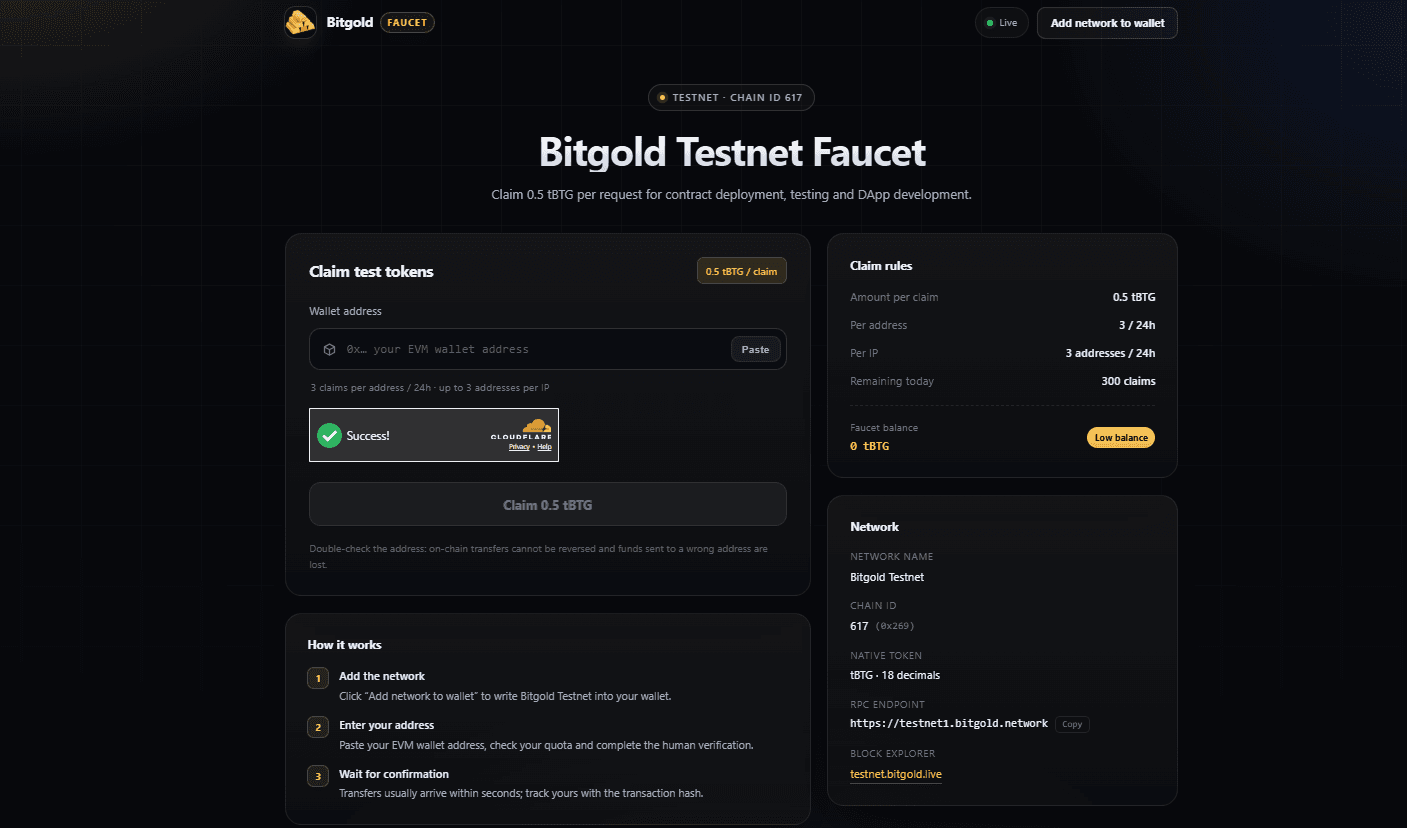
The following Bitgold faucet tutorial flow is based on the How it works section on its official site:
- Open faucet.bitgold.network. Make sure the site address exactly matches the one announced on the official Openverse Global account.
- Click Add network to wallet and approve the request in your wallet.
- Copy your EVM wallet address, i.e., the address starting with 0x, then paste it into the Wallet address field. A Paste button is available to speed this up.
- Check the quota in the Claim rules panel, then complete the Cloudflare human verification until the Success mark appears.
- Click Claim 0.5 tBTG.
- Wait for confirmation. The faucet states that transfers usually arrive within seconds, and the result can be tracked via the transaction hash at testnet.bitgold.live.
When no address is entered, the claim button appears inactive. Enter the address correctly first.
Claim Rules and Limits
The Claim rules panel displays the following limits:
- 0.5 tBTG per claim.
- Maximum 3 claims per address in 24 hours, equivalent to 1.5 tBTG per day.
- One IP may be used for 3 addresses in 24 hours.
- The daily quota had 300 claims remaining at the time of the screenshot.
One important note: the Faucet balance column shows 0 tBTG with the label Low balance. In that condition, claims may fail. Try again later or monitor official announcements on the Openverse Global X account.
Read Also: Ethereum Foundation Sells US$6.42 Million in ETH, Is ETH Price Under Pressure?
Things to Note
The faucet warns that on-chain transfers cannot be canceled, so tokens sent to the wrong address will be lost. Double-check the address before pressing the claim button.
Also beware of fake sites. Use only links from official accounts, and never enter your seed phrase or private key into any field. The faucet only needs a public address. Messages promising mainnet rewards from testnet tokens should be treated with suspicion.
For those who want to dig deeper, Bitgold developer documentation is available through its main site.
Read Also: Bitcoin Price This Week: 4 Important Agendas to Watch
Conclusion
Claiming Bitgold testnet tokens requires only three things: the network already added, the correct EVM address, and Cloudflare verification. As a Bitgold testnet faucet guide, this guide confirms the limit of 0.5 tBTG per claim and 3 claims per address every 24 hours. Because the faucet balance was low at times, patience and repeated checks are often needed.
Check the prices of Bitcoin (BTC), Ethereum (ETH), XRP, Solana (SOL), GRAM, and BNB as well as leading memecoin DOGE. You can trade directly on Bittime!

Bittime is a licensed Digital Financial Asset Trader (PAKD) platform supervised by the Financial Services Authority — a place where you can buy Bitcoin in Indonesia and hundreds of other crypto assets starting from Rp10,000. The registration process is fast, secure, and can be started today.
Monitor the USDT to IDR conversion and the price movements of your favorite crypto assets in real time. Everything is available in one crypto investment app that can be downloaded for free on the Play Store.
Ready to start? Register now at Bittime and execute your investment strategy with a platform trusted by millions of users in Indonesia.
FAQ
How much tBTG do you get from the Bitgold faucet?
Each claim gives 0.5 tBTG. This amount is the same for all addresses.
What wallet is needed?
A wallet that supports 0x-prefixed EVM addresses. The Bitgold site also recommends Faypay and OpenWallet in its ecosystem section.
Why did my claim fail?
Possible causes: invalid address, 24-hour quota exhausted, verification not completed, or the faucet balance is currently empty.
Can tBTG be exchanged for mainnet BTG?
There is no official information about that. The faucet page only states that tBTG is for contract testing and dApps.
Where can I check the claim transaction?
Use the block explorer testnet.bitgold.live and search by transaction hash or wallet address.
Disclaimer: This article is for informational purposes and is not investment advice. Testnet tokens are intended for testing and are not meant to be investment assets.
Disclaimer: The views expressed belong exclusively to the author and do not reflect the views of this platform. This platform and its affiliates disclaim any responsibility for the accuracy or suitability of the information provided. It is for informational purposes only and not intended as financial or investment advice.

.png)