How to Install ClipX in Browser
2026-02-19
ClipXis a BNB Chain based extension designed to facilitate direct crypto interactions on social media X (Twitter).
With escrow tipping, token swap, and risk analysis features, ClipX delivers a safer and more convenient Social-Fi experience.
This extension can be installed in browsers like Chrome to provide quick access to trading, tipping, and analytics without having to leave the timeline.
Key Takeaways
ClipXis a browser extension that integrates crypto trading and tipping directly into X.
This extension supports BNB Chain tokens with an escrow system for transaction security.
ClipX can be installed in Chrome with simple steps via the extensions menu.
What is ClipX?
ClipXis a browser plugin that acts as a bridge between social media and crypto activities. With ClipX, users can send and receive BNB Chain tokens directly from X posts. The escrow tipping system ensures that sent tokens are secure, only received if the recipient claims them, and returned if unclaimed.
In addition to tipping, ClipX also provides token swap features, chart analysis, and market data integration.
This makes ClipX not just a tipping tool, but a Social-Fi platform that combines education and hands-on crypto usage.
Read also:Tej Coin Mobile Mining: An Easy Way to Mine Cryptocurrency on Your Phone
How to Install ClipX in Browser
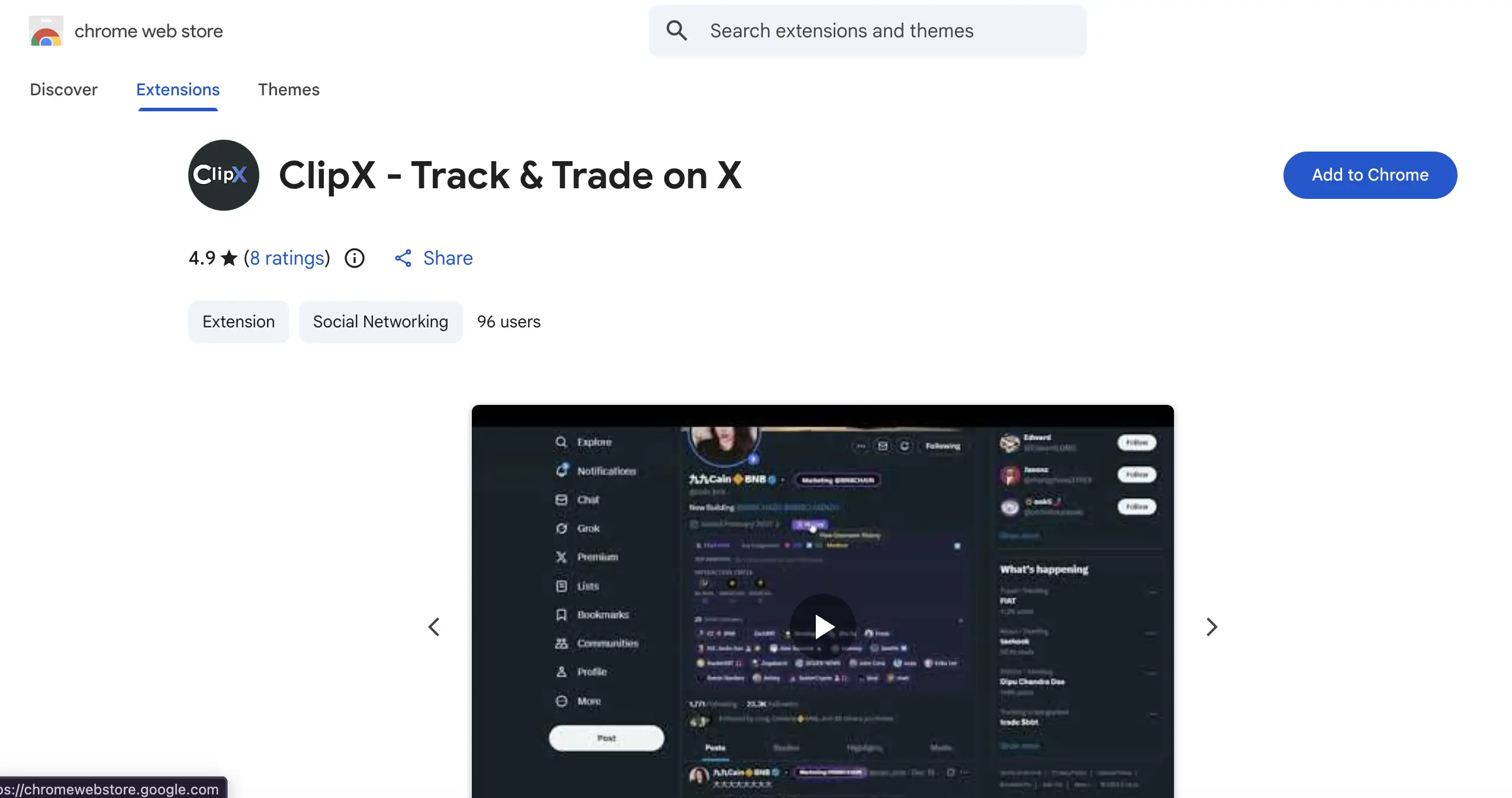
To install ClipX in Chrome or any Chromium-based browser, follow these steps:
Go to Chrome Web Store or the official ClipX website.
Search ClipX extension and click the “Add to Chrome” button.
Confirm the installation by selecting “Add Extension”.
Once installed, the ClipX icon will appear in the browser toolbar.
Click the icon to perform the initial setup, including connecting your BNB Chain wallet.
Once setup is complete, ClipX is ready to use for tipping, trading, and analysis directly on X.
Read also:Complete CoinQuant Airdrop Guide: How to Claim Free CQX Tokens
ClipX Key Features
Escrow Tipping:Tokens sent will be held until the recipient claims them, reducing the risk of errors.
Token Swap:Allows exchange of BNB Chain tokens without leaving the X feed.
Market Analysis:Provides charts, heatmaps, and data holders directly on the timeline.
Profile Intelligence:Scan profiles with bio analysis, engagement, and username history.
Smart Followers:Displays KOLs, VCs, and projects that follow an account.
Read also:What Is Golden Dome Reserve (DOME) Crypto? A Complete Guide
ClipX Smart Contract Security
The official contract address of ClipX on BNB Chain is0xc269d59a0d608ea0bd672f2f4616c372d8554444.
This smart contract has been verified on blockchain explorer and audited to ensure there are no hidden minting or blacklist functions.
The integrated Risk Check Engine system helps users detect potential honey-pots or unhealthy token distributions.
Conclusion
ClipXis a Social-Fi innovation that brings crypto trading and tipping directly to the browser. With easy installation in Chrome, users can access escrow tipping, token swaps, and market analysis without leaving X.
Verified contract addresses and additional security systems make ClipX a worthwhile extension for BNB Chain users.
How to Buy Crypto on Bittime?
Want to trade sell buy Bitcoins and crypto investment easily? Bittime is here to help! As an Indonesian crypto exchange officially registered with Bappebti, Bittime ensures every transaction is safe and fast.
Start with registration and identity verification, then make a minimum deposit of IDR 10,000. After that, you can immediately buy your favorite digital assets!
Check the exchange rate BTC to IDR, ETH to IDR, SOL to IDR and other crypto assets to find out today's crypto market trends in real-time on Bittime.
Also, visit the Bittime Blog for interesting updates and educational information about the crypto world. Find reliable articles about Web3, blockchain technology, and digital asset investment tips designed to enrich your crypto knowledge.
FAQ
What is ClipX?
ClipXis a BNB Chain-based browser extension for tipping and trading crypto directly on X.
How to install ClipX on Chrome?
Search for ClipX in the Chrome Web Store, click “Add to Chrome,” and then setup your BNB Chain wallet.
What is ClipX's official contract address?
0xc269d59a0d608ea0bd672f2f4616c372d8554444.
Is ClipX safe to use?
Yes, ClipX smart contract has been verified and equipped with Risk Check Engine system.
What are the main features of ClipX?
Escrow tipping, token swap, market analysis, profile intelligence, dan smart followers.
Disclaimer: The views expressed belong exclusively to the author and do not reflect the views of this platform. This platform and its affiliates disclaim any responsibility for the accuracy or suitability of the information provided. It is for informational purposes only and not intended as financial or investment advice.

.png)