How to Buy USDT with BCA Bank: Complete Guide to Deposits and Transactions on Bittime
2026-02-16
Indonesia's leading digital asset exchange platform now provides national banking customers with easy access to crypto assets through a secure and regulated distribution channel.
Through the integration of the Virtual Account system, users can now convert fiat currencies into digital assets such as Tether (USDT) in an instant and efficient process.
Systematically designed steps enable investors from various backgrounds to start building their digital portfolio without significant technical barriers.
Key Takeaways
Users can utilize BCA's bank transfer service to automatically top up their Rupiah balance via the Virtual Account feature in the app.
The security of every transaction is guaranteed by Bappebti supervision, so that every deposited fund has clear legal protection according to regulations in Indonesia.
The system requires security PIN verification at every final stage of the transaction to ensure that only the authorized account owner can execute asset purchases.
Understanding the Role of USDT and the Importance of KYC Verification for Investors
Understanding how to buy USDT with BCA bank starts with recognizing USDT's crucial role as a stablecoin in the global crypto market.
USDT is a digital asset whose value is pegged one-to-one to the United States dollar, making it an ideal instrument for protecting asset value from extreme market volatility.
According to information from reputable crypto data providers, using local banking channels like BCA is the most recommended method due to the speed of fund clearing, which typically occurs within minutes.
Before proceeding to the transfer process, each user is required to complete the identity verification or KYC stage in accordance with Anti-Money Laundering (APL) standards.
This process is crucial for opening transaction limits and ensuring the integrity of the trading ecosystem is maintained from illegal activity.
Once the account is declared active, users can access the deposit menu to obtain the account number for the transfer, which is unique to each individual.
Read also:How to Deposit Rupiah and Crypto Assets on Bittime: It's So Easy!
Tutorial on How to Deposit Rupiah Through BCA Banking Services
Here are the procedures for making a Rupiah deposit using BCA banking services:
Run the Bittime app on your mobile device and log in to your verified account.
Go to the main page and select the Rupiah Deposit menu to see a list of available payment methods.
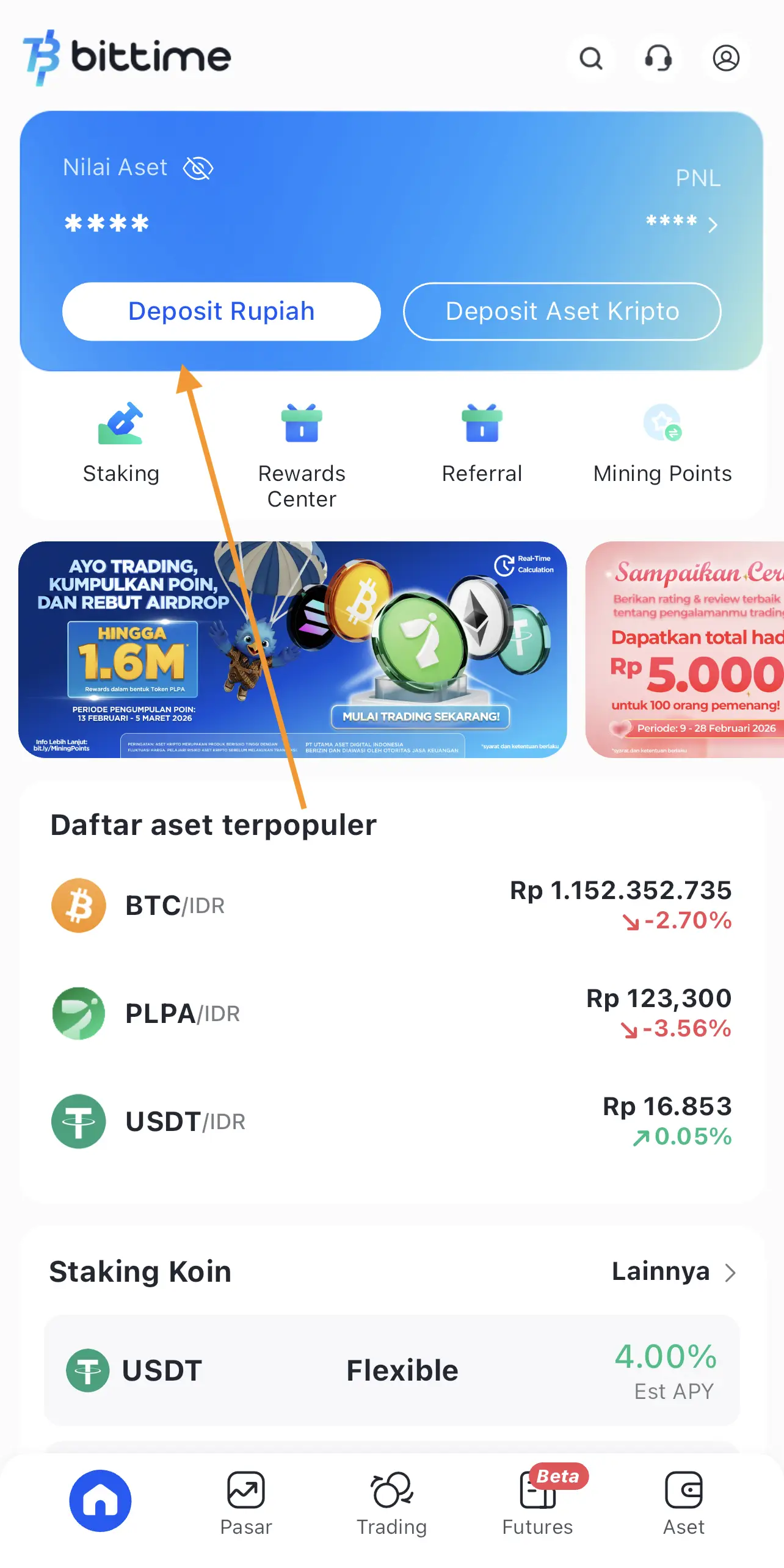
Select the Bank Transfer option and search for BCA Bank as the destination for your deposit.
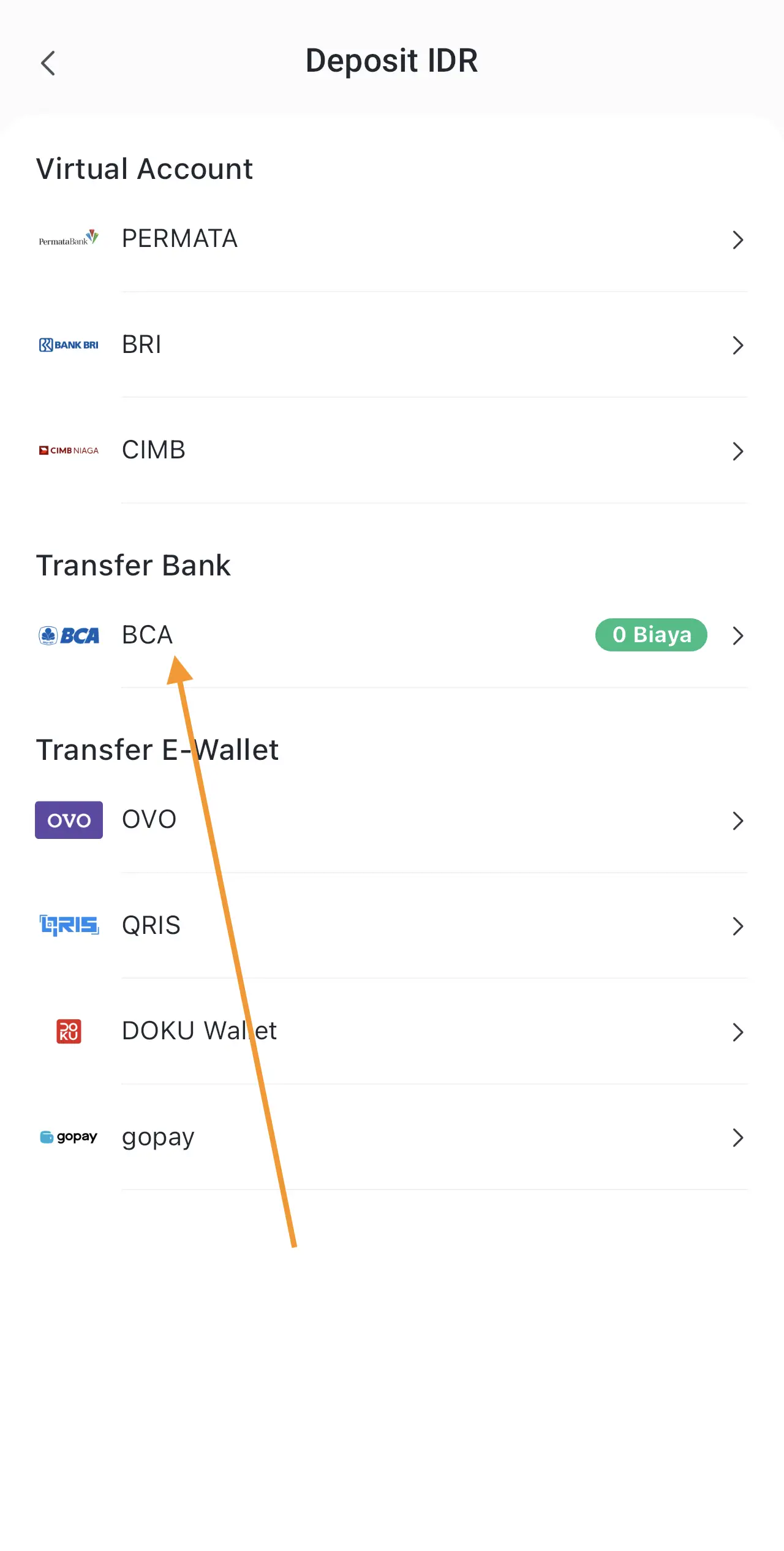
Copy the Virtual Account number displayed on the application screen and enter the nominal amount you wish to deposit.
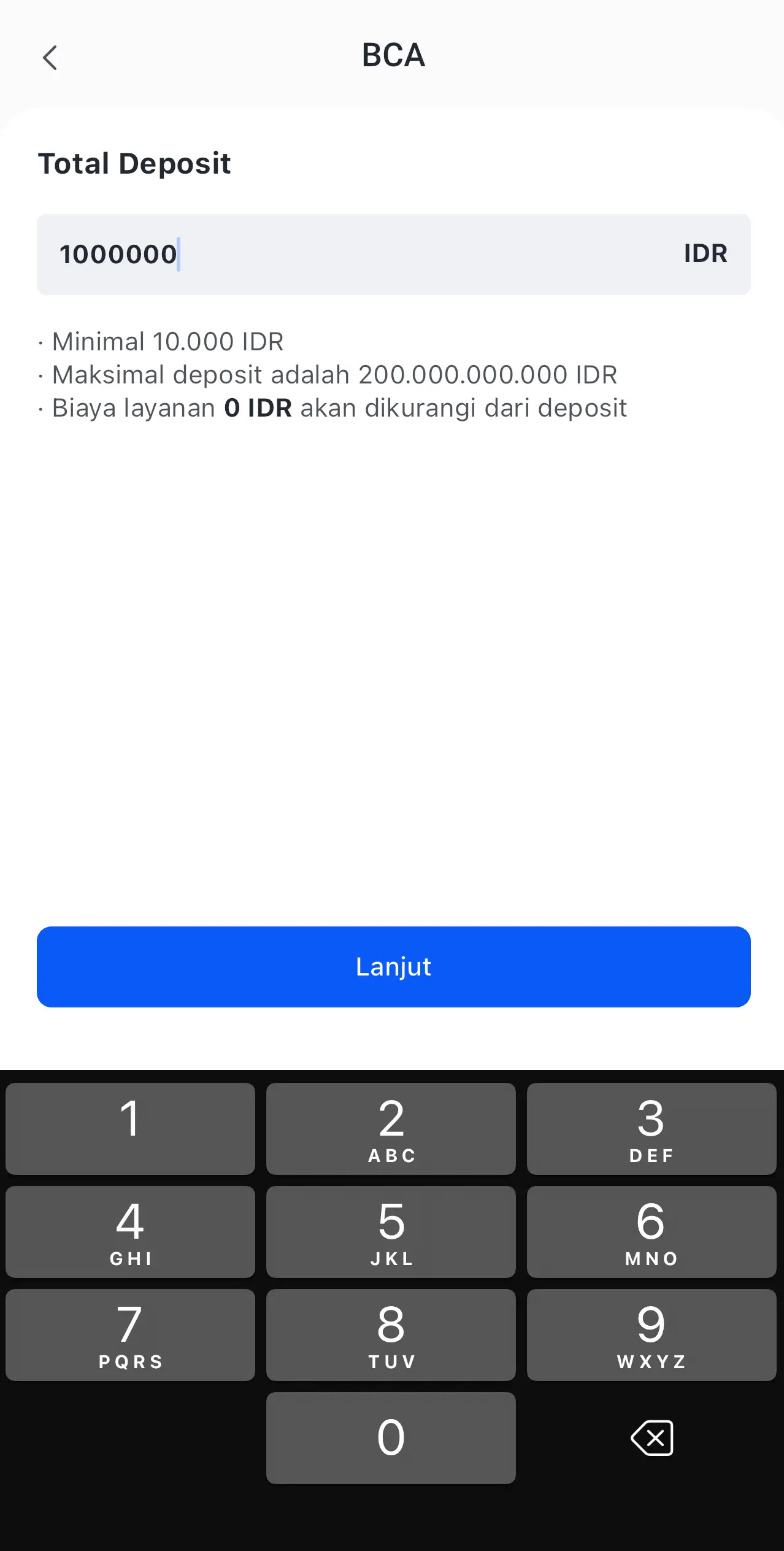
Use the m-BCA, klikBCA, or BCA ATM services to send funds to the Virtual Account number.
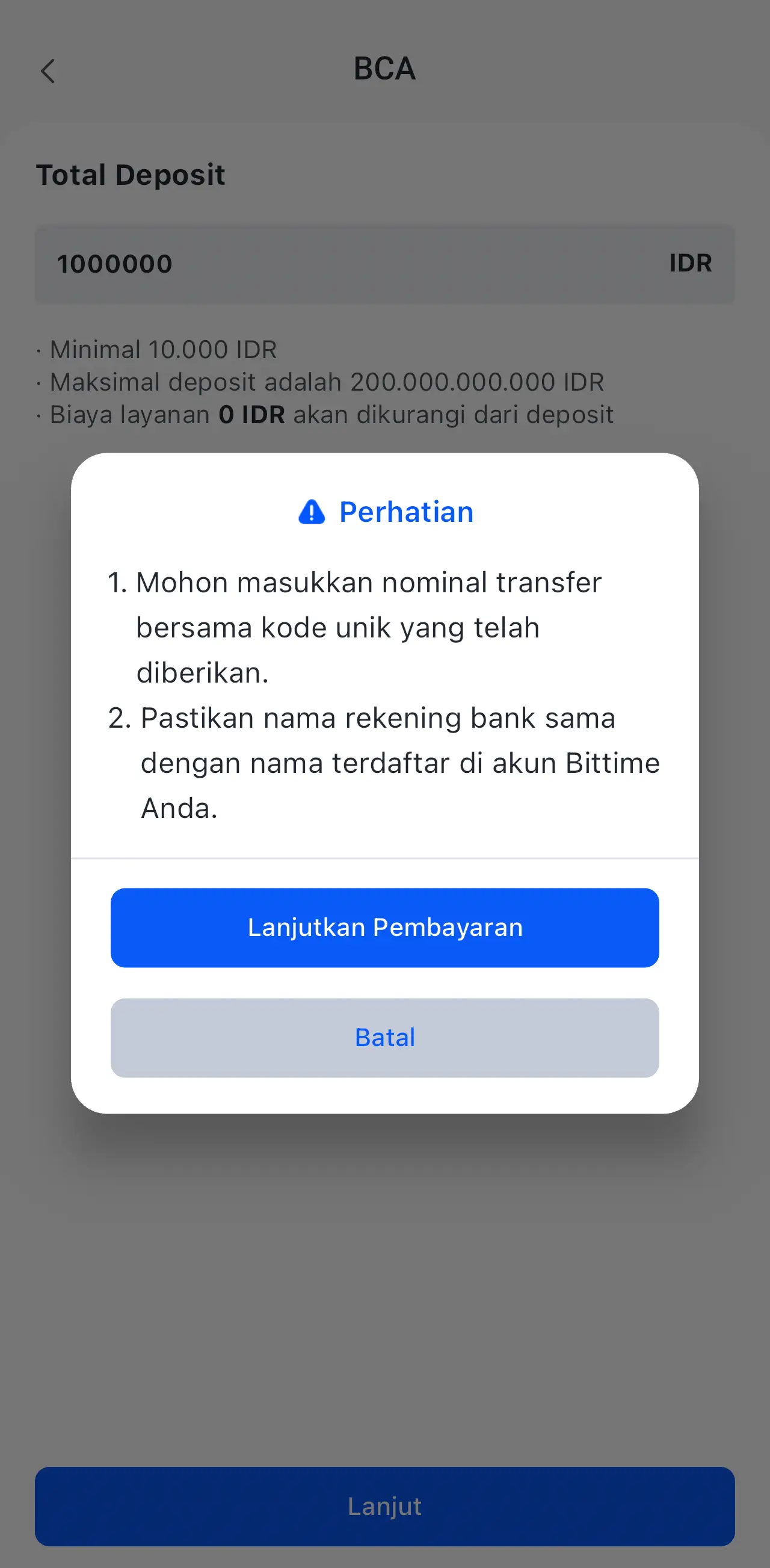
Check the balance on your app's digital wallet after receiving a notification that the transfer has been successfully processed by the system.
Read also:1 USDT to IDR
Execution Steps: How to Buy USDT with IDR Balance and PIN Activation
Once the IDR balance has been successfully credited to your account, the next step is to purchase digital assets in real time. This step involves selecting the appropriate trading pair on the spot market to convert your Rupiah funds into USDT.
Here is a technical guide to executing USDT purchases and activating security features:
Click on the Market menu in the app, then search for and select the USDT/IDR trading pair.
Specify the amount of Rupiah you wish to spend or use a percentage of your available balance to make data entry easier.
Press the Buy button to send transaction instructions directly into the exchange's trading engine.
Enter your six-digit security PIN as a form of final authorization so that the transaction can be processed further.
If you are a new user and do not have a PIN, the system will guide you to create a new PIN through an automatic confirmation window.
Wait for the success message to appear, then verify your USDT balance via the asset or wallet menu to ensure the transaction is complete.
Read also:How to Buy Tether USDT (USDT)
Layered Security: The Function of Security PINs in Protecting Digital Assets
It is important for users to understand that the security PIN entered in the fourth step serves as the last line of defense for your digital assets.
Unlike a login password, a PIN is used specifically to authorize activities involving the movement of value, such as buying and selling or withdrawing funds to a bank account.
Bittime ensures that these procedures are strictly implemented to minimize the risk of account misuse by irresponsible parties.
Conclusion
In conclusion, the convenience of how to buy USDT with BCA bank provides traders with high flexibility to respond to crypto market dynamics at any time.
Solid banking integration coupled with a PIN security layer makes the investment experience more convenient and structured for users in Indonesia.
Make sure to always check the transaction details before making the final confirmation to avoid errors in sending funds or selecting prices in the market.
How to Buy Crypto on Bittime?

Want to trade sell buy Bitcoins and crypto investment easily? Bittime is here to help! As an Indonesian crypto exchange officially registered with Bappebti, Bittime ensures every transaction is safe and fast.
Start with registration and identity verification, then make a minimum deposit of IDR 10,000. After that, you can immediately buy your favorite digital assets!
Check the exchange rate BTC to IDR, ETH to IDR, SOL to IDR and other crypto assets to find out today's crypto market trends in real-time on Bittime.
Also, visit the Bittime Blog for interesting updates and educational information about the crypto world. Find reliable articles about Web3, blockchain technology, and digital asset investment tips designed to enrich your crypto knowledge.
FAQ
Can I buy USDT on Bittime using m-BCA?
Yes, you can use the m-Transfer feature in the m-BCA application to send funds to the BCA Virtual Account number listed in the Bittime application instantly.
What is the minimum transfer from BCA to buy USDT?
The minimum Rupiah deposit at Bittime is very affordable, starting from IDR 10,000, so you can start investing in USDT with a small amount of capital.
How long does it take for the BCA balance to enter the Bittime account?
The deposit process via BCA Virtual Account is processed automatically by the system within 24 hours and the balance will usually be credited to the application wallet within minutes.
Why do I have to enter a PIN when buying USDT?
The security PIN serves as an additional layer of protection (Two-Factor Authentication) to ensure that the asset purchase transaction is actually carried out by the legitimate account owner.
Is there an admin fee for transfers from BCA bank?
Transfer fees follow BCA bank regulations for transfers to Virtual Accounts. However, Bittime frequently offers no-deposit promotions, which you can check on the app's promotions page.
Disclaimer: The views expressed belong exclusively to the author and do not reflect the views of this platform. This platform and its affiliates disclaim any responsibility for the accuracy or suitability of the information provided. It is for informational purposes only and not intended as financial or investment advice.

.png)