Prompt AI How to Turn Photos into Monster High Using ChatGPT
2026-02-10
Transforming a photo into a Monster High character is no longer a hassle. With the help of the image version of ChatGPT (DALL·E) or another AI Image Generator, anyone can look like an iconic, characterful, goth-glam doll.
This trend is going viral on social mediabecause the results are unique, personal, and very aesthetic, suitable for avatars, Instagram content, and personal branding.
Key Points
- You can turn your photo into Monster High with just one right AI prompt.
- Modern ChatGPT and AI Image Generator already support direct photo upload.
- Prompt details greatly determine the quality and similarity of the final result.
What is Monster High Style in AI Image?
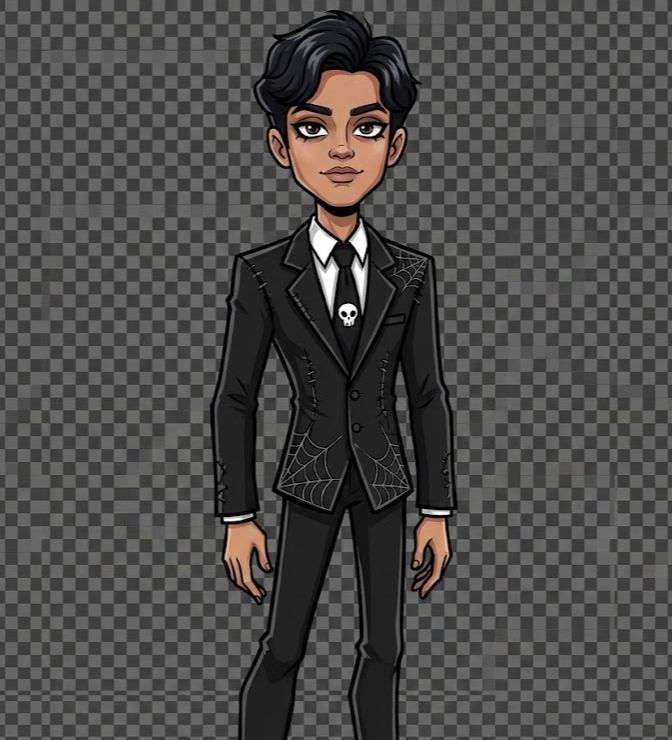
Monster High is a visual style of doll characters characterized by gothic-glam, tall, doll-like proportions, dramatic makeup, and touches of monster elements such as vampires, zombies, or Frankenstein-style characters. In the world of AI image generation, this style can be replicated through visual descriptions.which is correct in the prompt.
The AI doesn't "copy" the Monster High characters directly, but rather interprets their visual style: edgy fashion, contrasting colors, bold makeup, and a modern fantasy aura. This makes the results safe to use as creative content.
Read Also:Wow! Polaroid Gemini AI: Retro Photo Trends with a Twist
AI Applications and Services That Can Be Used
To turn a photo into a Monster High character, you'll need an AI service that supports image upload and visualization, not just text. Some popular options include:
- ChatGPT (version with image feature / DALL·E)
- Gemini AI, Grok AI
- Other AI Image Generators like Leonardo AI, Runway, and the like
Make sure the service you choose supports image-to-image generation so that the results resemble the original photo.
Read Also:Gemini AI Male Prompts to Look Cool and Aesthetic
AI Prompt Example: Change Photo to Monster High
Here are the ready-to-use promptswhich you can copy and paste directly. Upload the photo first, then send a prompt based on the condition of your photo.
Female Solo Photo
Transform the uploaded female subject into a Monster High cartoon-style character. Preserve her hairstyle, outfit, pose, facial expression, accessories, and skin tone, but reinterpret them in the distinct Monster High doll aesthetic.
Apply tall, slim, slightly exaggerated proportions with long legs and arms and an elegant angular posture. Create big almond-shaped eyes with bold eyeliner, dramatic eyeshadow, long lashes, defined glossy lips, and stylized brows. Keep her original outfit but restyle it with a gothic-glam Monster High twist using sharp outlines, plaid or striped textures, lace, layered details, bold belts, statement jewelry, subtle studs or skull-inspired accents. Maintain her original skin tone using smooth flat shading with soft highlights.
Render voluminous shiny hair with stylized flow and subtle bold streaks if suitable. Add dramatic platform heels or edgy boots. Use a transparent background like a Monster High character sheet. Full body visible, occupying about 80% of the frame.
Solo Photo of a Hijab-Wearing Woman
Transform the uploaded hijab-wearing female subject into a Monster High cartoon-style character. Preserve her hijab style, outfit details, pose, facial expression, accessories, and skin tone while adapting them into the Monster High doll aesthetic. Apply tall, slim, slightly exaggerated proportions with long legs and elegant posture.
Create large almond-shaped eyes with bold eyeliner and defined lashes while maintaining modest styling. Keep the hijab shape and coverage intact but stylize the fabric with clean cartoon linework, subtle gothic-inspired textures, layered details, and sharp outlines.
Restyle the outfit with Monster High-inspired elements such as plaid accents, structured silhouettes, statement belts, subtle lace patterns, or decorative studs while keeping it modest.
Maintain her natural skin tone with smooth flat shading. Add stylized high-platform boots or fashion-forward footwear that remains proportionate. Use a transparent background like a Monster High character sheet. Show full body occupying about 80% of the frame.
Male Solo Photo
Transform the uploaded male subject into a Monster High cartoon-style character. Preserve his hairstyle, outfit, pose, facial expression, accessories, and skin tone, and reinterpret them in the Monster High aesthetic.
Apply tall, slim, slightly exaggerated proportions with long limbs and confident posture. Create sharp facial features with stylized brows, defined eyes with subtle dark liner, and clean cartoon shading.
Keep the original outfit but enhance it with gothic-glam elements such as layered jackets, sharp tailoring, textured patterns, bold belts, metallic accents, or stitched details. Stylize the hair with volume and clean linework.
Maintain the original skin tone with smooth flat shading. Add dramatic boots or platform-style footwear consistent with Monster High fashion. Use a transparent background like a character sheet. Full body visible and centered, occupying about 80% of the frame.
Read Also:How to Edit Gemini AI Photos and Complete Prompts!
How to Use This Prompt in ChatGPT
The steps are very practical and can be done in a matter of minutes:
- Go to chatgpt.com and log in to your account
- Select Create / Image mode
- Click the upload photo icon, then select the best photo.
- Copy one of the Monster High prompts above and paste it in the chat box.
- Click send and wait for the image creation process
- Download the result, ideally in transparent PNG format for more flexibility.
Read Also:Cara Prompt Gemini Retro AI Portrait
Add Effects with Photo Editing Apps
To make the results more professional and ready to upload to social media, you can add the following finishing touches:
- Open CapCut, Canva, PicsArt, or Photoshop
- Import the original photo as a base layer
- Place the Monster High character image (PNG) on the top layer
- Adjust size, position and lighting
- Save in high resolution for sharp results
Tips for Cooler Monster High AI Results
- Use close-up photos with clear lighting.
- Avoid blurry or overly dark photos
- Add details in the prompt such as hair color, vampire style, or accessories.
- Try style references like “Frankie Stein style” or “Draculaura vibe”
- Feel free to repeat the prompt with minor adjustments.
Read Also:Prompt Edit Photo Gemini AI by Lift
Register at Bittime
Before we continue to the conclusion, for those of you who are interested in the digital world, AI, and crypto assets, don't forget to...registration on the Bittime platformBittime is a legal crypto exchange in Indonesia suitable for both beginners and experienced traders.
Read Also:Bittime's Flexible Staking Offers XAUT & SLVon with APYs up to 15%
Conclusion
Turning photos into Monster High characters using ChatGPT and AI Image Generator is a fun way to express yourself in the digital age.
With the right prompts, an ordinary photo can be transformed into a unique and aesthetically pleasing gothic-glam character. Whether for social media content, avatars, or just for fun, this technique is easy to do and the results are incredibly satisfying.
FAQ
Can ChatGPT directly convert photos to images?
Yes, certain versions of ChatGPT already support image creation by uploading photos.
Are Monster High results safe to post on social media?
It's safe, because the AI only mimics the visual style, not the official characters.
Does the prompt have to be in English?
Not mandatory, but English usually gives more detailed results.
Can the results be re-edited?
Yes, it is possible, and it is even highly recommended to use a photo editing application.
Is this feature free?
Depending on the AI platform used, some are free with certain limitations.
Disclaimer: The views expressed belong exclusively to the author and do not reflect the views of this platform. This platform and its affiliates disclaim any responsibility for the accuracy or suitability of the information provided. It is for informational purposes only and not intended as financial or investment advice.

.png)