What Is Heroic Token? An Easy Way to Create VTT Tokens
2026-07-29
Three decades ago, a boy in Germany received a box of The Dark Eye game from his grandmother — a small gift that would later change the course of his life.
Sven Speer, the name of that boy, is now known as the creator of Heroic Token, a token maker for character tokens used by millions of VTT (Virtual Tabletop) players to bring NPCs and characters to life in their role-playing sessions.
From that childhood hobby came one of the tools most sought after by Dungeon Masters today for creating VTT tokens quickly, for free, and without technical hassle.
Key Takeaways
- Heroic Token is a free character token maker for VTT, compatible with Foundry, Roll20, MapTool, and Owlbear.
- It offers more than 400 token borders across genres and game systems, complete with animated token export in WebM format.
- Pro versions start from $3.99 per month or a lifetime plan at $26.99, unlocking cloud storage and custom borders without strict limits.
What Is Heroic Token and Who Is This Tool Made For?
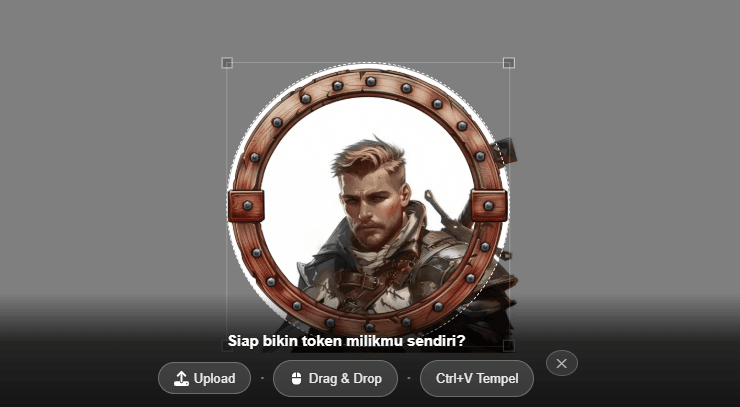
Heroic Token is a web-based tool that transforms photos or character illustrations into game-style tokens — round, square, or hexagonal frames ready to be placed on digital battle maps.
The tool was born from the practical needs of a Game Master: every play session usually requires dozens of new NPC tokens, and creating them one by one in a regular photo editing app clearly takes a lot of time.
Sven Speer launched Heroic Token on March 1, 2024, after previously building two similar tools for the role-player community: CoaMaker for family crests and Flag Creator for fictional flags.
Sign up at Bittime to get the latest blockchain game information!
All three have already been used by more than one million users, proof that the worldbuilding niche has a far larger community base than it appears at first glance.
What makes Heroic Token widely relevant is the momentum of the industry itself. According to research by GM Craft Tavern, the three most dominant VTT platforms this year — Foundry VTT, Roll20, and Owlbear Rodeo — each have large user bases with the same visual needs: neat and consistent character tokens.
Even NerdCulture notes that Roll20 alone has surpassed more than 15 million registered players, so the need for supporting tools like this is no small matter.
Read Also: This Week’s Token Unlock Schedule: SUI August 1, KMNO July 30, EIGEN August 1
Source: Heroic Token
Key Features of Heroic Token You Need to Know
Before diving into how to use it, here are the core features that set this tool apart from a simple photo-cropping app:
- Flexible upload — drag and drop, paste directly from the browser clipboard, or import multiple character portraits at once via batch upload.
- 400+ border options — grouped by genre (fantasy, sci-fi, horror, modern, steampunk) and by game system such as D&D 5e, Pathfinder, Shadowrun, Warhammer, Starfinder, The Dark Eye, and Call of Cthulhu.
- Flexible export — PNG or WebP format with transparent background, or animated WebM tokens if the source image is an mp4/WebM video.
- Automatic background color — the system reads the dominant color of the image and adjusts the background automatically.
- Automatically saved borders — the last settings used are applied automatically again, making it easy to create tokens for an entire group of characters at once.
- Broad compatibility — the resulting tokens can be used directly in Foundry, Roll20, MapTool, Owlbear, and other VTT platforms.
Read Also: GameFi is on the Rise? Here Are 10 Potential Gaming Tokens Today!
How to Create VTT Tokens with Heroic Token
The process is quite simple, even for users who have never created a token before:
- Open heroictoken.com, then upload a character photo or illustration via drag-and-drop, paste, or manual upload.
- Choose a border from the collection of 400+ designs, matching the genre or game system currently being played.
- Adjust the position and zoom of the image within the frame until the composition is just right.
- Let the background color adjust automatically, or change it manually if the result is not suitable.
- Export the token in PNG/WebP format for static tokens, or WebM if you want to create an animated token from a character video.
- Download the result and import it directly into your preferred VTT — Foundry, Roll20, MapTool, or Owlbear.
For large-scale needs, such as preparing tokens for a complete party in one sitting, the batch import feature and last-used border storage become the most tangible time-savers.
Read Also: What Is Token Sniffer? A Token Security Checker Tool to Avoid Scams
Free vs Pro: Which One Is Suitable for Dungeon Masters?
The free version of Heroic Token is already sufficient for basic needs: uploading images, selecting borders, and exporting tokens. But for Game Masters who regularly prepare weekly sessions, the Pro version offers significant added value.
Pro also unlocks cloud storage for tokens and source images, access to community-shared tokens, folder organization, bulk download as ZIP, custom border masks (round, square, hexagonal), and an ad-free interface. Payments are processed through Paddle as a third-party payment gateway.
Interestingly, development of this tool remains active. The latest update as of July 2026 added multi-language support, while the June 2026 update introduced animated token features and dozens of new steampunk borders — a sign that Heroic Token continues to grow based on community feedback.
Read Also: 30 Original Money-Making Games on the Play Store, Updated 2026
Conclusion
Heroic Token proves that a niche tool born from a personal hobby can grow into a real need for a large community.
With its extensive border collection, cross-platform VTT compatibility, and a free option that remains fully functional, this tool deserves to be the first choice for anyone who wants to create VTT tokens without the hassle of manual image editing.

Check the price of Bitcoin (BTC), Ethereum (ETH), XRP, Solana (SOL), GRAM, and BNB as well as the leading memecoin DOGE. You can trade directly on Bittime!
Bittime is a Digital Financial Asset Trader (PAKD) platform licensed and supervised by the Financial Services Authority — where you can buy Bitcoin in Indonesia and hundreds of other crypto assets starting from Rp10,000. The registration process is fast, secure, and can be started today.
Monitor the conversion of USDT to IDR and the price movements of your favorite crypto assets in real time. Everything is available in one crypto investment app that can be downloaded for free on the Play Store.
Ready to start? Register now at Bittime and execute your investment strategy with a platform already trusted by millions of users in Indonesia.
FAQ
Is Heroic Token free to use?
Yes, the basic version is free and already includes image upload and a limited selection of borders. Cloud features and unlimited custom borders are only available in the Pro version.
Which VTTs are compatible with tokens from Heroic Token?
The generated tokens can be used in Foundry, Roll20, MapTool, Owlbear, and almost all other VTT platforms. The format is transparent PNG or WebP, making them easy to import anywhere.
Can I create animated tokens with Heroic Token?
Yes, as long as the source image is a video in mp4 or WebM format. The export result is an animated token in WebM format.
Who created Heroic Token?
Heroic Token was created by Sven Speer, an indie developer from Berlin who also made CoaMaker and Flag Creator. The tool was officially launched on March 1, 2024.
Disclaimer: The views expressed belong exclusively to the author and do not reflect the views of this platform. This platform and its affiliates disclaim any responsibility for the accuracy or suitability of the information provided. It is for informational purposes only and not intended as financial or investment advice.

.png)