Elicit AI: A Comprehensive Guide to Literature Research
2026-09-16
If your goal is to find journals for a thesis, dissertation, paper, or research project, Elicit AI can help speed up the literature search and processing stages. However, it is important to note that Elicit is not simply a place to type keywords and get a list of journals.
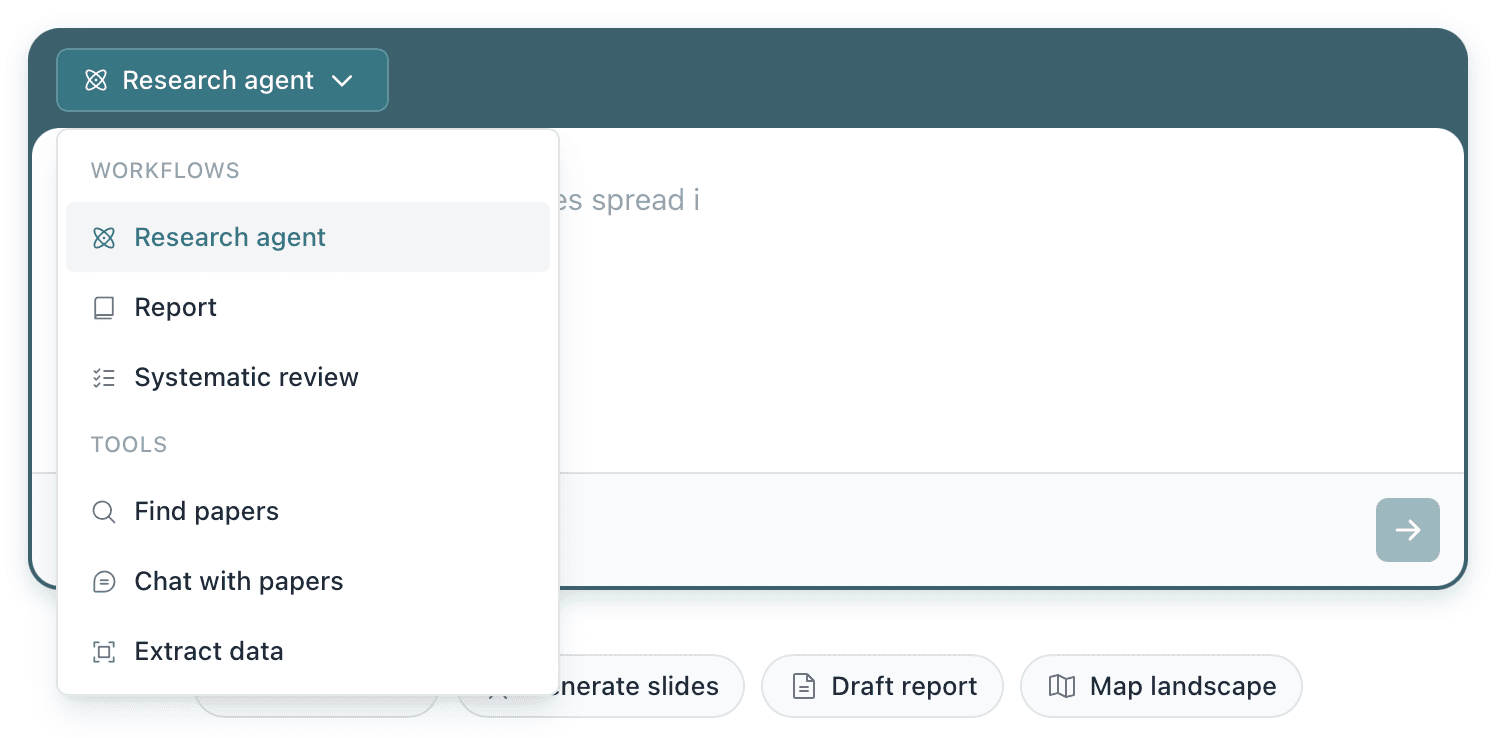
The workflow can be adjusted to your needs. You can start by searching for papers, creating comparison tables, reading several journals at once, extracting data from PDFs, or conducting a systematic review.
So, how can you use Elicit AI for research without getting confused about which feature to choose?
Key Takeaways
- Use Find Papers if you are just starting to search for journals and do not yet have a collection of papers.
- Use Chat with Papers or tables with custom columns if you have already found papers and want to explore their contents.
- For your own PDF collection, use Extract Data, while systematic reviews require a more structured workflow.
How to Start Researching with Elicit AI
The first step is to define a research question, rather than simply using one or two keywords.
For example, if the topic you want to research is the impact of AI on education, do not just type:
“AI education”
Create a more specific question, for example:
“How does generative AI affect learning outcomes in higher education?”
A question like this provides clearer context to Elicit. The platform is designed for semantic search, allowing users to use natural language questions to find relevant papers.
Elicit also recommends using English because its search, summarization, and data extraction features are optimized for English-language papers.
Practical tip: if the search results are too broad, do not immediately change multiple keywords. Narrow the question by adding the population, period, method, or variables you want to study.
Read Also: What Is Elicit AI? Definition and How to Use It
Use Find Papers to Search for Journals
Once your question is ready, go to Find Papers.
Enter the research question in the search field, then review the papers that appear. Do not download everything immediately. Use the initial results to understand what research is available.
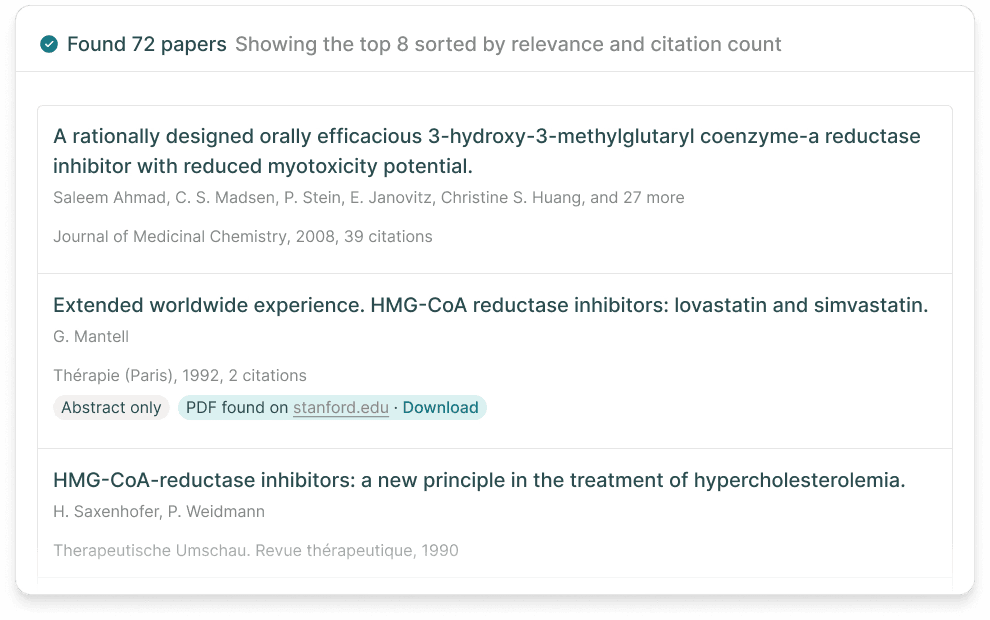
Pay attention to several things:
- Paper title and abstract.
- Publication year.
- Relevance to the research question.
- Method used.
- Research population or object.
- Key findings.
Elicit can then be used to create an analysis table. You can add columns as needed, such as “What research method was used?”, “What are the main findings of the study?”, or “What are the limitations of this study?”
The columns feature is designed to extract specific information from a collection of papers, making research findings easier to compare side by side.
Be productive with AI, invest smarter. Register on Bittime and build your portfolio now.
What to Do After Finding Papers
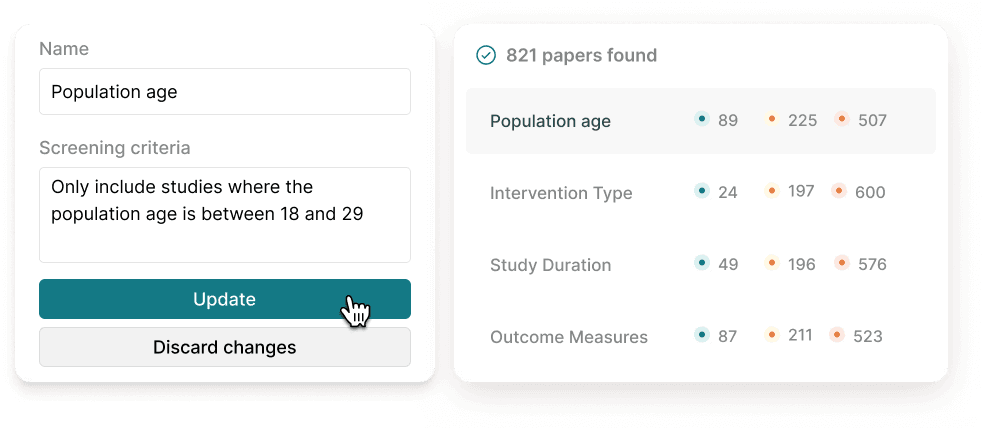
A common mistake when conducting research with Elicit AI is stopping after finding a list of journals.
In fact, the next stage is even more important: determining which papers are actually worth using.
For example, suppose you get 30 papers. Not all of them need to be read in depth. Establish simple criteria first.
For example, the research should:
- Discuss generative AI in higher education.
- Use empirical data.
- Be published within a specific period.
- Have findings related to learning outcomes.
Once the criteria are clear, use the Elicit table to help compare the papers.
In this way, Elicit functions as a tool for mapping the literature, while the final decision about which papers to use remains with the researcher.
Read Also: What Is Jenni? An AI Academic Writer for Theses and Research
Already Have PDFs? Use Extract Data
If you have already collected journals in PDF format, you do not always need to start the search from scratch.
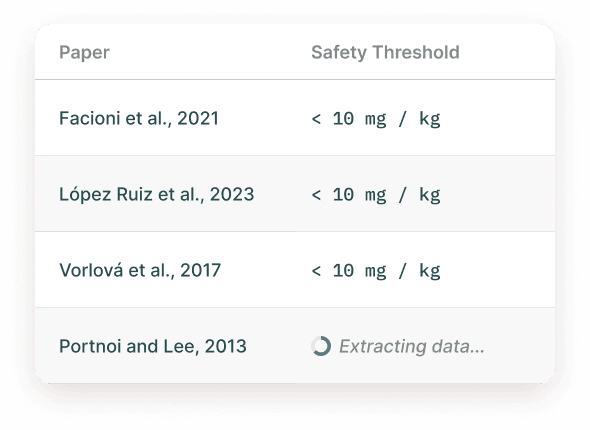
Elicit provides Extract Data to create tables from a collection of papers you already have. PDFs can be uploaded or taken from the Elicit library, and specific information can then be extracted for analysis.
For example, you have 20 journals about the effectiveness of AI-based learning methods.
You can create columns for:
Researcher | Year | Sample | Method | Variables | Findings | Limitations
Elicit then helps fill in that information based on the papers.
However, do not assume that automated extraction results are always correct. Elicit's documentation itself notes that certain tables in papers can be more difficult to extract, especially when their formatting is complex.
For PDFs with complex tables or formulas, Premium PDF parsing is available on certain plans.
Use Chat with Papers to Read Several Journals at Once
If you already have several key papers and want to understand their contents without switching between documents, use Chat with Papers.
Select the papers you want to analyze, then ask specific questions.
For example:
“What are the differences in methodology among these studies?”
or:
“What findings are consistent across these papers?”
This approach is more useful than giving an overly general prompt such as “explain all the papers.”
The more specific the question, the easier it is to use the results to continue the research.
Read Also: AI Prompts for Academic Research: ChatGPT and Gemini Examples for Students
When Should You Use Research Report?
If you want to gain a more comprehensive overview of a research question, Research Report can be an option.
This workflow produces a report based on papers found by Elicit and can be exported to PDF or Word.
For example, after conducting an initial search on the topic “impact of generative AI on higher education”, you can use Research Report to obtain an initial synthesis of findings from the available literature.
However, use the report as an initial research resource, not as a replacement for academic papers. Important claims still need to be checked against the original sources.
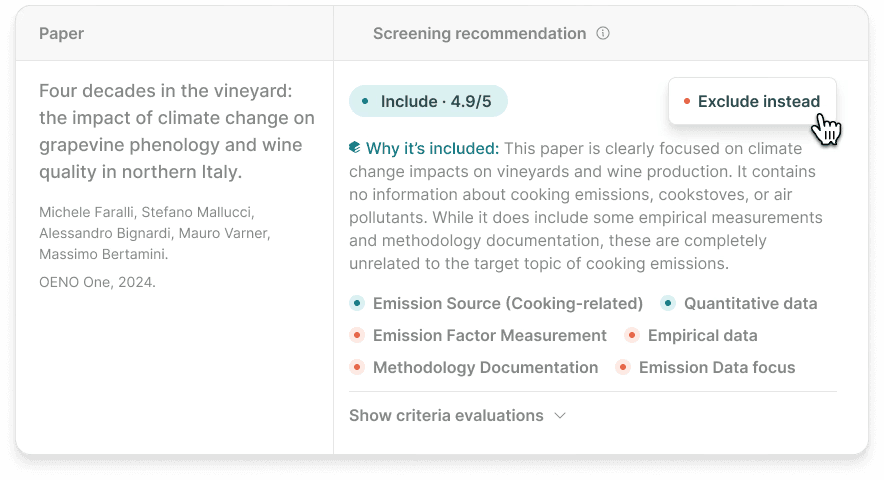
For Systematic Reviews, Use a Dedicated Workflow
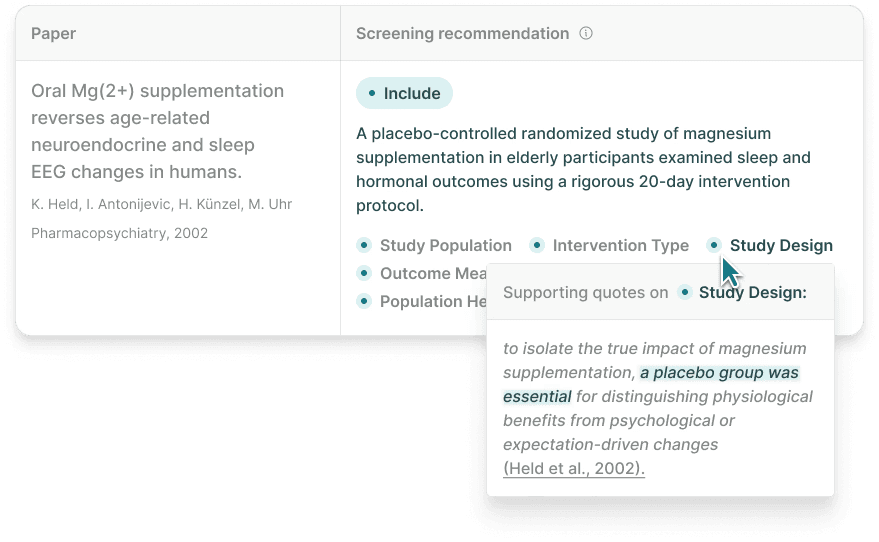
For research that requires a systematic review process, Elicit has a different workflow from a standard paper search.
The process may include defining the question, collecting sources, screening, data extraction, and evidence synthesis. This means users do not need to force Find Papers to handle the entire systematic review process.
This feature also has limitations depending on the Elicit plan being used, so it is important to check your account access before starting a large project.
Read Also: What Is Gauth AI? Learn About the AI Tutor to Help You Study
How to Make Research with Elicit AI More Effective
There is one simple principle you can apply: do not ask Elicit to do everything at once.
Break the research process into several stages:
Question → Find papers → Select → Extract data → Compare → Verify → Synthesize
During the search stage, focus on relevance. During extraction, focus on the data needed. During synthesis, compare findings from papers that have passed the selection process.
This approach makes the results easier to review and reduces the risk of using information from papers that are not actually relevant.
Elicit also provides export features. Certain tables can be exported to CSV or Excel, while references can be exported in formats such as RIS and BIB for use with reference managers.
Is Elicit AI Enough to Complete Research?
Elicit can reduce manual work in literature searching and processing, but research still requires human judgment.
AI can help identify patterns, summarize information, and organize data. However, researchers still need to examine the context, methodology, quality of evidence, and whether the paper's conclusions actually support the argument being used.
Therefore, the most practical workflow is to use Elicit to speed up the process of finding and organizing evidence, then return to the original papers when the information will become an important part of the research.
Read Also: Pintarly Id vs Pelajarin AI: Which AI Learning App Is Best for Indonesian Students?
Conclusion
For beginners, the easiest way to use Elicit AI is to start with Find Papers using a clear research question.
After finding papers, use columns to compare information, Chat with Papers to explore several sources, and Extract Data if you already have a collection of PDFs.
If your research needs become more complex, Research Report or Systematic Review can be used according to the required workflow.
With this approach, an Elicit AI guide does not need to start with all features at once. First determine what you want to find, then choose the tool based on the stage of research you are working on.

Interested in investing in the AI crypto sector? Monitor prices and start trading popular AI coins such as Bittensor (TAO), NEAR Protocol (NEAR), and Artificial Superintelligence Alliance (FET) directly on Bittime.
Bittime is a licensed and OJK-supervised Digital Financial Asset Trader (PAKD) platform — where you can buy Bitcoin in Indonesia and hundreds of other crypto assets starting from Rp10,000. The registration process is fast, secure, and can be started today.
Monitor the USDT to IDR conversion and your favorite crypto asset price movements in real time. Everything is available in one crypto investment app that can be downloaded for free from the Play Store.
Ready to get started? Register now on Bittime and execute your investment strategy with a platform trusted by millions of users in Indonesia.
FAQ
How do you use Elicit AI for research?
Start by creating a specific research question, enter it into Find Papers, select relevant papers, then use columns to extract and compare information.
Can Elicit AI find journals based on a question?
Yes. Find Papers uses semantic search, allowing users to enter research questions in natural language rather than relying only on keywords.
Which Elicit feature can be used to read several papers at once?
Use Chat with Papers. This feature allows users to ask questions based on selected papers, making it more practical to compare or understand multiple studies.
How do you use Elicit for PDFs?
If you already have journals in PDF format, use Extract Data. Papers can be added to a table and analyzed using columns based on the information you want to find.
Is Elicit AI suitable for literature reviews?
Yes. Elicit can help with literature search, screening, data extraction, and literature synthesis. For a more formal systematic review, use the Systematic Review workflow to make the process more structured.
Should Elicit AI results be checked again?
Yes. Important information should still be verified against the original papers, especially when it is used for a thesis, dissertation, journal, or professional research.
Disclaimer: The views expressed belong exclusively to the author and do not reflect the views of this platform. This platform and its affiliates disclaim any responsibility for the accuracy or suitability of the information provided. It is for informational purposes only and not intended as financial or investment advice.

.png)