How to Stake VET on Bittime in 4 Easy Steps
2025-11-19
Interest in VET staking is growing as more users seek to earn passive returns from the VeChain ecosystem.
VeChain staking on Bittime now offers a short-term product with an estimated APY of 7 percent and a period of just seven days, making it attractive to users who want quick rotation without locking up assets for too long.
With a simple application interface and concise operational steps, the staking process can be completed in seconds.
The information in this article is compiled based on the latest Bittime data and product details displayed on the VET staking screen.
What is VET staking and how does the reward model work?
Staking VET is usually synonymous with receiving rewards in the form of VTHO which functions as gas on the VeChainThor network.
However, in staking exchange products like Bittime, users receive rewards according to the applicable program terms.
The Est. APY is clearly displayed, and in the VET product example in the app, the figure is7 percent with a seven-day tenor.
This kind of staking program provides a flexible option for users who do not want to run a node or process VTHO independently.
Rewards are calculated based on active staking time and will be given at the end of the period, along with the return of VET assets locked according to the product duration.
With a relatively short duration, this product is suitable for users who want to test performance or rotate capital periodically.
Product details of Staking VET on Bittime based on app view
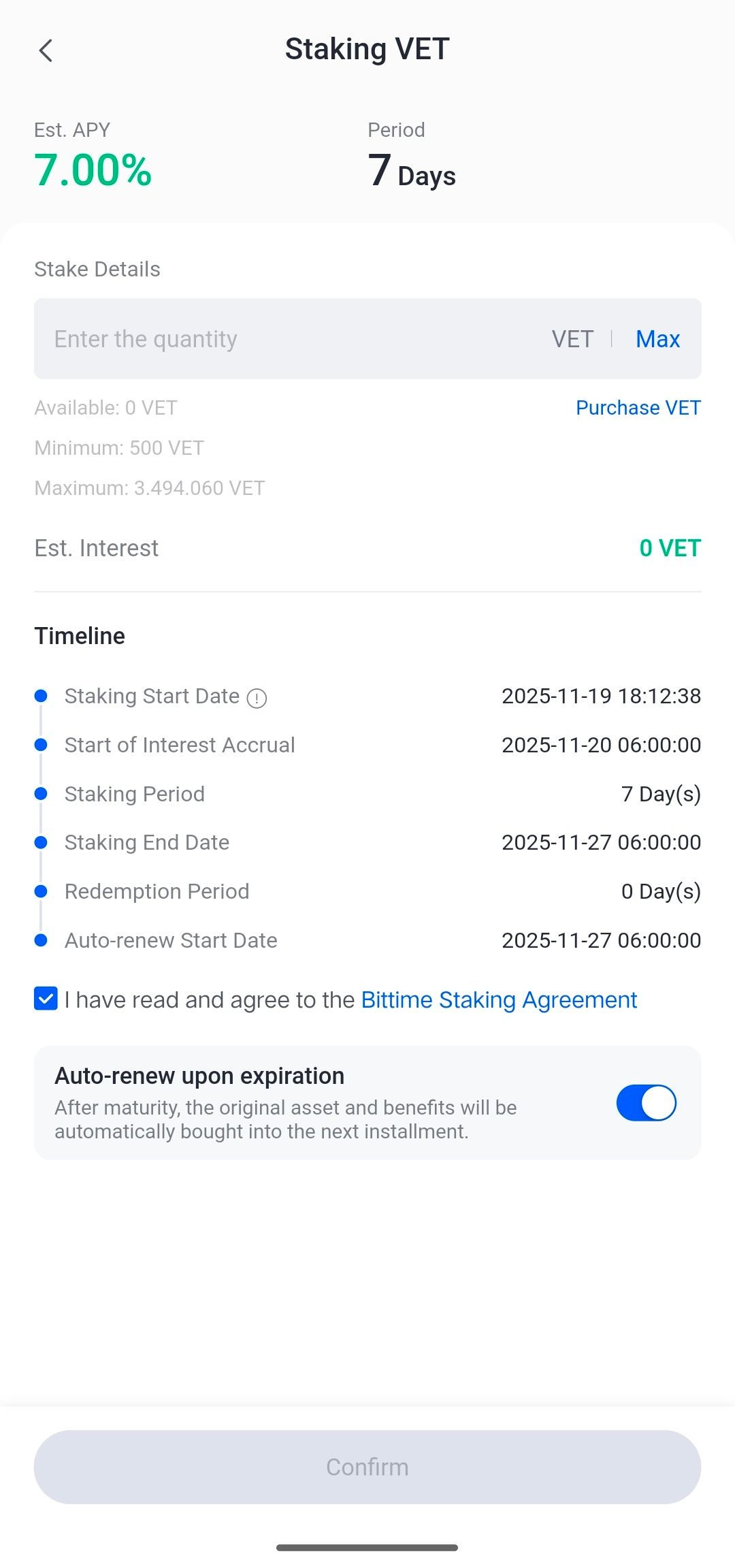
The VET staking image on Bittime shows some important provisions:
Est. APY:7 percent
Period:7 days
Minimum staking: 500 VET
Maximum strike: 3.494.060 VET
Start calculating yield:November 20, 2025 at 6:00 AM
Staking end date:November 27, 2025 at 6:00 AM
Redeem:0 days (immediately after maturity)
Auto-renew feature:available and can be activated
The entire process is displayed in a timeline, from the staking start date to the reward disbursement date. Seven-day term products like this allow users to receive returns more quickly than long-term staking.
The auto-renew feature helps users continue staking automatically without reconfirming, allowing assets to immediately enter the next period after the tenor ends.
How to Top Up IDR to Buy VET on Bittime
Top Up Via Bank
Top up Bittime IDR very easy, follow these steps:
- Make sure your Bittime account is verified.
- Open Bittime App, open deposit IDR on the Home page or open the wallet menu and select IDR deposit
- Select a Virtual Bank account, copy one of the bank VAs you will transfer to.
- Make sure you transfer using a real-time/online transfer method so that your deposit can be credited immediately.
- Minimum deposit starts from 10,000 rupiah.
- The funds you transfer will be credited to your IDR wallet.
Top Up IDR Via E-wallet
Top up IDR on Bittime is very easy, follow these steps:
- Make sure your account is verified.
- Open the Bittime App, go to IDR deposit on the homepage or open your wallet and choose IDR deposit
- Select Ewallet such as OVO, DOKU and follow the instructions to top up IDR
- Make sure you transfer using a real-time/online transfer method so that your deposit can be credited immediately.
- Minimum deposit starts from 10,000 rupiah.
- The funds you transfer will be credited to your IDR wallet.
How to Stake VET on Bittime in 4 simple steps
Unlike the complicated staking process on some platforms, Bittime has designed an easy-to-follow process. Here are four steps that align with the VET product's visualization:
1. Open the Bittime App
Start by opening the Bittime app. Log in with your registered account. If you don't have an account, register now orsignup.
Or download the Bittime app and register on Bittime with your email address and set a strong password to secure your account.
2. Go to the Staking menu
Open the Staking menu from the app's main page, search for VET, then select a product with an estimated APY of 7 percent and a seven-day duration. Ensure you have at least 500 VET. You can deposit from another wallet or purchase VET directly on the Bittime spot market using IDR.
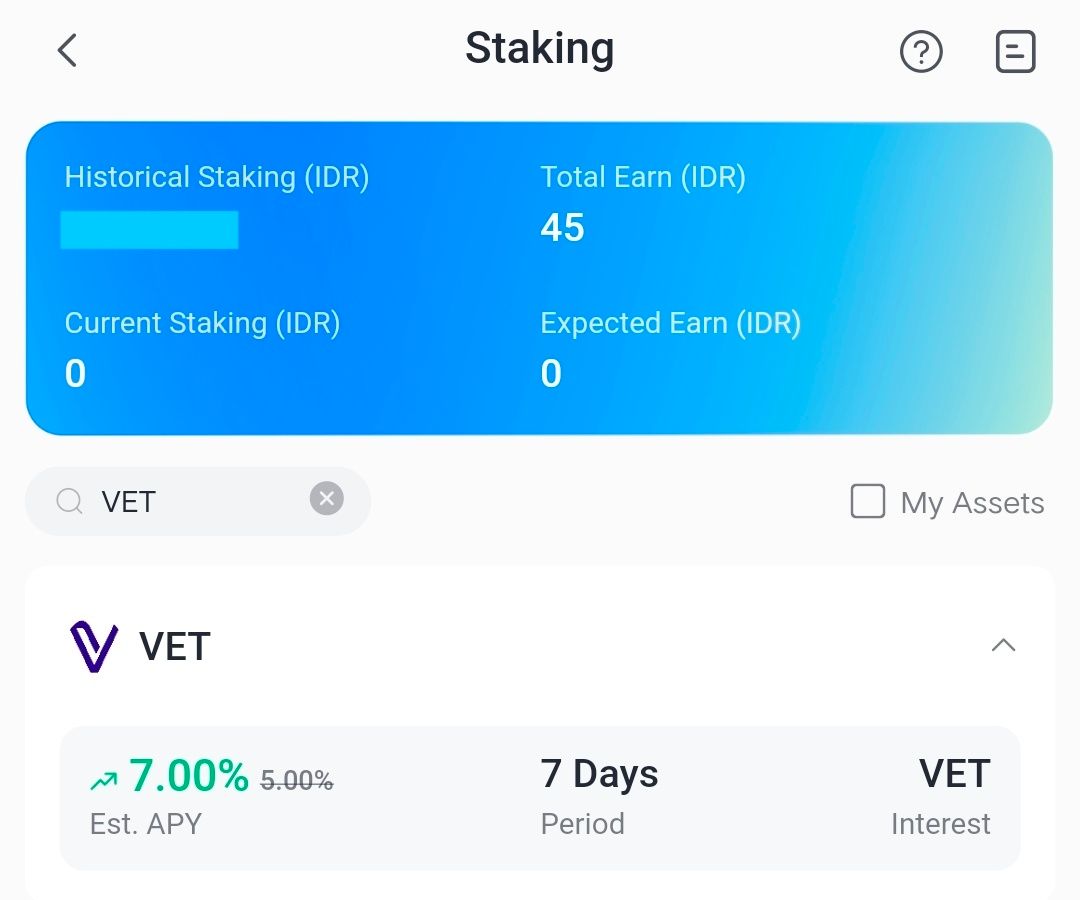
3. Enter the staking amount
Enter the required amount of VET (minimum 500). The app will immediately display the estimated yield and the maximum staking limit.
4. Confirm and Receive Rewards After the Staking Period
Check the box to agree to the terms of service. If you want your staking to recur automatically, enable the auto-renew feature. Then, tap Confirm. Your staking will be recorded immediately and will begin earning rewards according to the time indicated on the timeline.
VET APY estimates and seven-day yield meaning
The estimated APY of 7 percent in this product means the calculation is based on an annual rate, but the rewards users receive are adjusted for a seven-day period.
With this APY, the rewards received during a staking period will be proportional to the lock-up time.
Because the seven-day tenor is quite short, users usually take advantage of auto-renew for a compounding effect so that the total yield increases as the product continues to repeat.
Rewards will be credited on the staking end date, which is the seventh day at 6:00 AM, and directly added to your VET balance. You can monitor the reward amount via the Assets menu and the staking history page.
How to Check Staking Assets
- Login akun Bittime.
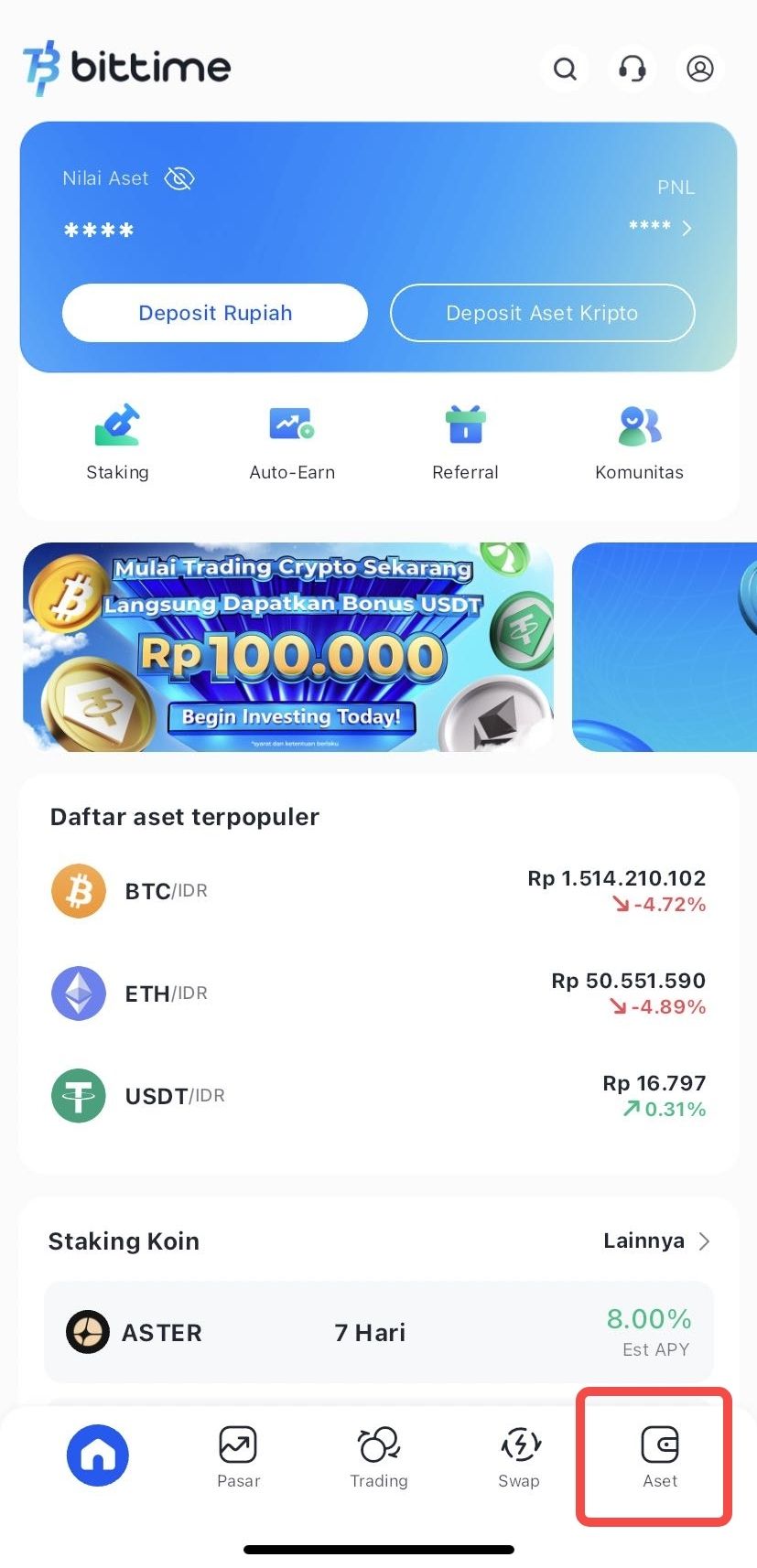
- Select the Assets menu on the Homepage.
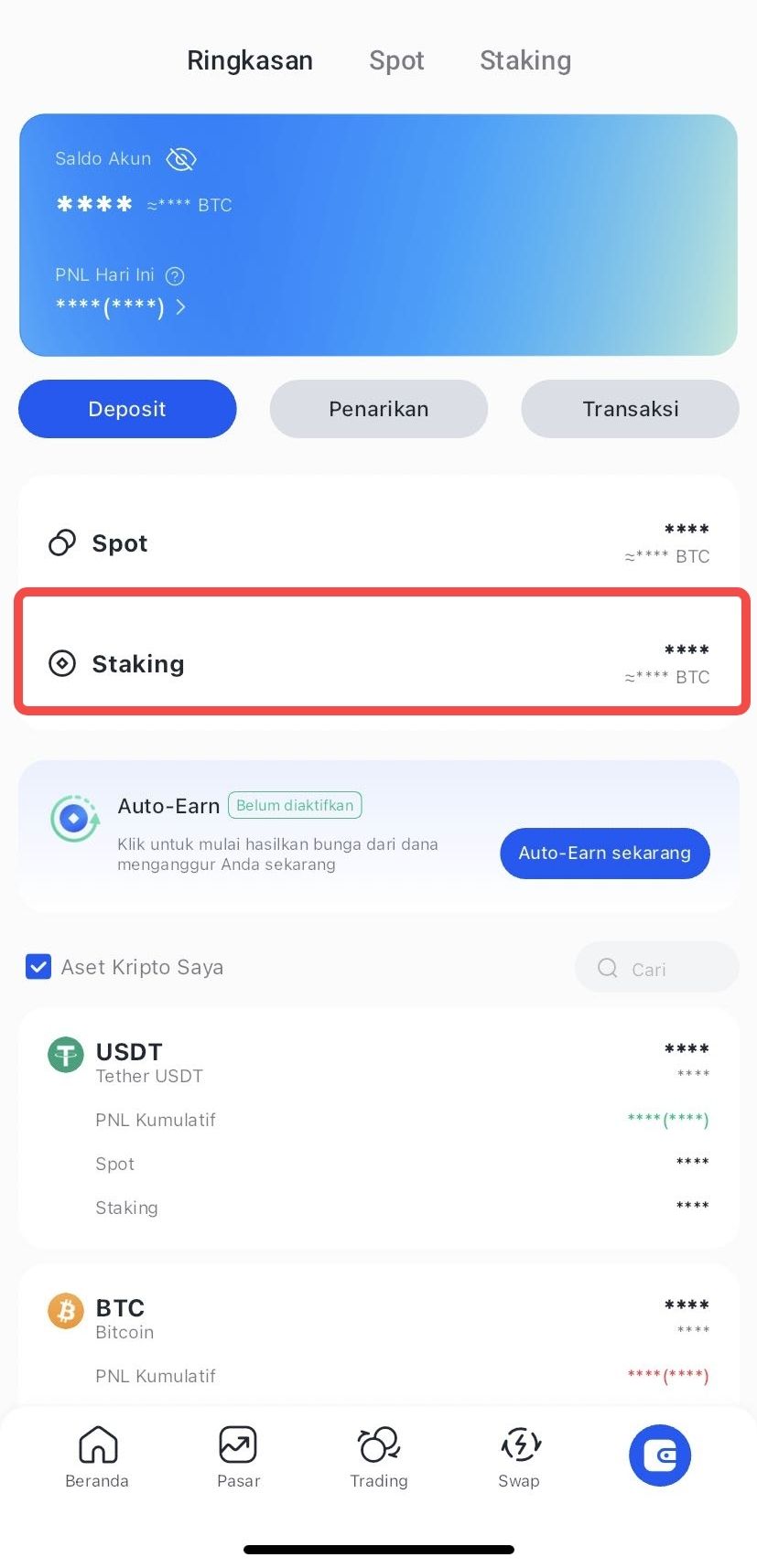
- Click Staking to see the amount of your staking assets.
How to Do Early Redeem Staking
- Login Bittime account.
- Select the Assets menu on the Homepage.
- Select the crypto asset you wish to redeem.
- Click Choose Early Redeem
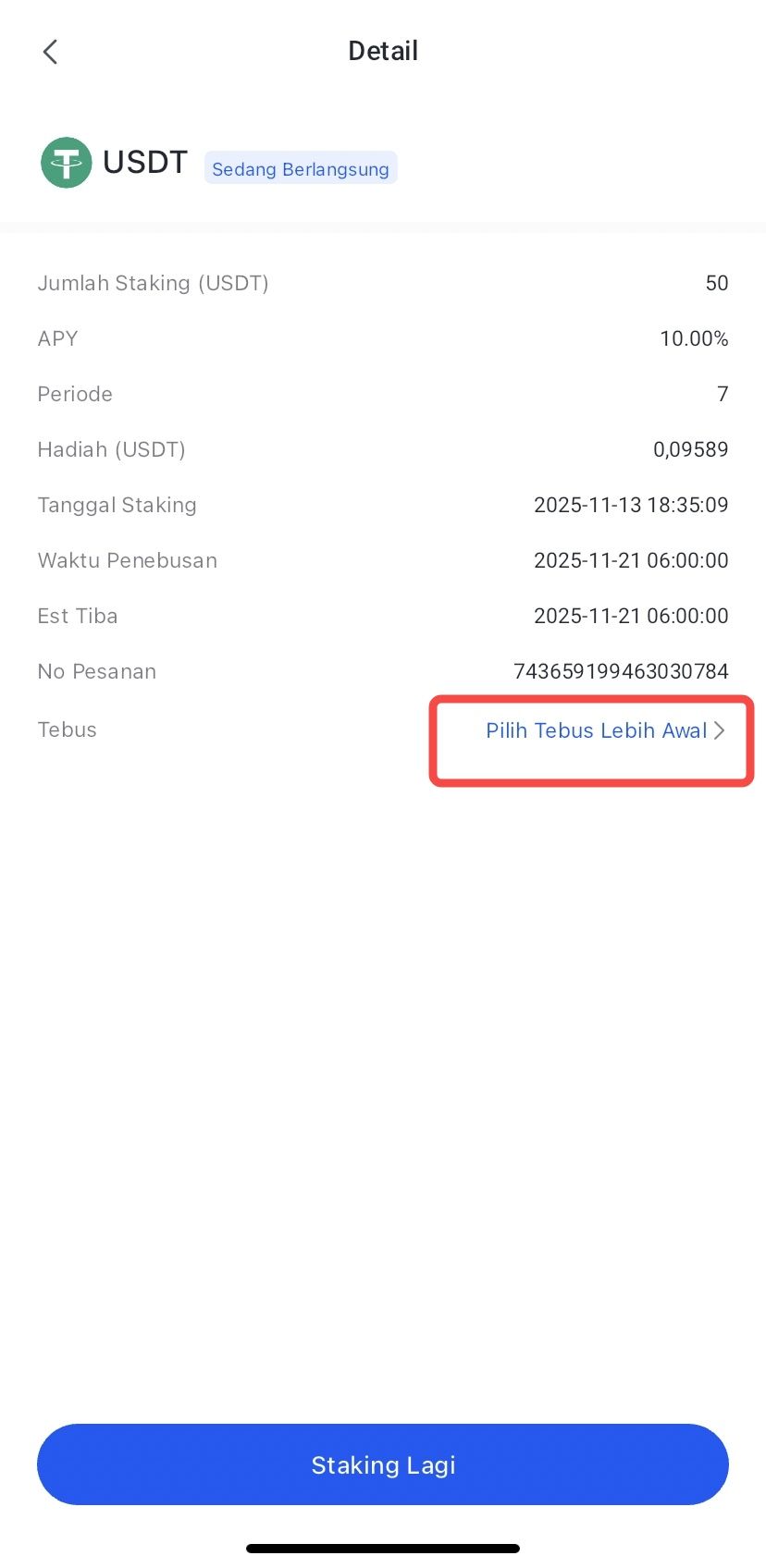
- Confirm by clicking Redeem.
- The redemption process has been completed, and your crypto asset funds will be processed according to the arrival time.
Conclusion
Staking VET on Bittime offers a fast and simple way to earn returns on VeChain assets without having to manage the network's technical aspects.
With an APY of 7 percent and a duration of just seven days, this product appeals to users who want flexibility and fast results.
The four-step process is easy to follow, while the auto-renew feature makes returns more consistent for users who want to continue staking without manual intervention.
FAQ
What is the Est. APY for staking VET on Bittime?
On the products featured in the app, the Est. APY for staking VET is7 percentwith a seven day period.
What is the minimum VET staking?
The minimum staking displayed is 500 VET.
When does the reward start to be calculated?
It starts counting one day after staking is active, precisely at 06.00 according to the data listed in the timeline.
When can I redeem assets?
Redeem is available on the seventh day after the product expires, with no additional waiting period.
What is the function of auto-renew?
Auto-renew allows staking to be automatically extended to the next period along with its rewards, so you don't have to reconfirm every seven days.
Disclaimer: The views expressed belong exclusively to the author and do not reflect the views of this platform. This platform and its affiliates disclaim any responsibility for the accuracy or suitability of the information provided. It is for informational purposes only and not intended as financial or investment advice.

.png)