How to Stake ATOM on Bittime in 4 Easy Steps
2025-11-19
Demand for Cosmos Hub assets continues to grow as more users seek ways to stake ATOM with stable returns.
Many are considering staking ATOM because of its strong security mechanisms and relatively short lock-up process.
With Atom APYs reaching seventeen percent for a seven-day period on Bittime, staking is an attractive option for users looking to earn passive income without complicated technical steps.
The data on the staking page displays clear periods, transparent interest calculations, and an auto-renew feature that makes the process more convenient.
Understanding ATOM and the Yield Mechanism on Bittime
ATOM is the Cosmos Hub's primary token, used to maintain network security through staking. At Bittime, users earn an estimated APY of seventeen percent for a seven-day lockup period.
This figure is calculated based on the estimated annual return divided according to the proportion of staking duration.
The information displayed on the staking page includes a minimum of two ATOMs, a maximum of nineteen point two three ATOMs, as well as an interest estimate that updates automatically based on the amount entered.
Users can also view a complete timeline, including the staking start date, interest calculation, lock-up duration, and expiration date. The absence of a redemption period means assets can be withdrawn on the day the period ends.
This feature makes staking easier to manage for users who want to take advantage of flexibility without having to wait for additional processes.
How to Top Up IDR to Buy ATOM on Bittime
Top Up Via Bank
Top up Bittime IDR very easy, follow these steps:
- Make sure your Bittime account is verified.
- Open Bittime App, open deposit IDR on the Home page or open the wallet menu and select IDR deposit
- Select a Virtual Bank account, copy one of the bank VAs you will transfer to.
- Make sure you transfer using a real-time/online transfer method so that your deposit can be credited immediately.
- Minimum deposit starts from 10,000 rupiah.
- The funds you transfer will be credited to your IDR wallet.
Top Up IDR Via E-wallet
Top up IDR on Bittime is very easy, follow these steps:
- Make sure your account is verified.
- Open the Bittime App, go to IDR deposit on the homepage or open your wallet and choose IDR deposit
- Select Ewallet such as OVO, DOKU and follow the instructions to top up IDR
- Make sure you transfer using a real-time/online transfer method so that your deposit can be credited immediately.
- Minimum deposit starts from 10,000 rupiah.
- The funds you transfer will be credited to your IDR wallet.
How to Stake ATOM on Bittime in Four Steps
1. Open the Bittime App and Login to your Account
Start by opening the Bittime app. Log in with your registered account. If you don't have an account, register through the signup menu. The registration process is short and required to access the staking features.
Make sure you have an ATOM balance in your account wallet. If you don't have any ATOM, purchase them through the Trade menu.
2. Go to the Staking Menu and Select ATOM
From the app's main page, open the Earn menu and select the Staking section. Find ATOM in the asset list.
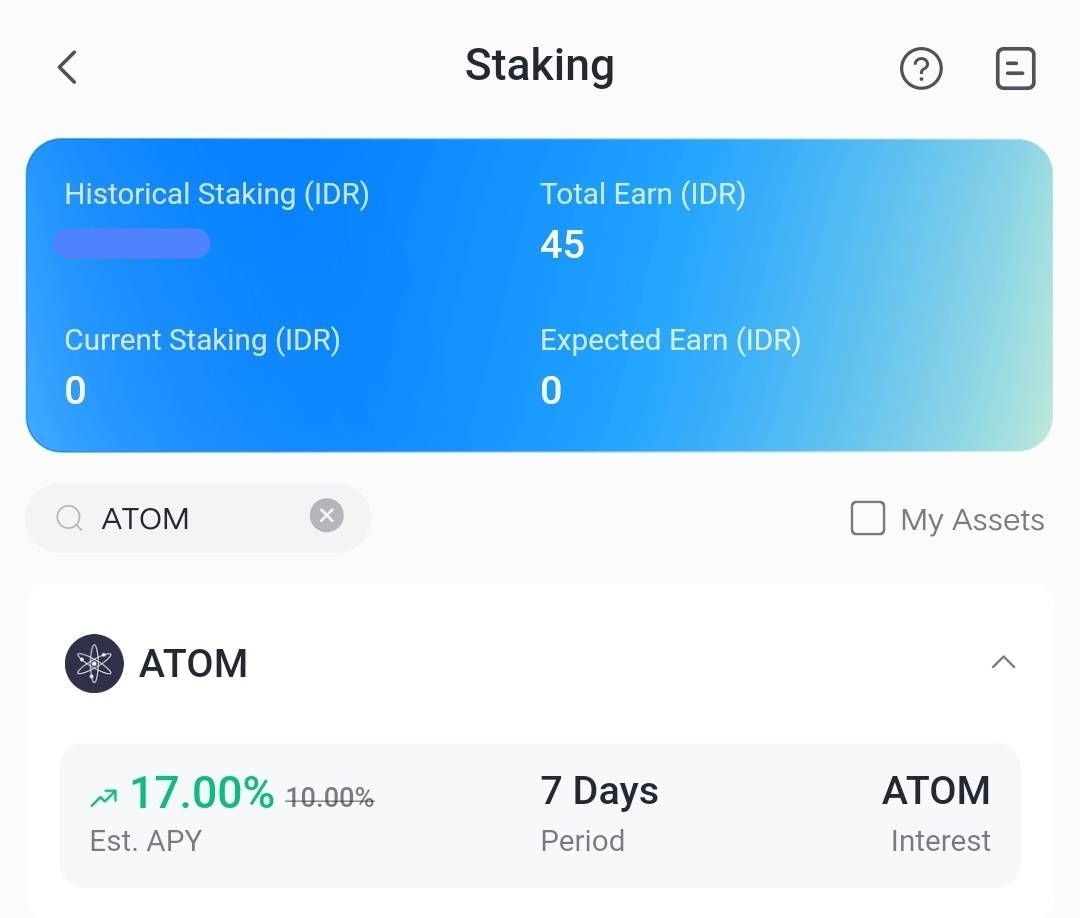
This page displays complete information such as the seventeen percent APY, seven-day duration, estimated interest rate, minimum staking rate, and interest calculation timeline. Reading these details is essential for understanding the staking process.
3. Start Staking ATOM
Enter the number of ATOMs you wish to stake. The system will automatically display the estimated interest. Users can select the Max button if they wish to stake their entire balance.
After understanding the terms and conditions, check the box to agree to the Bittime Staking Agreement. If you want to continue staking automatically, enable the auto-renew feature. Press Confirm to begin the process.
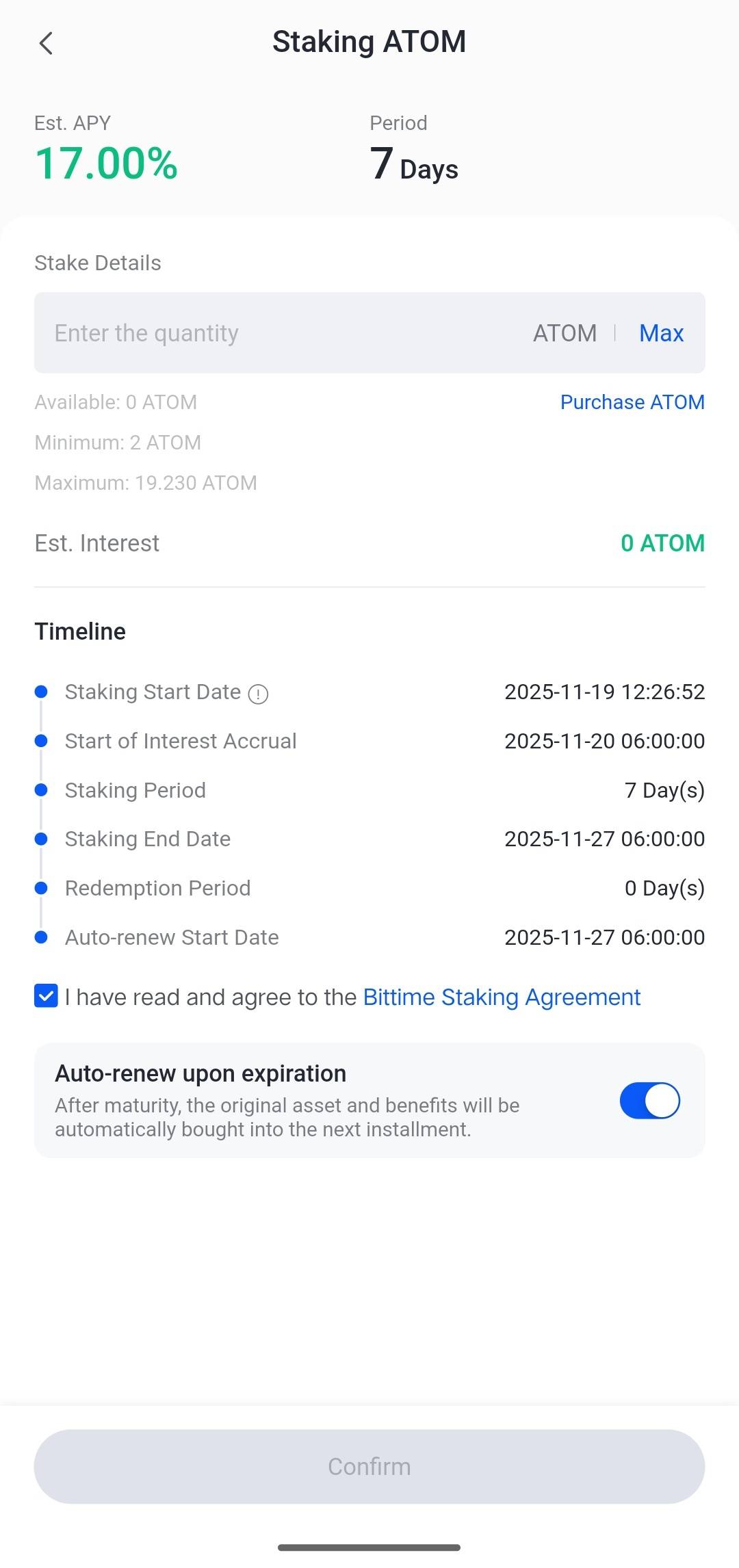
4. Receive Rewards After the Staking Period Ends
While staking is running, you can view a complete timeline, including the start date, interest calculation time, duration, and end date. Interest will be credited to your account after the period ends, according to the APY calculation.
If auto renew is enabled, the system automatically continues staking to the next period using the principal and interest generated.
ATOM Staking Benefits, Risks, and Considerations
The seven-day ATOM staking process provides high flexibility for users who want to maximize assets without locking them in for the long term.
With an APY of seventeen percent, the yield remains competitive compared to similar assets in the short-term staking category. The lack of a redemption period makes the withdrawal process faster.
However, users should still be aware of market risks, as the value of ATOM can fluctuate during the staking period. Even though assets are locked, price fluctuations remain a significant factor in portfolio management.
Activating auto-renew also needs to be carefully considered, especially for users who want to set up a medium-term strategy automatically.
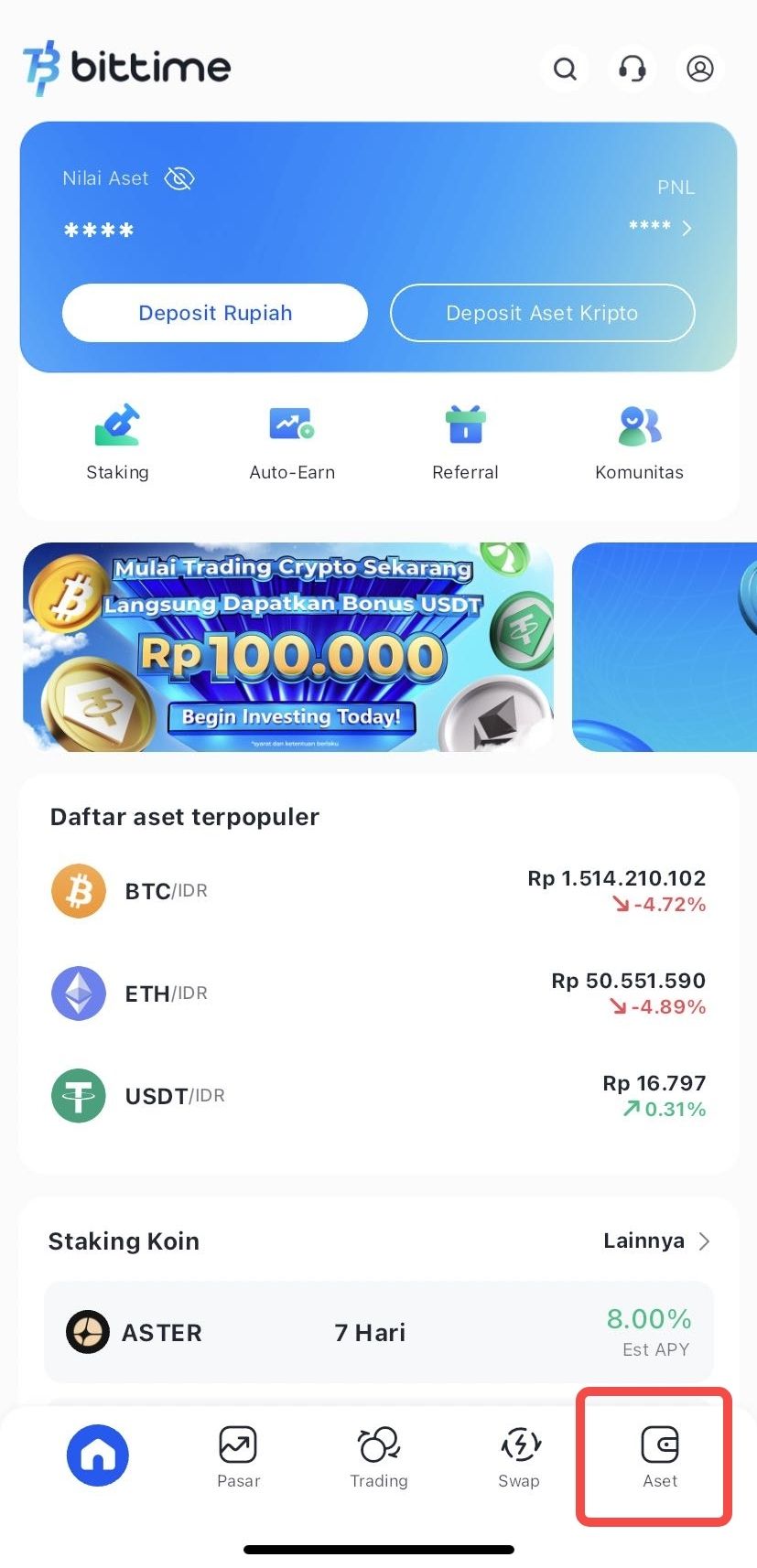
How to Check Staking Assets
- Login akun Bittime.
- Select the Assets menu on the Homepage.
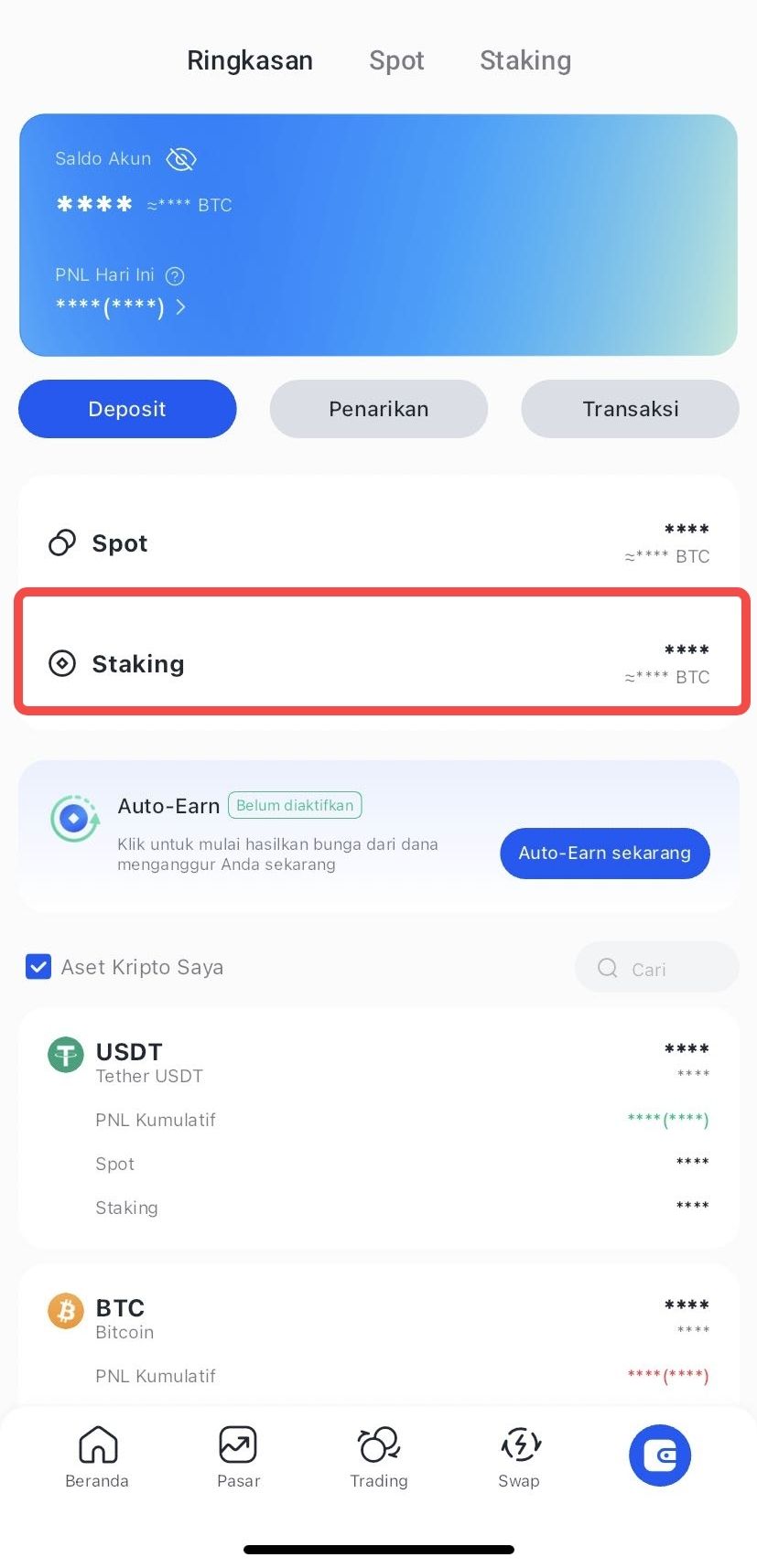
- Click Staking to see the amount of your staking assets.
How to Do Early Redeem Staking
- Login Bittime account.
- Select the Assets menu on the Homepage.
- Select the crypto asset you wish to redeem.
- Click Choose Early Redeem
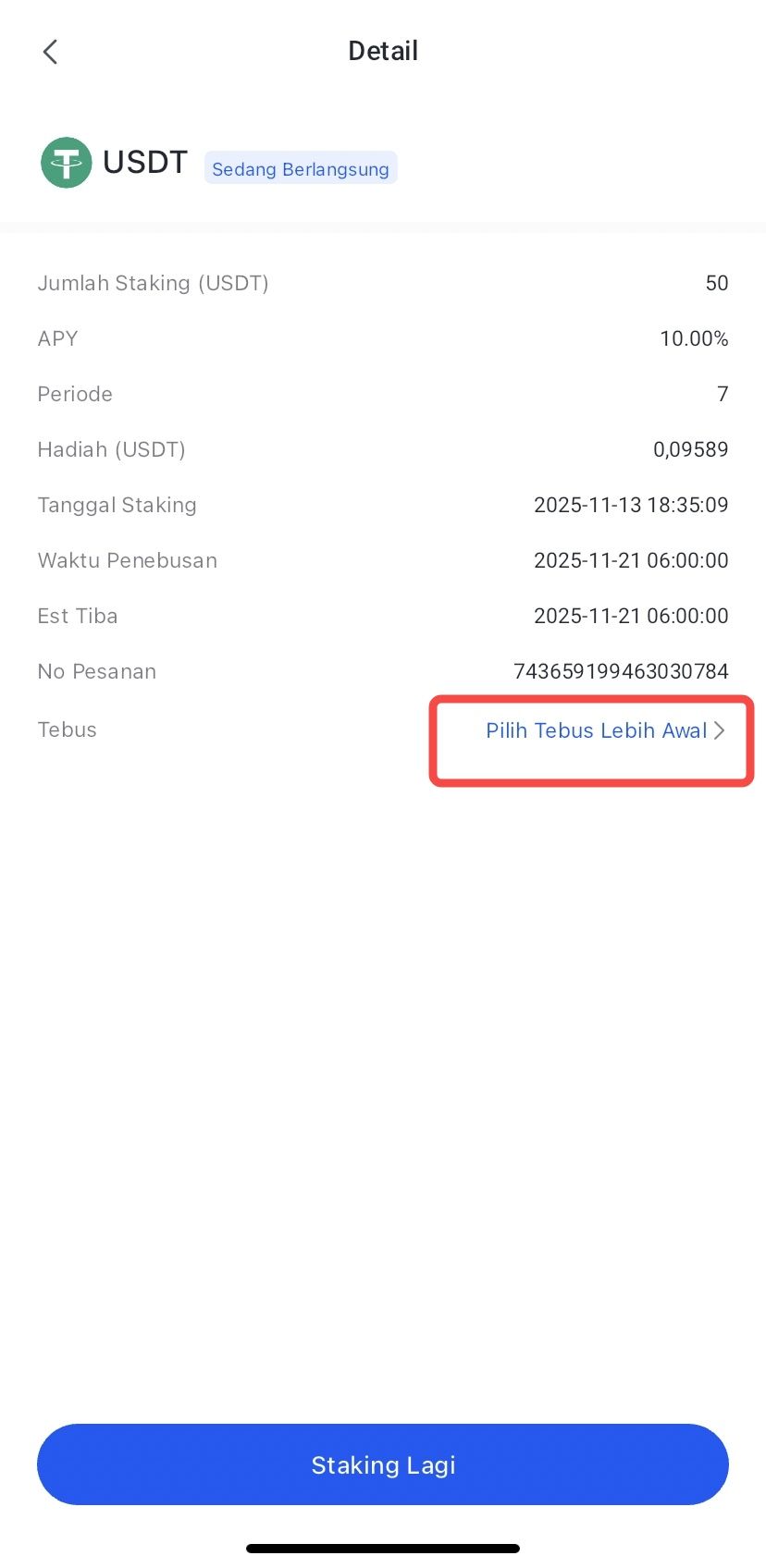
- Confirm by clicking Redeem.
- The redemption process has been completed, and your crypto asset funds will be processed according to the arrival time.
Conclusion
Staking ATOM on Bittime provides a simple, transparent, and efficient process.
With a seventeen percent yield for a seven-day period, ATOM staking is an attractive option for users looking to capitalize on the potential of the Cosmos Hub ecosystem.
The auto-renew mechanism and clear timeline information help users organize their asset growth strategies more neatly.
FAQ
What is the APY for staking ATOM on Bittime?
The estimated APY available is seventeen percent for a seven-day lock period.
When does ATOM staking interest start to be calculated?
Interest starts to be calculated at six in the morning the day after staking is confirmed.
Is there a redemption period after ATOM staking ends?
There is no redemption period, assets can be withdrawn immediately on the staking end date.
What is the minimum ATOM staking on Bittime?
The minimum amount displayed on the staking page is two ATOM.
Can staking be automatically extended?
Yes, the auto renew feature is available and can be activated before confirmation.
Disclaimer: The views expressed belong exclusively to the author and do not reflect the views of this platform. This platform and its affiliates disclaim any responsibility for the accuracy or suitability of the information provided. It is for informational purposes only and not intended as financial or investment advice.

.png)