How to Farm Metric: A Guide to Swaps, Points, and Fees
2026-10-23
Farming Metric starts with setting up a wallet, selecting a network supported by the application, and then performing activities that meet the program requirements. However, before spending money on swaps, you need to make sure those activities actually count and understand how to check your points.
This guide helps you organize each step, from preparation to cost evaluation. The focus is on using Metric with a clear objective, recording transaction results, and assessing the potential for an airdrop without treating it as guaranteed income.
Key Takeaways
- Check the points requirements before making transactions for farming purposes.
- Record gas fees, trading fees, and changes in asset value to keep spending under control.
- Providing liquidity involves additional risks, while points do not guarantee a token distribution.
What Is Metric Crypto?
Metric provides token exchange infrastructure through liquidity pools. Each pool uses a Price Provider to determine buying prices, selling prices, and reference prices based on its configuration.
Price sources may include oracles, market data, or custom logic. This means you need to pay attention to asset pairs and pool mechanisms because trading characteristics may differ from one pool to another.
In this article, “Metric farming” refers to participating in platform activities while monitoring the possibility of earning points. The term does not automatically mean earning interest, generating trading profits, or receiving free tokens.
Read also: Axis Robotics Airdrop: How to Participate, Requirements, and Claim AXIS
What Is the Status of Metric Points and the Airdrop Potential?
Third-party information reviewed on October 23, 2026, indicates a weekly points program for activities such as trading and providing liquidity. The same source still lists the airdrop as unconfirmed.
However, the points formula, distribution schedule, and eligibility requirements could not be directly verified through the application or accessible official announcements. Therefore, allocation figures and referral bonuses are not used as the basis for calculations in this guide.
Before getting started, find answers to the following four questions:
- Which activities count during the current period?
- Are there specific networks or pools that qualify?
- When are points updated?
- Where are wallet activity results displayed?
If this information is not yet available, you can still learn how swaps work. However, you should not spend money on transaction fees under the assumption that your points will definitely increase.
Read also: GenLayer Airdrop: How to Check Eligibility and Claim GEN
Preparing Before Farming Metric
1. A Compatible Wallet and Network
Use a wallet that can connect to the Metric application. Make sure the wallet address and selected network match the location of your assets.
Having the same address on different networks does not automatically make your balance available for transactions. Check the destination network before transferring assets from another platform.
2. Assets for Swaps and Gas Fees
Keep the assets you intend to swap separate from the balance reserved for network fees. Avoid using up your entire gas-token balance on the first transaction.
Keep funds available for token approvals, subsequent transactions, and asset transfers if needed. The amount required depends on network conditions and the actions you perform.
3. Spending Limits
Set a spending limit before starting, such as an experimental budget that you can afford to lose without affecting other financial needs. Keep this budget separate from the capital you still hold in assets.
This limit gives you a clear reason to stop. Your spending does not need to keep increasing just because points or rewards have not appeared yet.
How to Farm Metric Through Swaps
The following steps are an operational guide and should be checked against the application's interface. Button names and menu locations have not been verified through direct testing.
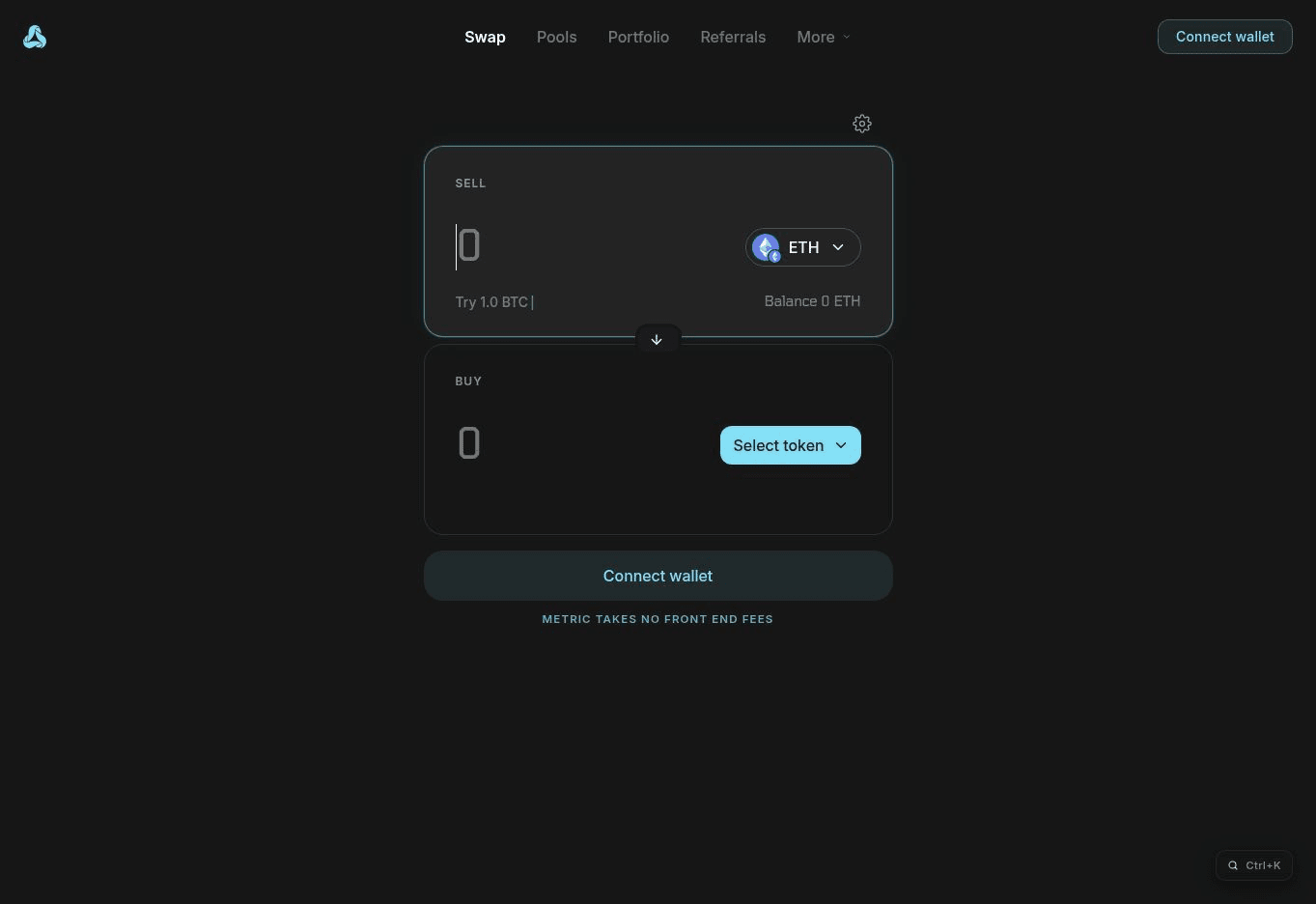
1. Open the Application and Connect Your Wallet
Visit app.metric.xyz and select one of the available wallet connection options. Check the domain and wallet address before proceeding.
Connecting a wallet is different from approving token spending. Read every wallet request whenever the application asks you to sign a message or authorize a transaction.
2. Select a Network and Asset Pair
Select a network available in the application and make sure your balance is displayed correctly. Next, choose the token you want to exchange and the token you want to receive.
Choose a pair that suits your needs. Selecting an asset solely in the hope of earning extra points may expose you to price risks you did not intend to take.
3. Enter the Amount and Review the Quote
Start with a small amount to understand the process. Check the estimated number of tokens you will receive, the displayed fees, and the minimum amount to be received, if available.
A quote is an estimate provided before execution. Metric's documentation explains that successfully obtaining a quote does not guarantee that the transaction will succeed.
4. Review Token Approvals
If your wallet requests permission to spend tokens, check the asset, the contract receiving the approval, and the spending limit. Set the allowance according to your needs if your wallet offers that option.
Token approval does not mean the swap is complete. You may still need to approve the exchange transaction after this step.
5. Confirm and Check the Results
Once the details are correct, confirm the transaction through your wallet. Wait until the transaction is complete and check the balance of the tokens received.
Save the transaction hash as proof of activity. Use the network explorer to distinguish between successful, pending, and failed transactions.
6. Record Your Activity Before Making Another Transaction
Record the date, network, token pair, amount, and actual fees. Add any change in points only when the result is visible or can be confirmed.
Do not assume that a successful transaction automatically proves the activity qualifies for the program. Successful swaps and points eligibility are two separate checks.
Read also: How to Claim the Genius (GENIUS) Airdrop: Requirements and Schedule
How to Check Metric Points
Use the points or account activity page if one is available in the application. Make sure the connected wallet is the same one you used to make transactions.
Record your points balance before an activity and again after the announced update period. This approach helps distinguish observed changes from personal estimates.
If your points do not appear, check the following in order:
- The transaction has been successfully processed on the network.
- The wallet and network being checked are correct.
- The activity is covered by the program requirements.
- The update period has ended.
- There are no announcements about service disruptions or rule changes.
If the dashboard location or update rules are unclear, save your transaction records first. Repeating swaps without identifying the cause will only increase your costs.
Read also: Dola AI (DOLA) Airdrop: How to Claim, Requirements, and Schedule
Farming Cost Simulation: US$50 in Capital (Not a Guaranteed US$50 Expense)
Suppose you use US$50 worth of assets and perform five swaps. The figures below are an example, not Metric's actual fees:
- Average gas fee: US$0.08 per swap.
- Trading fees and execution price difference: US$0.12 per swap.
- One-time token approval fee: US$0.05.
The total simulated cost is:
5 × (US$0.08 + US$0.12) + US$0.05 = US$1.05
The US$50 in capital represents the value of the assets used, while US$1.05 represents the activity expenses in this example. The final amount may still change due to asset prices, fund transfer fees, or failed transactions.
If you subsequently record an additional 30 points, the cost per point in this simulation would be approximately US$0.035. This figure measures spending only; it does not represent the market value of points or an estimated profit.
Avoid double-counting costs. If the execution result already accounts for the overall trading cost, do not add components that are already included.
Read also: Brasil 22 Token (B22) Airdrop: Requirements, How It Works, and Risks
Should You Add Liquidity?
Providing liquidity is a separate activity that requires a deeper understanding. On Metric, liquidity is allocated across bins, which represent price ranges relative to a pool's reference price.
Spread revenue is earned when trades use liquidity allocated to those bins. Unused liquidity does not generate trading revenue, and the documentation notes that losing the entire deposit is possible.
Before depositing funds, check the pool operator, price source, fee distribution, and withdrawal rules. Do not add liquidity solely to increase the number of activities you perform.
Also pay attention to the difference between Edge and Trading PnL. Edge represents the portion of the spread earned, while Trading PnL compares the position's performance with the alternative of holding the tokens. Positive spread revenue does not necessarily mean the overall investment result is positive.
When Should You Stop or Reevaluate?
Reevaluate when spending reaches your limit, the points rules remain unclear, or execution costs increase. You should also review your activity if your original goal shifts toward making as many transactions as possible.
There is no recommended number of daily swaps that can guarantee airdrop eligibility. Activity frequency should be based on your actual usage needs and the requirements that have been officially announced.
To prepare your assets, you can register with Bittime and review the available assets and withdrawal networks. Confirm that the destination network matches before sending funds to the wallet you intend to use.
Will Metric Have an Airdrop?
The potential for an airdrop should be assessed based on announcements that explain the token, eligible recipients, allocation mechanism, and distribution schedule. The existence of a points program alone does not answer all these questions.
Because there is no verified basis for calculating reward values in this guide, assume a reward value of zero when setting your spending limit. This approach helps you determine whether the cost of experimenting is acceptable without relying on potential rewards.
Conclusion
A measured approach to farming Metric begins with checking the requirements, executing swaps, recording costs, and checking points. Evaluate the results based on completed activities and actual expenses, then reassess before making additional transactions.
An airdrop may be a reason to follow the project's progress, but it is not a source of guaranteed income. If you need to prepare your assets, check the options available on Bittime based on your network requirements.

Bittime is a licensed Digital Financial Asset Trader (PAKD) platform supervised by Indonesia's Financial Services Authority (OJK) — where you can buy Bitcoin in Indonesia and hundreds of other crypto assets starting from IDR 10,000. Registration is quick and secure, so you can get started today.
Track the USDT to IDR conversion rate and monitor your favorite crypto assets in real time. Everything is available in one crypto investment app that you can download for free from the Play Store.
Ready to get started? Register with Bittime now and put your investment strategy into action with a platform trusted by millions of users in Indonesia.
FAQ
What Is Metric Crypto?
Metric provides pool infrastructure for token swaps. Its pricing mechanism depends on the Price Provider and the configuration of each pool.
How Can You Earn Metric Points?
Check which activities qualify under the current program rules, then use the same wallet to participate and check your results. Do not assume that every swap automatically earns points until the rules have been confirmed.
How Much Capital Is Needed for Metric Farming?
This guide cannot establish an official minimum capital requirement. The funds needed include assets for the activity and a balance for network fees, so you should check the transaction quote before proceeding.
Why Haven't Metric Points Appeared After a Swap?
The cause should be investigated by checking the transaction status, wallet, activity eligibility, and update schedule. A successful transaction does not automatically prove that the activity meets the points requirements.
Does Metric Farming Guarantee an Airdrop?
There is no guarantee of a token distribution simply because you make transactions or collect points. Wait for the official requirements before assessing your eligibility or the potential value of any rewards.
Disclaimer: The views expressed belong exclusively to the author and do not reflect the views of this platform. This platform and its affiliates disclaim any responsibility for the accuracy or suitability of the information provided. It is for informational purposes only and not intended as financial or investment advice.

.png)