How to Connect Wallet TON on PixelTap by PixelVerse Easily
2024-07-06
Bittime - PixelTap by PixelVerse allows you to connect with various games and decentralized applications (dApps) using your TON wallet.
This complete guide will walk you step by step in connecting your TON wallet on PixelTap by PixelVerse.

What is PixelTap?
PixelTap is a tap-to-earn game that launched in 2024 and is part of the Pixelverse. This game allows players to generate income by tapping on their mobile screens.
Check Today's Crypto Market:
How to Play PixelTap?
PixelTap is a popular clicker game on the Telegram platform. The game allows players to tap coins to earn in-game currency called coins. These coins can then be used to upgrade bots (or pets) and earn more coins.
Also Read How To Buy Crypto:
How to Download PixelTap
Step 1: Find an Authorized PixelTap
Before starting, make sure you choose the right platform to download PixelTap. This app is available for two main platforms:
- Android: For Android users, PixelTap can be downloaded for free on the Google Play Store. Open the Play Store app, search for "PixelTap: Color by Number", and click the "Install" button.
- iOS: iOS users can download PixelTap on the App Store. Open the App Store, search for "PixelTap: Color by Number", and tap the "Get" button.
Step 2: Easy and Fast Installation
After the download process is complete, follow the installation steps below:
- Android: Open the newly downloaded app from Play Store. Click the "Open" button to start PixelTap.
- iOS: Open the newly downloaded app from the App Store. Tap the PixelTap icon to launch the app.
PixelTap integration with Ton Wallet
PixelTap is now integrated with the Ton Blockchain Wallet, providing a secure Bitcoin storage solution and easy access to the Ton Network.
How to Connect Wallet TON on PixelTap by PixelVerse
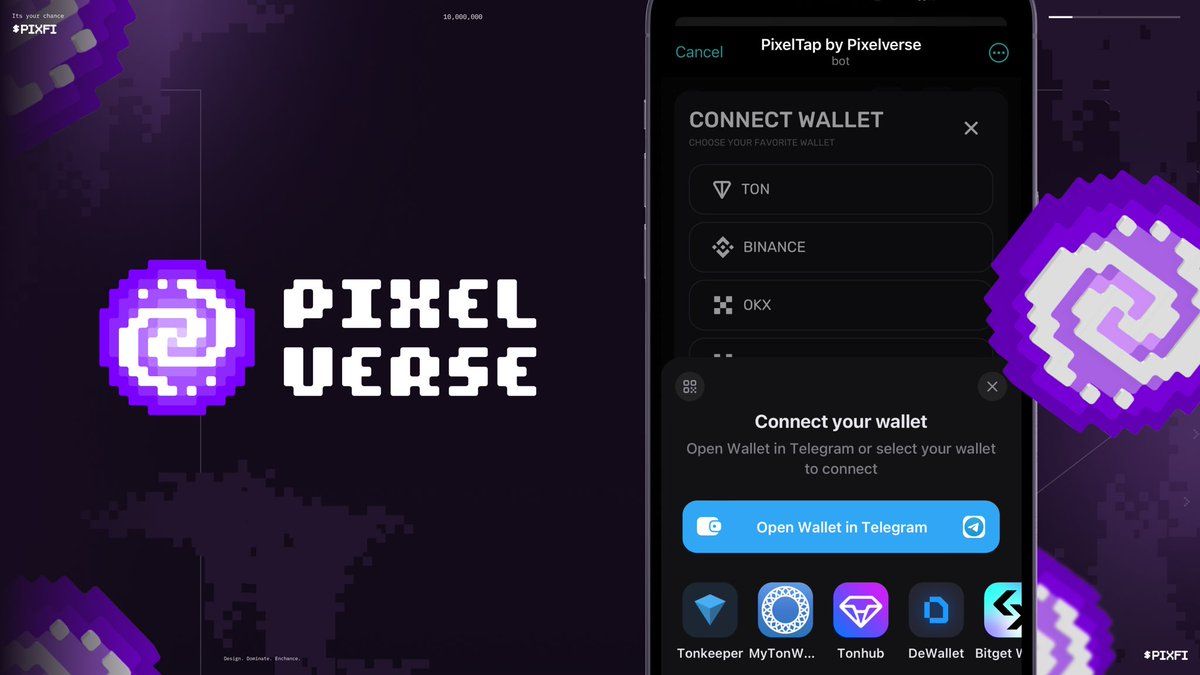
Step 1: Open the PixelTap app and find the wallet icon at the top of the screen. This icon can be found on the Earn (Home) and Rewards pages.
Step 2: Click the wallet icon.
Step 3: Select the "Multiple" option from the menu that appears.
Step 4: Select "Connect your wallet".
Step 5: Click "Open Wallet in Telegram".
Don't have a TON Wallet yet?
If you don't have a TON Wallet yet, don't worry! Follow the instructions provided on PixelTap to create your wallet in just a few minutes. The process is easy and fast, allowing you to start enjoying PixelTap's features immediately.
How to Buy Crypto on Bittime
You can buy and sell crypto assets in an easy and safe way via over. Bittime is one of the best crypto applications in Indonesia which is officially registered with Bappebti.
To be able to buy crypto assets at over, make sure you have registered and completed identity verification. Apart from that, also make sure that you have sufficient balance by depositing some funds into your wallet. For your information, the minimum purchase of assets on Bittime is IDR 10,000. After that, you can purchase crypto assets in the application.
Study Complete Guide How to Buy Crypto on Bittime.
Monitor graphic movement Bitcoin (BTC) price, Ethereum (ETH), Solana (SUN) and other cryptos to find out today's crypto market trends in real-time on Bittime.
Disclaimer: The views expressed belong exclusively to the author and do not reflect the views of this platform. This platform and its affiliates disclaim any responsibility for the accuracy or suitability of the information provided. It is for informational purposes only and not intended as financial or investment advice.

.png)